

rtWidgets
This installs multiple custom widgets in one activation. All the custom widgets are translation ready.
Plugin info
Maintenance & Compatibility
Maintenance score
Possibly abandoned • Last updated 4154 days ago
Is rtWidgets abandoned?
Possibly abandoned (last update 4154 days ago).
Compatibility
Languages
Similar & Alternatives
Explore plugins with similar tags, and compare key metrics like downloads, ratings, updates, support, and WP/PHP compatibility.
Description
This plugin is assortment of custom widgets. On activating this, we can install multiple custom widgets at once. For convenience, it also provides an option to activate or deactivate the widgets. All the widgets installed by this plugin are translation ready.
This plugin contains the list of below mentioned custom widgets:
- rtw: Categories – It provides multiple category filter options, like Order by, Sort by and Number of categories to be shown.
- rtw: Comments with Gravatar – This show the list of recent comments with commenter gravatar.
- rtw: Multiple Menus – It provides 2 custom menu options, for each of which we can select the respective menu.
- rtw: Subscribe Widget – It provides these email subscription options, like Feedburner and MailChimp. Also, provide social connect options where you can change order of social icons. Using WordPress filter you can add multiple social connect icons like rss, facebook, github-circled, youtube, flickr-circled, vimeo, twitter, gplus, pinterest, linkedin, stumbleupon, instagram, paypal, picasa, soundcloud, wordpress, blogger, delicious, deviantart, digg, foursquare, reddit, stackoverflow, tumblr
Need Help!
Post your problem in our free support forum or wordpress.org forum here. We answer questions everywhere.
Its just that we are hyperactive on our own forum!
Installation
Automatic Installation
- Log in to your WordPress admin panel, navigate to the Plugins menu and click Add New.
- In the search field type “rtWidgets” and click Search Plugins. From the search results, pick rtWidgets and click Install Now. WordPress will ask you to confirm to complete the installation.
Manual Installation
- Extract the zip file.
- Upload them to ‘/wp-content/plugins/’ directory on your WordPress installation.
- Then activate the Plugin from Plugins page.
Frequently Asked Questions
How to add extra social icon or update current icon label in subscribe widget?
Please check our plugin documentation.
Review feed
Screenshots
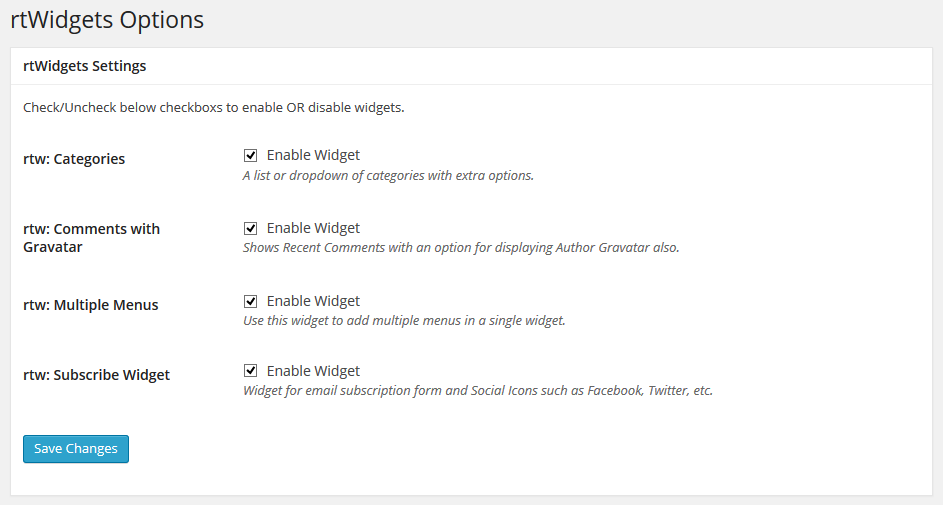
rtWidgets Options
Changelog
1.2.2
- Update Grunt Packages
1.2
- Update plugin documentations
1.0
- First release