

RVSubMenu
This plugin used to get de sub menu refers the current item menu, and show this with a menu, for exemple a sub menu left.
Plugin info
Maintenance & Compatibility
Maintenance score
Possibly abandoned • Last updated 5285 days ago • 1 reviews
Is RVSubMenu abandoned?
Possibly abandoned (last update 5285 days ago).
Compatibility
Similar & Alternatives
Explore plugins with similar tags, and compare key metrics like downloads, ratings, updates, support, and WP/PHP compatibility.
Description
This plugin used to get de sub menu refers the current item menu, and show this with a menu, for exemple a sub menu left.
Supose you have a big main menu, and this have a lot submenus, so, to show yours submenus in a side of your site, you create one new menu in wordpress for each submenu you have, and create codes to define which submenu you show, according the location in hierarchy’s menu you are.
This is very tiring and biggest, for just show the submenu, then this plugin do all things for you, but don’t create any menu, it just get the submenu according the main menu.
Installation
- Upload
plugin-name.phpto the/wp-content/plugins/directory - Activate the plugin through the ‘Plugins’ menu in WordPress
- If you install plugin and you already have a menu, you need go in your menu and save it again, for plugins set params it’s need.
Frequently Asked Questions
1. I install plugin, set widget, but nothing show.
After install plugin, you need save again each menu you have, to plugin set params necessary.
Review feed
Screenshots
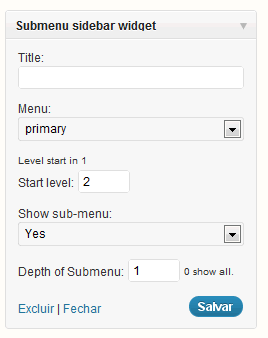
screenshot-1.png - Admin widget screenshot.

screenshot-2.jpg - Result screenshot.
Changelog
1.2
Update bug language
1.3
Add option to show title os widget with ancestor’s name