

S2 Subscription for WooCommerce
S2 Subscription for WooCommerce allows to make products(simple, variable) accessible by your users as subscriptions, so make them accessible for a sch …
Plugin info
Maintenance & Compatibility
Maintenance score
Possibly abandoned • Last updated 934 days ago • 1 reviews
Is S2 Subscription for WooCommerce abandoned?
Possibly abandoned (last update 934 days ago).
Compatibility
Similar & Alternatives
Explore plugins with similar tags, and compare key metrics like downloads, ratings, updates, support, and WP/PHP compatibility.
Description
S2 Subscription for WooCommerce allows to make products(simple, variable) accessible by your users as subscriptions, so make them accessible for a scheduled time (years / months / weeks / days). You can add signup fee, trial period etc. One of the cool feature is to split payment if you want to receive product payment in installment.
Check some of its features:
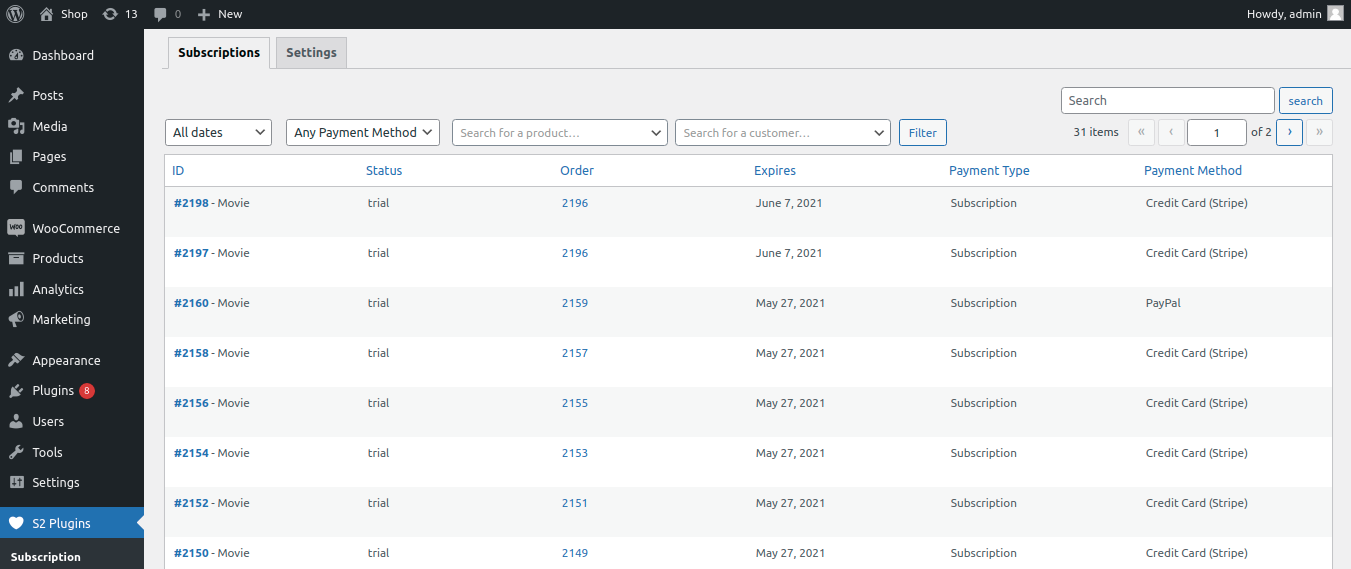
- Access subscription list.
- Choose subscription product with option frequency, trial 1 day, 2 days, 1 week so on.
- Choose split pay i.e. divide amount in 2, 3 etc. parts so customer dont have to pay whole amount at once.
- Choose one time fee i.e. sigunp fee before subscribing product for one time.
- Add trial period i.e. free for certain days 1 day, 2 days so on.
Supported Payment Gateway:
1. Stripe
2. Paypal
3. Cash on delivery (COD)
Configuration
“S2 Subscription for WooCommerce” will add a new submenu page called “Subscription” in “S2 Plugins” menu item.
There you will find all “S2 plugins” with quick access to plugin pages.
Suggestions
If you have any suggestions concerning how to improve “S2 Subscription for WooCommerce”, you can write to us, so that we can improve “S2 Subscription for WooCommerce”.
Installation
Important: First of all, you have to download and activate WooCommerce plugin, which is mandatory for “S2 Subscription for WooCommerce” to be working.
- Unzip the downloaded zip file.
- Upload the plugin folder into the
wp-content/plugins/directory of your WordPress site. - Activate “S2 Subscription for WooCommerce” from Plugins page.
Frequently Asked Questions
Do you have questions or issues with S2 Subscription for WooCommerce? Use these support channels appropriately.
Review feed
Screenshots


Changelog
1.0.2 – 2021-07-21
- Fix: Bug fixes and improvement
For older changelog entries, please see the additional changelog.txt file delivered with the plugin.