

Plugin info
Maintenance & Compatibility
Maintenance score
Stale • Last updated 344 days ago • Support resolved 0% • 78 reviews
Is Safe Redirect Manager abandoned?
Likely maintained (last update 344 days ago).
Compatibility
Similar & Alternatives
Explore plugins with similar tags, and compare key metrics like downloads, ratings, updates, support, and WP/PHP compatibility.
Description
Safely manage your site’s redirects the WordPress way. There are many redirect plugins available. Most of them store redirects in the options table or in custom tables. Most of them provide tons of unnecessary options. Some of them have serious performance implications (404 error logging). Safe Redirect Manager stores redirects as Custom Post Types. This makes your data portable and your website scalable. Safe Redirect Manager is built to handle enterprise level traffic and is used on major publishing websites. The plugin comes with only what you need following the WordPress mantra, decisions not options. Actions and filters make the plugin very extensible.
Configuration
There are no overarching settings for this plugin. To manage redirects, navigate to the administration panel (“Tools” > “Safe Redirect Manager”).
Each redirect contains a few fields that you can utilize:
“Redirect From”
This should be a path relative to the root of your WordPress installation. When someone visits your site with a path that matches this one, a redirect will occur. If your site is located at http://example.com/wp/ and you wanted to redirect http://example.com/wp/about to http://example.com, your “Redirect From” would be /about.
Clicking the “Enable Regex” checkbox allows you to use regular expressions in your path. There are many great tutorials on regular expressions.
You can also use wildcards in your “Redirect From” paths. By adding an * at the end of a URL, your redirect will match any request that starts with your “Redirect From”. Wildcards support replacements. This means if you have a wildcard in your from path that matches a string, you can have that string replace a wildcard character in your “Redirect To” path. For example, if your “Redirect From” is /test/*, your “Redirect To” is http://google.com/*, and the requested path is /test/string, the user would be redirect to http://google.com/string.
“Redirect To”
This should be a path (i.e. /test) or a URL (i.e. http://example.com/wp/test). If a requested path matches “Redirect From”, they will be redirected here. “Redirect To” supports wildcard and regular expression replacements.
“HTTP Status Code”
HTTP status codes are numbers that contain information about a request (i.e. whether it was successful, unauthorized, not found, etc). You should almost always use either 302 (temporarily moved) or 301 (permanently moved).
Note:
- Redirects are cached using the Transients API. Cache busts occur when redirects are added, updated, and deleted so you shouldn’t be serving stale redirects.
- By default the plugin only allows at most 1000 redirects to prevent performance issues. There is a filter
srm_max_redirectsthat you can utilize to up this number. - “Redirect From” and requested paths are case insensitive by default.
- Developers can use
srm_additional_status_codesfilter to add status codes if needed. - Rules set with 403 and 410 status codes are handled by applying the HTTP status code and render the default WordPress
wp_diescreen with an optional message. - Rules set with a 404 status code will apply the status code and render the 404 template.
- Browsers heavily cache 301 (permanently moved) redirects. It’s recommended to test your permanent redirects using the 302 (temporarily moved) status code before changing them to 301 permanently moved.
Developer Documentation
Safe Redirect Manager includes a number of actions and filters developers can make use of. These are documented on the Safe Redirect Manager developer documentation micro-site.
Installation
Install the plugin in WordPress. You can download a zip via GitHub and upload it using the WordPress plugin uploader (“Plugins” > “Add New” > “Upload Plugin”).
Frequently Asked Questions
Review feed
okay for a few items
Simple to use, redirect management
Screenshots
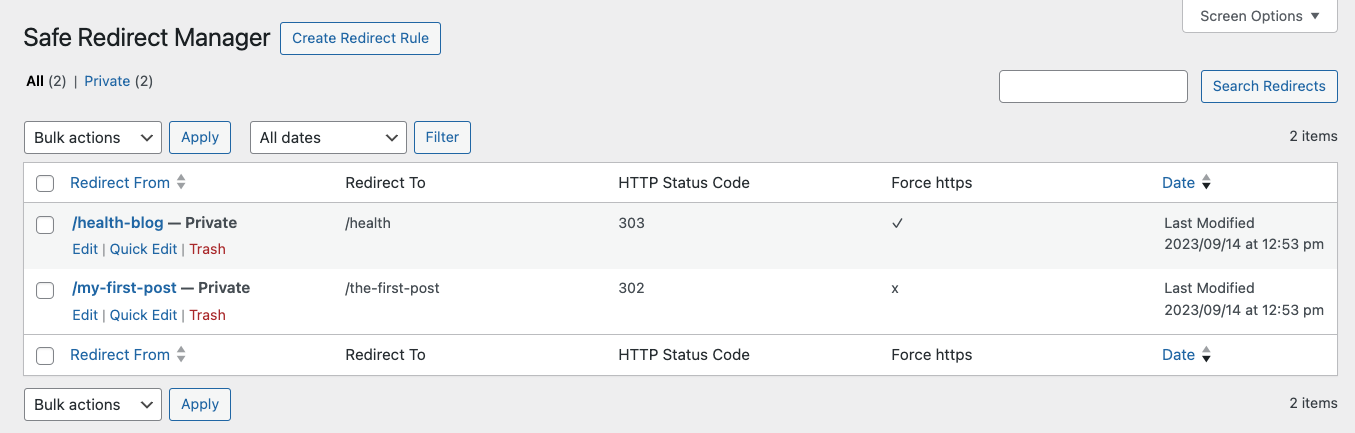
List of Redirect rules under Tools > Safe Redirect Manager
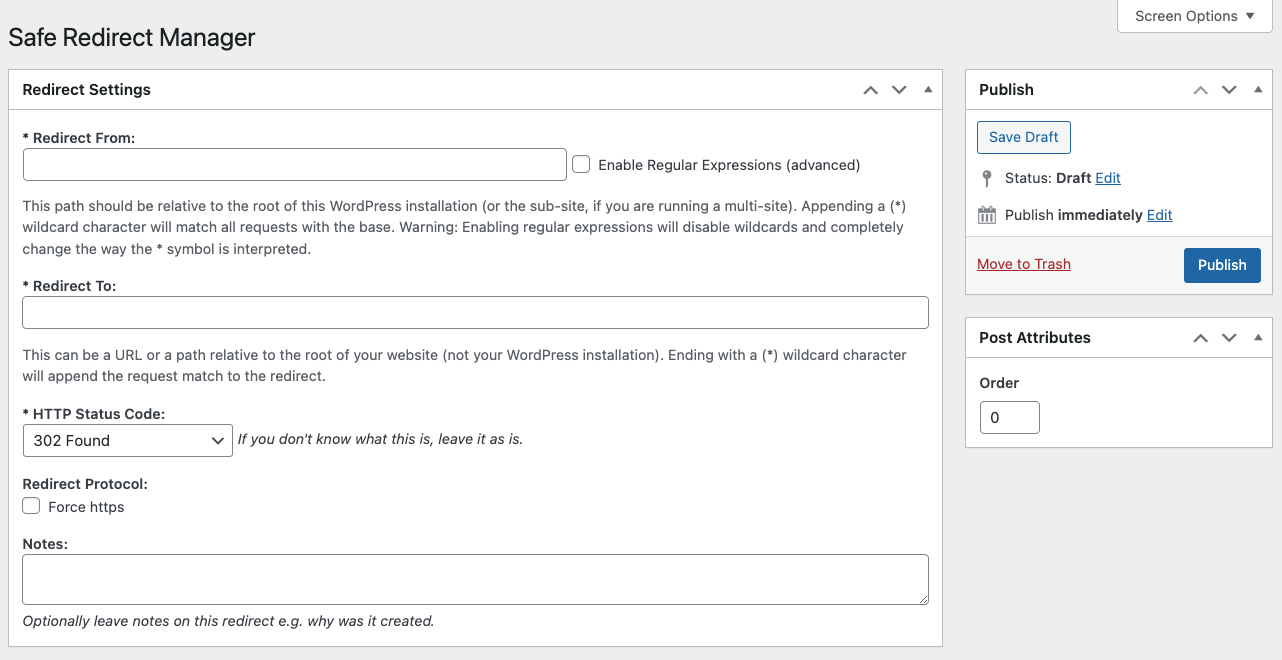
Edit view of a Redirect rule
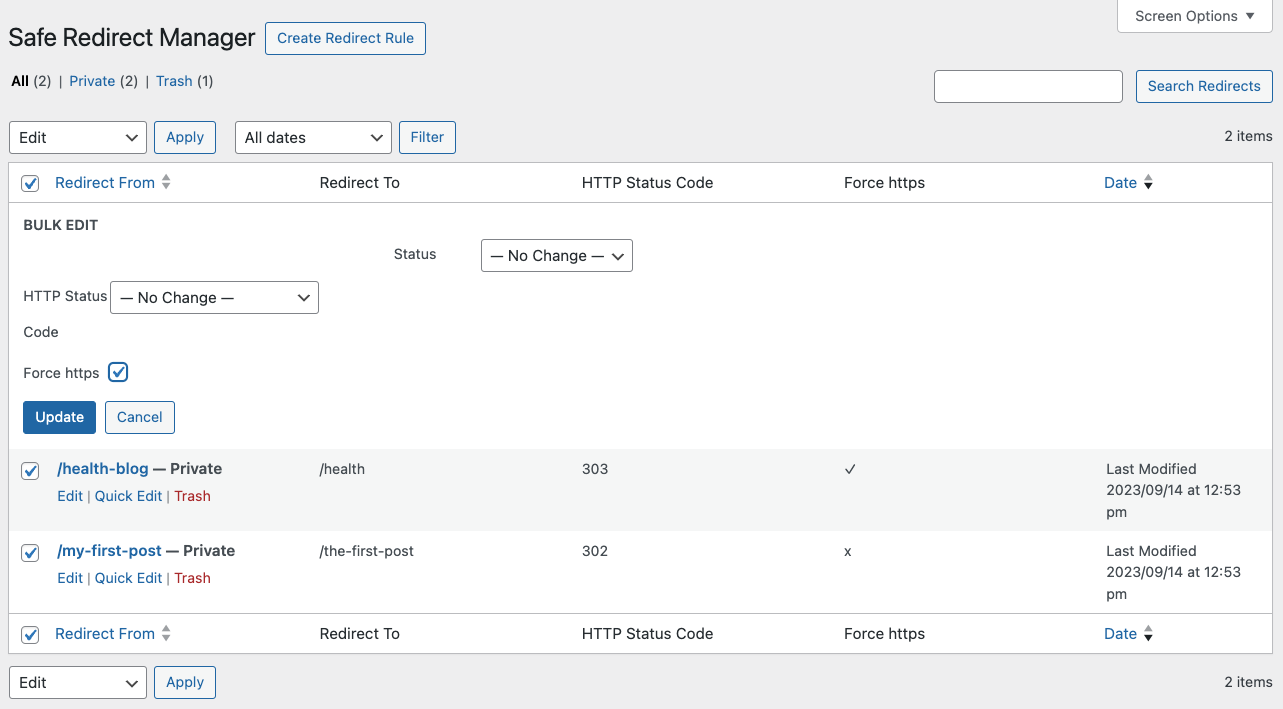
Bulk Edit view of multiple Redirect rules
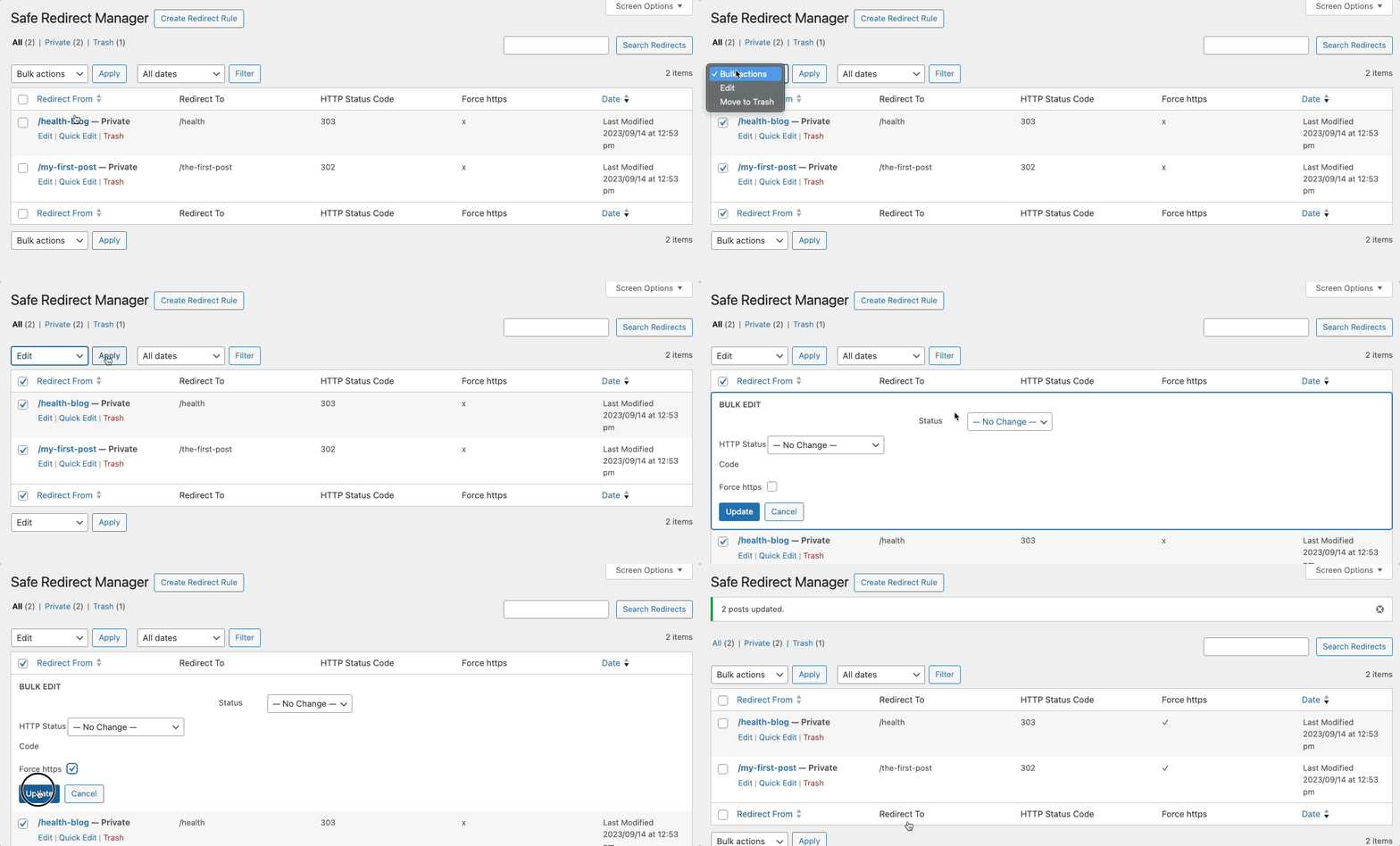
Bulk Edit to enable Force HTTPs
Changelog
2.2.2 – 2025-02-05
- Added: Add author ID as a new, optional argument to the
srm_create_redirectfunction. If passed, will associate this author ID to the newly created redirect (props @norcross, @dkotter via #408). - Fixed: Fix a few typos (props @szepeviktor, @jeffpaul via #407).
2.2.1 – 2024-11-13
- Changed: Bump WordPress “tested up to” version 6.7 (props @sudip-md, @jeffpaul, @mehidi258 via #403).
- Changed: Bump WordPress minimum supported version to 6.5 (props @sudip-md, @jeffpaul, @mehidi258 via #403).
- Fixed: Prevent undefined property warnings when searching redirects (props @chermant, @Sidsector9, @peterwilsoncc via #400).
- Fixed: Ensure the add new button shows proper text (props [@dkotter, @jeffpaul via #404).
2.2.0 – 2024-09-19
- Added: Option to Quick Edit and Bulk Edit redirect’s https status and force https meta (props @dhanendran, @ravinderk, @faisal-alvi, @dkotter, @qasumitbagthariya, @mehul0810, @espellcaste via #350).
- Added: Screenshots for WP.org plugin page (props @faisal-alvi, @jeffpaul, @iamdharmesh via #394).
- Changed: Bump WordPress “tested up to” version 6.6 (props @ankitguptaindia, @sudip-md via #386).
- Changed: Bump WordPress minimum supported version from 6.3 to 6.4 (props @ankitguptaindia, @sudip-md via #386).
- Changed: Update documentation (props @szepeviktor, @jeffpaul, @iamdharmesh, @dkotter via #384, #388, #391).
- Fixed: Allows use of full URLs as redirect targets when using absolute URLs (props @benlk, @peterwilsoncc via #395).
- Security: Bump
bracesfrom 3.0.2 to 3.0.3 (props @dependabot, @faisal-alvi via #383). - Security: Bump
jsdocfrom 3.6.11 to 4.0.3 (props @dependabot, @faisal-alvi via #383).
2.1.2 – 2024-06-19
- Added: Provide example for modifying the default redirect status code (props @peterwilsoncc, @jeffpaul, @JosVelasco, @dkotter via #365).
- Added: “Testing” section in the “CONTRIBUTING.md” file (props @kmgalanakis, @jeffpaul via #379).
- Changed: Improved reference to the postmeta table for better WordPress compatibility (props @ogorzalka, @Sidsector9 via #361).
- Changed: Clean up NPM dependencies and update node to v20 (props @Sidsector9, @dkotter via #363).
- Changed: Warning message to error message after loops are detected (props @aaemnnosttv, @Sidsector9, @BhargavBhandari90 via #368).
- Changed: Disabled auto sync pull requests with target branch (props @iamdharmesh, @jeffpaul via #371).
- Changed: Replaced lee-dohm/no-response with actions/stale to help with closing no-response/stale issues (props @jeffpaul, @dkotter via #373).
- Changed: Upgrade the
download-artifactfrom v3 to v4 (props @iamdharmesh, @jeffpaul via #372). - Changed: Bump WordPress “tested up to” version 6.5 (props @sudip-md, @jeffpaul, @dkotter via #376).
- Changed: Bump WordPress minimum from 5.7 to 6.3 (props @sudip-md, @jeffpaul, @dkotter via #376).
- Changed: URL validation check on “input” event for “Redirect From” field (props @peterwilsoncc, @BhargavBhandari90, @Sidsector9 via #369).
- Fixed: PHP warning when running the “wp safe-redirect-manager list” CLI command (props @planetahuevo, @kmgalanakis, @dkotter via #378).
2.1.1 – 2024-01-08
- Added: Support for the WordPress.org plugin preview (props @dkotter, @jeffpaul via #357).
- Added:
phpcs:ignoreon the now safeini_set()(props @philipjohn, @ravinderk via #355). - Changed: Bump
Cypressfrom 13.0.0 to 13.1.0,@10up/cypress-wp-utilsfrom 0.1.0 to 0.2.0,@wordpress/envfrom 5.3.0 to 8.7.0,cypress-mochawesome-reporterfrom 3.4.0 to 3.5.1 andnode-wp-i18nfrom 1.2.5 to 1.2.7 (props @iamdharmesh, @ravinderk via #349). - Changed: Bump WordPress “tested up to” version 6.4 (props @qasumitbagthariya, @jeffpaul via #353, #354).
- Changed: Validate and sanitize a superglobal before using it (props @jspellman814, @ravinderk via #356).
- Fixed: Ensure text can be translated (props @alexclassroom, @iamdharmesh via #351).
Earlier versions
For the changelog of earlier versions, please refer to the changelog on github.com.