
Safelayout Brilliant Buttons – WordPress Buttons
Beautiful CSS buttons, available for Classic Editor, Block Editor and Elementor.
Plugin info
Maintenance & Compatibility
Maintenance score
Maintained • Last updated 118 days ago
Is Safelayout Brilliant Buttons – WordPress Buttons abandoned?
Likely maintained (last update 118 days ago).
Compatibility
Similar & Alternatives
Explore plugins with similar tags, and compare key metrics like downloads, ratings, updates, support, and WP/PHP compatibility.
Description
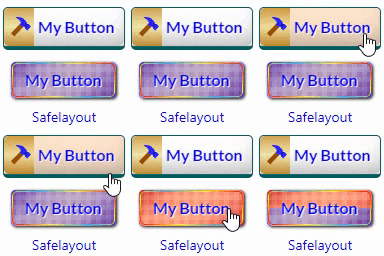
Create beautiful buttons easily and quickly. Safelayout brilliant buttons, adds a beautiful and high quality button block to the WordPress Classic editor, Block editor and Elementor.
Features
- High quality buttons.
- Available in Block editor, Classic editor and Elementor.
- Many beautiful button effects.
- Many beautiful Hover animation effects.
- Includes buttons with various background patterns.
- Includes buttons with various click effects.
- Ability to show loading animation and change text after click.
- Include icon button.
- Include Sub text.
- Include multi color icon packs.
- No icon fonts, just inline SVG.
- Gradient color for icon fill and stroke as well as background color.
- Fully compatible with Full-Site Editing.
- Cross browser compatible.
- Fully customizable.
- Work with Any Theme.
Live Demo
Safelayout Brilliant Buttons Demo.
Pro Version
Safelayout Brilliant Buttons Pro is available. Upgrade to pro version and get full features!
Safelayout other plugins
Safelayout Elegant Icons – WordPress icon block
Installation
- Go to the Plugins section of your WordPress dashboard.
- Click on Add New.
- Click on the Upload Plugin button.
- Browse and locate the zipped plugin that you have downloaded.
- Activate the plugin by clicking on Activate.
Frequently Asked Questions
Review feed
Screenshots

Available in elementor

Available in classic editor

Available in block editor

Beautiful Button effects

Link and title, size and color

Icon (No icon fonts, just inline SVG)
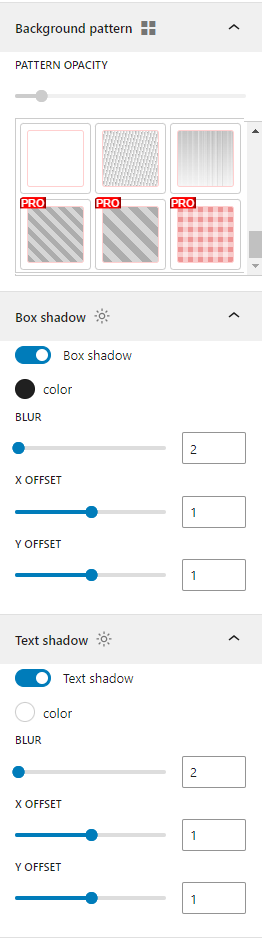
Background pattern, box shadow and text shadow

Hover animation, click effect and block spacing
Changelog
1.2.1
- removed the ability to change the “Add to cart” button of WooCommerce.
- removed the ability to change the buttons of Easy Digital Downloads (EDD).
- Updated user interface.
1.2.0
- Fixed some issue.
- Updated user interface.
1.1.12
- Fixed mce dialog issue.
1.1.11
- Fixed animation issue.
1.1.10
- Added Sub text to the button.
1.1.9
- Fixed some issue.
- Updated user interface.
1.1.8
- Added some templates to the Elementor.
1.1.7
- Added “Insert Button from Library” button.
1.1.6
- Fixed button issue with classic editor.
1.1.5
- Added some block patterns to the block editor.
- Added a new animation type to the button block.
1.1.4
- Added upgrade notification in the WordPress dashboard.
1.1.3
- Updated user interface.
1.1.2
- Activated some features of the pro version, in the free version.
- Updated the button block default value.
- Fixed Elementor history issue.
1.1.1
- Updated user interface.
1.1.0
- Added compatibility with Elementor.
1.0.4
- Added the ability to change the “Add to cart” button of WooCommerce.
- Added the ability to change the buttons of Easy Digital Downloads (EDD).( “Add to cart”, Checkout, Purchase, “Free Download” )
- Added After click ( loading ) effects.
1.0.3
- Added compatibility with classic editor.
1.0.2
- Added deactivation feedback.
1.0.1
- Added rate reminder notification in the WordPress dashboard.
1.0.0
- Initial Release.