

Advanced Woocommerce Reporting
Track, analyze, and optimize WooCommerce sales with detailed reports on orders, products, categories, and regions for data-driven decisions.
Plugin info
Maintenance & Compatibility
Maintenance score
Possibly abandoned • Last updated 408 days ago • 1 reviews
Is Advanced Woocommerce Reporting abandoned?
Possibly abandoned (last update 408 days ago).
Compatibility
Similar & Alternatives
Explore plugins with similar tags, and compare key metrics like downloads, ratings, updates, support, and WP/PHP compatibility.
Description
The WooCommerce Sales Report Plugin is a powerful tool designed to provide in-depth insights into your store’s sales performance. Whether you need a product advanced woocommerce reporting, advanced WooCommerce reporting, or a WooCommerce sales tax report, this plugin simplifies data analysis for better decision-making.
Short Description
Track, analyze, and optimize WooCommerce sales with detailed reports on orders, products, categories, and regions for data-driven decisions
Compatible
- Addify Cost Of Goods
- Yith Cost Of Goods
- Woocommerce Sales Report
Features
-
Sales Analysis for WooCommerce: Track sales trends over different time periods.
-
Sales by Order: View detailed reports on all orders placed.
-
Sales by Product: Analyze revenue generated by specific products.
-
Sales by Specific Category: Get category-wise sales performance reports.
-
WooCommerce Sales Report by Product: Identify best-selling products and low-performing items.
-
WooCommerce Sales Report by User Role: Understand how different user roles contribute to sales.
-
Sales by Country and State: Filter reports by geographical location.
-
WooCommerce Daily Sales Report: Monitor daily revenue and order trends.
-
WooCommerce Sales Tax Report: Generate tax reports based on sales data.
-
Get cost of goods and revenue data through report
-
Hide or Show any column to get your preferred sales data
Filters Options
-
sale by Order
- sale by Product
- Specific Product
- Specific Category
- Order Status
- Select Countries
- Select States
- Select Zip Code
- Generate Sale Tax
- Generate Daily Sales Report
- Generate Report by User/ User Role
Want to Try Our Premium Version you can visit below and let us know if anything else in your mind. Email:[email protected]
Why use this extension
Gain Actionable Sales Insights
*The WooCommerce Sales Report Plugin helps store owners track, analyze, and interpret their sales data effectively. Whether you need reports for sales by product, category, or country, this plugin provides the flexibility to generate detailed insights.
Make Informed Business Decisions
*With advanced WooCommerce reporting, you can identify top-performing products, track sales trends across different geographical locations, and optimize pricing and marketing strategies.
User-Friendly and Customizable
*The plugin offers an intuitive interface, making it easy to filter and customize reports based on your business needs. Whether you want a WooCommerce sales report by user role or a WooCommerce sales tax report, you can generate it with just a few clicks.
How to Use the WooCommerce Sales Report Plugin
Install & Activate: Download the plugin from the WordPress repository and activate it.
Access Sales Reports: Navigate to the WooCommerce Reports section in your dashboard.
Select Report Type: Choose from options such as sales by product, order status, or country.
Filter & Export: Apply custom filters and export data for further analysis.
FAQs
Q: How to get sales report from WooCommerce?
Ans: You can generate a sales report by navigating to WooCommerce > Reports. With our best WooCommerce sales report plugin, you get more advanced reporting options beyond default WooCommerce reports.
Q: How do I report sales by country in WooCommerce?
Ans: Using the WooCommerce Sales Report Plugin, you can filter sales data by country or state to analyze performance across different regions.
Q: How do I track sales in WooCommerce?
Ans: Our advanced WooCommerce reporting feature allows you to track orders, revenue, and sales trends in real time.
Q: How to extract sales data from WooCommerce?
Ans: The plugin allows you to export sales reports in CSV format, making it easy to analyze data in external applications.
Contact US
Email us at: [email protected]
- Feel Free to contact Us for support, installation or customization.
External Dependencies
This plugin uses the Google Charts loader library for chart rendering. The library is hosted on Google’s servers and accessed via the following URL: https://www.gstatic.com/charts/loader.js
Google Charts Loader: Used for chart rendering, hosted on Google’s servers.URL: https://www.gstatic.com/charts/loader.js
Font Awesome: Provides icon fonts for styling and UI enhancements.URL: https://cdnjs.cloudflare.com/ajax/libs/font-awesome/4.7.0/css/font-awesome.min.css
DataTables CSS: Styles the DataTables for enhanced table functionality.URL: https://cdn.datatables.net/1.11.5/css/jquery.dataTables.min.css
DataTables JS: Adds interactive table features such as sorting and pagination. URL: https://cdn.datatables.net/1.11.5/js/jquery.dataTables.min.js
Installation
Download the .zip file.
Go to: WordPress Admin > Plugins > Add New and Upload Plugin with the file you downloaded with Choose File.
Install Now and Activate the extension.
You can also visit devsouls.store
Frequently Asked Questions
Review feed
Screenshots

Graph
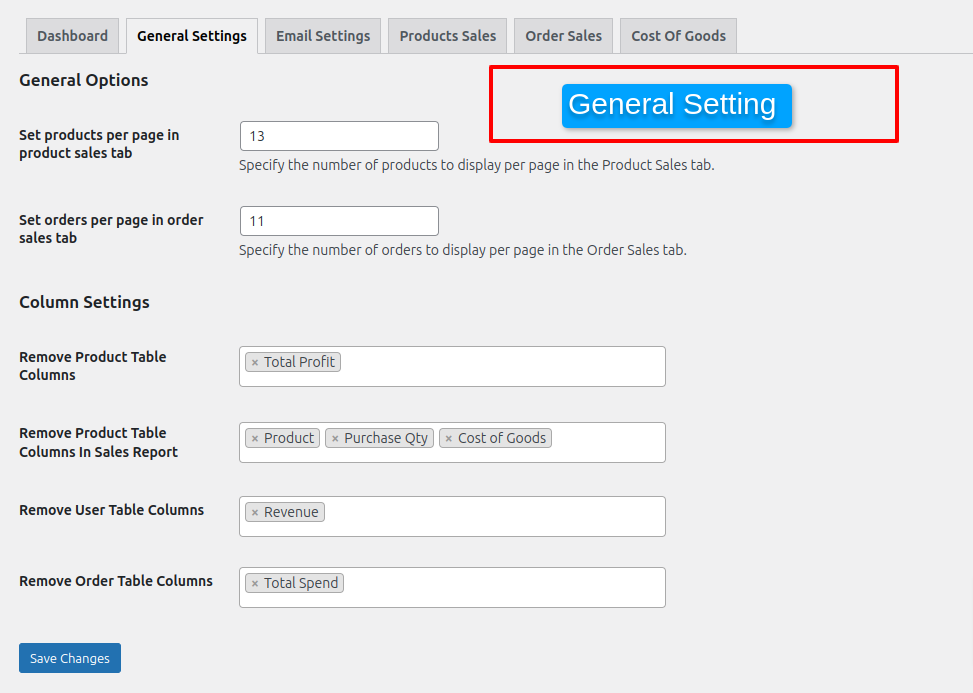
General Setting and Advance Filter

Email Setting

All Product Sale also search specific prdoduct and specific categories

Cost of Goods and Revenue Product Columns

Order Sales Report

Cost of Goods and Revenue Order Columns

Edit Order page Cost of Goods and Revenue

Cost of Goods Rules

Edit product Cost of Goods and Revenue

Variation level Cost of Goods and Revenue and product details or orders

Cost of Goods and Revenue in user columns

product sales report in csv

order sales report in csv

Instant Send CSV in Email as attachment of products and orders

Summary
Changelog
2025-02-19 – version 2.3.0
- Add – Email Summary Tab.
- Fix – Order Tab Fatal Error.
- Add – Add Order Currency column in order tab.
- Add – Add Order Payment method column in order tab.
2025-02-05 – version 2.2.0
- Add – Email Setting is added.
- Add – Export CSV is done .
- Add – Cost Of Goods in table and on product level both.
- Add – Add Rule in Cost Of Goods .
- Add – Send Instant CSV in email .
2025-01-15 – version 2.1.1
- Add – Graphs Of Sales Report.
- Add – add columns in csv.
2024-05-27 – version 1.0.0
- Initial release of the plugin.