

SARVAROV Lazy Load
Lazy Load all your images, videos & iframes with blurred LQIP and average color placeholder. Inspired by Medium.
Plugin info
Maintenance & Compatibility
Maintenance score
Possibly abandoned • Last updated 2140 days ago • 1 reviews
Is SARVAROV Lazy Load abandoned?
Possibly abandoned (last update 2140 days ago).
Compatibility
Similar & Alternatives
Explore plugins with similar tags, and compare key metrics like downloads, ratings, updates, support, and WP/PHP compatibility.
Description
This plugin is the best way to make your images, iframes & videos lazy. Just activate the plugin and lazy loading will work automatically. It’s very simple, just try it!
THIS PLUGIN WILL MAKE YOUR SITE FASTER
All your media content will be loaded only when it’s in the browser viewport. Also you can hide loading process from visitors at all: the lazy elements can be loaded invisibly before the user reaches it.
THIS PLUGIN WILL MAKE YOUR SITE LOOK BETTER
In just one click your can enable blurred LQIP (inspired by Medium) and average color placeholder. Both of them look very modern & interesting.
Main features
- Speed up your blog, improve its PageSpeed Insights score
- Change style of placeholder, animation, transition etc.
- Make placeholder color based of the average color
- LQIP technology (Low Quality Image Placeholders)
for visitors who don’t have a JavaScript enabled- Using the Lazysizes library and a lot of hooks give the possibility for customization to make the result the way you want
- High-quality code
- SEO friendly
- Mobile friendly
- Low server load (due to caching)
Installation
- Upload the complete
sarvarov-lazy-loadfolder to the/wp-content/plugins/directory - Activate the plugin through the ‘Plugins’ menu in WordPress
- You can configure the plugin by clicking on the ‘Lazy Load’ link in the ‘Settings’ menu.
Frequently Asked Questions
Will that plugin work on any template?
I hope so, but might be not. I originally made this plugin for myself and I tested it only on latest WordPress release on the default Twenty Fifteen theme. If you have compatibility issues with my plugin and your theme – just write me and I will try to fix it on next update.
Why isn’t LQIP technologue working?
LQIP (Low Quality Image Placeholders) is working only on newly uploaded images (.jpg & .jpeg). If you want to make it work with existing images, you need to regenerate lqip image size using a third-party plugin like Regenerate Thumbnails.
How to make lazy custom images/iframes?
You can create a custom function like this:
function my_lazy_process( $content = '', $params = array() ) {

    if( class_exists( 'SARVAROV_Lazy_Load' ) ) {
        return apply_filters( 'lazy_process', $content, $params );
    }

    return $content;
}
Will this plugin affect SEO?
Definitely Yes, in a positive way. The pages of your site will load faster, which positively affects the indexing of your site by search engine robots. The plugin has no effect on image indexing: search engines see them, don’t worry!
How to add Schema.org vocabulary?
For example:
add_filter( 'sarvarov_lazy_load_image_container_atts', function( $atts ) {
    $new_atts = array(
        'itemprop' => array(
            'value' => 'image'
        ),
        'itemscope' => array(
            'value' => 'itemscope'
        ),
        'itemtype' => array(
            'value' => 'http://schema.org/ImageObject'
        )
    );

    $atts = array_merge(
        $atts,
        $new_atts
    );

    return $atts;
}, 10, 1 );

add_filter( 'sarvarov_lazy_load_image_container', function( $content = '', $img_width, $img_height, $atts ) {
    if( $img_width && $img_height ) {
        $content .= sprintf( '<meta itemprop="width" content="%1$d" /><meta itemprop="height" content="%2$d" />', $img_width, $img_height );
    }

    return $content;
}, 10, 4 );
I still have a question
I can help with solving your problem on our forum.
Review feed
Screenshots

A small demonstration of what can be done.
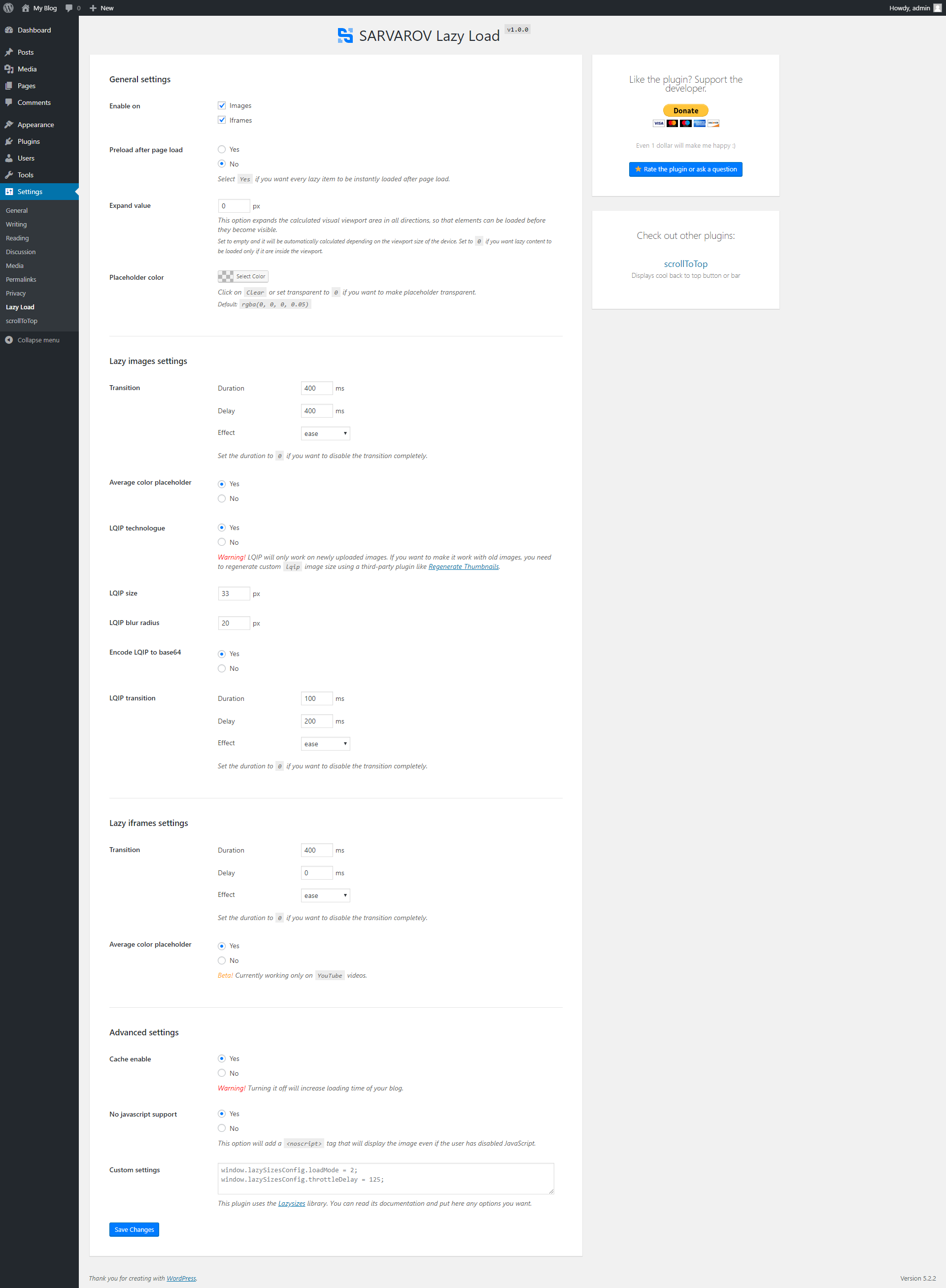
Settings page.
Changelog
1.1.0
- Post thumbnail fix
1.0.9
- WordPress 5.4.x support
- Post thumbnail fix
1.0.8
- Adds
loading="lazy"to images & iframes inside<noscript> - General performance improvements
1.0.7
- Use cURL if host has
allow_url_fopenset to false - Added Russian translation.
1.0.6
- New option:
Completely disable placeholders - General performance improvements and bug fixes
1.0.5
- Posts with no blocks support
1.0.4
- Critical cache bug fix
1.0.3
- General performance improvements
- Better cache method
1.0.2
- Cache error fix
- Global stability fix
1.0.1
- PHP error fix
- Minify public CSS & JavaScript files
1.0.0
- Initial release