

Save & Continue for Contact Form 7
Allow users to save Contact Form 7 progress and continue later. Reduce form abandonment with secure draft saving and resume functionality.
Plugin info
Maintenance & Compatibility
Maintenance score
Maintained • Last updated 163 days ago • Support resolved 0%
Is Save & Continue for Contact Form 7 abandoned?
Likely maintained (last update 163 days ago).
Compatibility
Similar & Alternatives
Explore plugins with similar tags, and compare key metrics like downloads, ratings, updates, support, and WP/PHP compatibility.
Description
Reduce form abandonment and improve user experience with Save & Continue for Contact Form 7. This essential plugin allows visitors to save their form progress and return later to complete lengthy or complex forms.
Perfect for:
* Job application forms
* Registration forms
* Survey and feedback forms
* Multi-step contact forms
* Any form requiring research or document gathering
🚀 Key Features
- Automatic Draft Saving – Forms save automatically as users type
- Secure Resume Links – Unique tokenized URLs for returning users
- Email Resume Option – Send resume links directly to user’s email
- Browser Storage Backup – LocalStorage fallback for reliability
- Admin Dashboard – Manage draft retention and cleanup settings
- Security First – Rate limiting, nonce protection, and input sanitization
- Lightweight & Fast – Minimal impact on site performance
- Mobile Friendly – Works seamlessly on all devices
Support
For support, feature requests, or bug reports:
* Visit the WordPress.org support forum
* Check our documentation
Privacy
This plugin stores form data temporarily in your WordPress database and user’s browser localStorage. No data is sent to external services. Users can request deletion of their saved drafts by contacting site administrators.
Requirements
- WordPress 6.2 or higher
- PHP 7.2 or higher
- Contact Form 7 plugin (active)
- Modern browser with JavaScript enabled
Installation
Automatic Installation
- Go to Plugins Add New in your WordPress admin
- Search for “Save Continue Contact Form 7”
- Click Install Now and then Activate
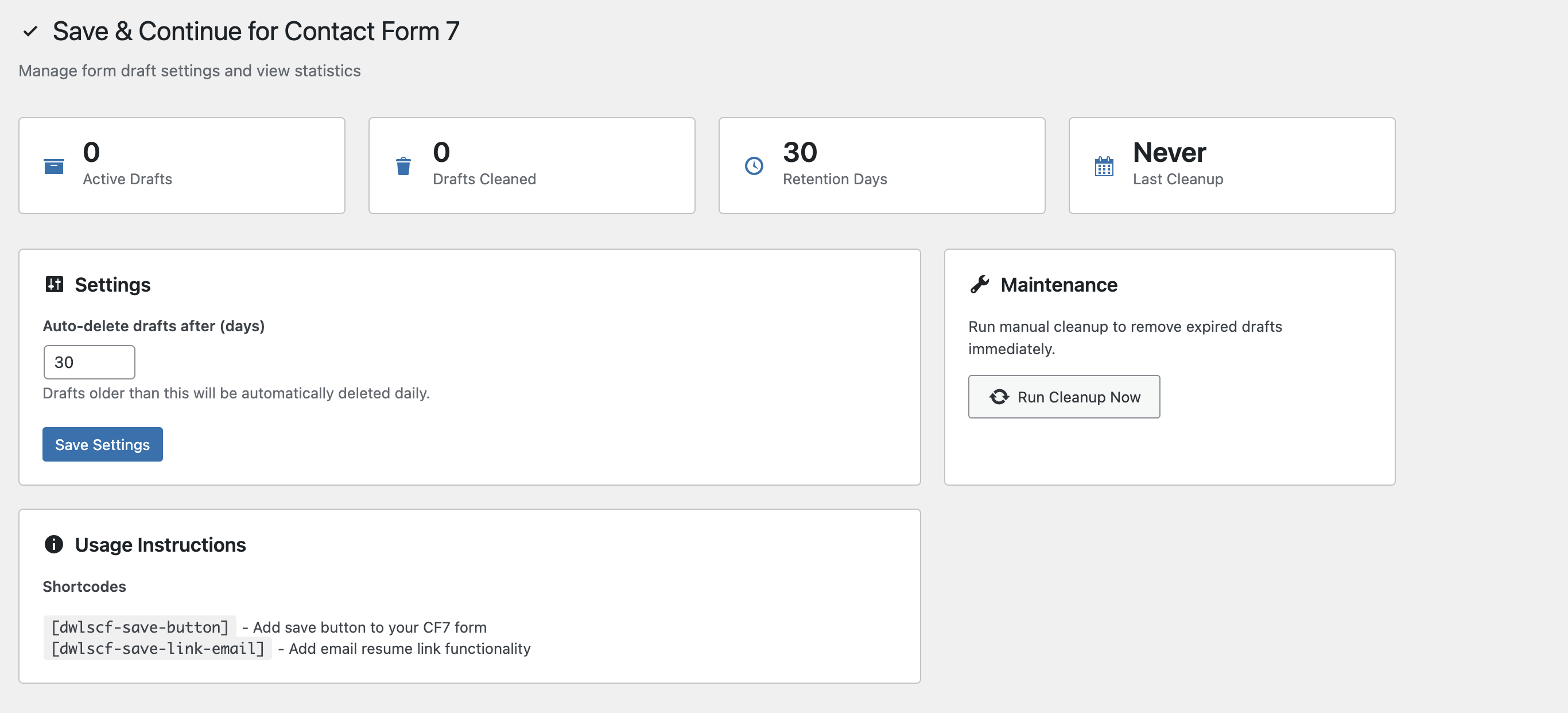
- Configure settings under Settings Dwlscf Save & Continue
Manual Installation
- Download the plugin zip file
- Upload to
/wp-content/plugins/and extract - Activate through the Plugins menu
- Configure settings under Settings Dwlscf Save & Continue
Setup Instructions
- Edit your Contact Form 7 form
- Add
[dwlscf-save-button]shortcode where you want the save button - Optionally add
[dwlscf-save-link-email]for email resume functionality - Save your form and test the functionality
Shortcode Options
[dwlscf-save-button label="Custom Button Text"][dwlscf-save-link-email]– Email resume link form
Frequently Asked Questions
When users fill out a form, their progress is automatically saved. They receive a unique resume link to continue later. The form data is securely stored and automatically restored when they return.
Form data is stored in your WordPress database using the options table with unique tokens. A backup copy is also saved in the user’s browser localStorage for additional reliability.
Yes! Version 1.2.0 includes comprehensive security measures: SQL injection prevention, XSS protection, CSRF protection, rate limiting, and secure token validation. All data is properly sanitized and validated.
You can configure the retention period in Settings Dwlscf Save & Continue. Default is 30 days. Expired drafts are automatically cleaned up daily, or you can run manual cleanup.
Yes, it supports text fields, textareas, dropdowns, checkboxes, radio buttons, and multi-select fields. File uploads and password fields are excluded for security.
No, the plugin is lightweight and only loads on pages with Contact Form 7 forms. It uses debounced saving to minimize server requests.
Yes, add the [dwlscf-save-link-email] shortcode to enable this feature. It includes rate limiting to prevent abuse.
Yes, it’s designed to work alongside other Contact Form 7 extensions without conflicts.
Absolutely! The plugin is fully responsive and works seamlessly on all devices and screen sizes.
Review feed
Screenshots
Save & Continue button integrated into Contact Form 7
Changelog
1.2.1
- IMPROVEMENT: Improve settings page
1.2.0 – Security & Performance Update
- SECURITY: Fixed SQL injection vulnerabilities with prepared statements
- SECURITY: Enhanced XSS protection with proper input validation and safe DOM manipulation
- SECURITY: Strengthened authentication with rate limiting (10 requests/minute) and nonce verification
- SECURITY: Added CSRF protection with enhanced validation
- SECURITY: Upgraded cryptography from MD5 to SHA-256
- SECURITY: Implemented strict token format validation (12 chars alphanumeric)
- IMPROVEMENT: Comprehensive input sanitization across all components
- IMPROVEMENT: Enhanced error handling and user feedback
1.1.0 – Stability & Performance
- NEW: Token-specific nonces for enhanced security
- NEW: Rate limiting for email resume functionality
- IMPROVEMENT: Debounced AJAX requests to reduce server load
- IMPROVEMENT: Smarter payload handling to prevent redundant saves
- IMPROVEMENT: Conditional asset loading (only on CF7 pages)
- FIX: Reliable scheduled cleanup execution
- FIX: Proper asset path resolution
- FIX: Aligned uninstall hooks with cleanup events
1.0.2 – Bug Fixes
- FIX: Removed debug error logging
- IMPROVEMENT: Code cleanup and optimization
1.0.1 – UI Improvements
- IMPROVEMENT: Updated styling for better theme compatibility
- IMPROVEMENT: JavaScript code cleanup and optimization
- FIX: Minor UI inconsistencies
1.0.0 – Initial Release
- NEW: localStorage-based draft saving
- NEW: Token-based resume functionality
- NEW: Admin settings and cleanup controls
- NEW: Email resume link feature
- NEW: Automatic and manual draft cleanup
- NEW: Contact Form 7 shortcode integration