

Save Me
Saves JavaScript and other inline code from distortion by the WordPress rich text editor. Add code in the editor's VISUAL mode, bracketing it wit …
Plugin info
Maintenance & Compatibility
Maintenance score
Possibly abandoned • Last updated 5491 days ago • 1 reviews
Is Save Me abandoned?
Possibly abandoned (last update 5491 days ago).
Compatibility
Similar & Alternatives
Explore plugins with similar tags, and compare key metrics like downloads, ratings, updates, support, and WP/PHP compatibility.
Description
The Save Me plugin saves JavaScript and other inline code from distortion by the WordPress rich text editor. Add code in the editor’s VISUAL mode, bracketing it with the shortcode [saveme][/saveme].
While it is possible without a plugin to switch to HTML editing mode and paste JavaScript into a post, often the code will be scrambled if you toggle back and forth between the HTML and Visual modes. For example, the TinyMCE editor sometimes eliminates what it doesn’t understand — like empty divs into which your JavaScript or AJAX widget needs to inject content. And since JavaScript code is not displayed with any representation in the visual editor, it’s easy to accidentally delete.
In rich tech mode, the editor will treat your code as if it were a code sample you were writing about, rather than a script to be executed. You may see distortions, like quotation marks being turned into curly quotes, but at least you can keep track of where you inserted the code. The saveme shortcode function reverses HTML entity transformations and turns your JavaScript widget back into executable code.
The saveme shortcode has been tested with Facebook social widgets and Google Adsense JavaScript blocks. If you encounter JavaScript that does not work after being passed through this function, contact me through Carr Communications Inc. and I will try to determine why not.
This is a spinoff of a similar function in Facebook Tab Manager for WordPress
Credits
Facebook Tab Manager
Copyright (C) 2011 David F. Carr
This program is free software: you can redistribute it and/or modify
it under the terms of the GNU General Public License as published by
the Free Software Foundation, either version 3 of the License, or
(at your option) any later version.
This program is distributed in the hope that it will be useful,
but WITHOUT ANY WARRANTY; without even the implied warranty of
MERCHANTABILITY or FITNESS FOR A PARTICULAR PURPOSE. See the
GNU General Public License for more details.
See the GNU General Public License at Installation
- Upload the entire
save-mefolder to the/wp-content/plugins/directory. - Activate the plugin through the ‘Plugins’ menu in WordPress.
Frequently Asked Questions
Review feed
Screenshots
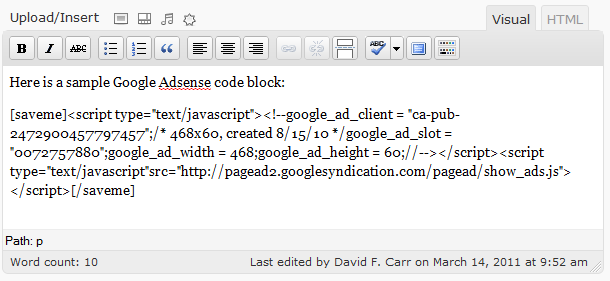
Using the
savemeshortcode in the editor
Reconstituted as working JavaScript
Changelog
1.0
First public release, March 2011