
Plugin info
Maintenance & Compatibility
Maintenance score
Stale • Last updated 236 days ago
Is SB Children block abandoned?
Likely maintained (last update 236 days ago).
Compatibility
Developers
Similar & Alternatives
Explore plugins with similar tags, and compare key metrics like downloads, ratings, updates, support, and WP/PHP compatibility.
Description
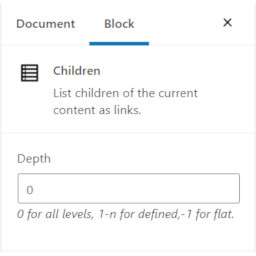
Use the Children block ( oik-sb/children ) to list children of the current content as links.
Works for any hierarchical post type which supports page-attributes, such as page.
Installation
- Upload the plugin files to the
/wp-content/plugins/sb-children-blockdirectory, or install the plugin through the WordPress plugins screen directly. - Activate the plugin through the ‘Plugins’ screen in WordPress
OR
With the authority to install plugins:
- In the block editor, open the block inserter.
- Search for the block by typing ‘Children’.
- Click on the ‘Add block’ button for the SB Children block.
- The SB Children block plugin will be installed and activated.
- And the block will be inserted into your content.
Frequently Asked Questions
- Value – Meaning
- 0 – Display all descendents in a tree
- 1 – Display Children only
- 2 – Display Children and Grandchildren
- n – Display n levels of descendents
- -1 – Display all descendents in a single list
You can try typing the following strings to find the block: c, ch, chi, chil, child, childr, childre and children.
You may also get results by typing the keywords: Child list, Descendents and Tree.
If your first language is not English then you could try:
- French – enfants
- German – Kinder
- Dutch – Kinderen
- Italian – la prole
- Spanish – niñas or niños
No. The plugin is delivered with the production version of the block.
The source and build routine for the block is now in https://github.com/bobbingwide/sb-starting-block.
Review feed
Screenshots

Children block depth=0

Children block depth=1

Children block depth=2

Children block depth=-1
Changelog
1.3.0
- Deleted: Remove source for the block – see sb-starting-block #21
- Changed: Remove wp-scripts build – uses sb-starting-block to build oik-sb/children #21
- Changed: Update files built with wp-scripts v30.21.0 by sb-starting-block #21
- Changed: Build the oik-sb/children block in sb-starting-block #21
- Tested: With WordPress 6.8.2 and WordPress Multisite
- Tested: With Gutenberg 21.3.0
- Tested: With PHP 8.3 and PHP 8.4
- Tested: With PHPUnit 9.6