

Scoreboard for HTML5 Games Lite
Scoreboard for HTML5 Games is a Wordpress Plugin to embed HTML5 Games with scoreboard, user can submit score and view top 10 leaderboard.
Plugin info
Maintenance & Compatibility
Maintenance score
Possibly abandoned • Last updated 618 days ago
Is Scoreboard for HTML5 Games Lite abandoned?
Possibly abandoned (last update 618 days ago).
Compatibility
Similar & Alternatives
Explore plugins with similar tags, and compare key metrics like downloads, ratings, updates, support, and WP/PHP compatibility.
Description
Scoreboard for HTML5 Games is a WordPress Plugin to embed HTML5 Games with scoreboard, user can submit score and view top 10 leaderboard. Admin can login through WP Admin Dashboard to view and filter player top rank scores, user score can be excluded by email/phone and scores can be control by range.
How to use?
Download the compatible HTML5 Games and integrate the scoreboard files, go to plugin settings to add and upload game, use shortcode to embed game at your WP post or page content.
Features:
- Add and upload games through plugin settings
- Use shortcode to embed game at WP post or page content
- Support landscape and portrait game layout
Full Version Features:
- Edit scoreboard settings for every games in plugin settings
- Submit score with Name and Email (Unique by Email)
- User unique ID can be email or phone field
- Scoreboard list display (Rank, Name, Score)
- Top 10 rank can be all time, daily, weekly or monthly high score
- Show more than 10 listing
- Admin access to view all user scores.
- Manage and filter users by ID (email/phone).
- Manage and filter user scores by number range eg. 1 – 1000
- HTML5 Games scoreboard display score list with filters
Installation
Installation
- Put the plugin folder into [wordpress_dir]/wp-content/plugins/
- Go into the WordPress admin interface and activate the plugin
- Go to plugin settings for Quick Start
Game Installation
Upload game
Add and upload games through plugin settings
Or manually upload through ftp or file manager:
Create a new folder /sfhg_games in root directoy and upload all games in the folder, eg. /sfhg_games/luckywheels
Embed game
Add shortcode to page or post content to embed the game.
[scoreboard data-game=”luckywheels” data-class=”landscape”]
Examples if you want to embed with different settings.
[scoreboard data-game=”luckywheels” data-class=”landscape,portrait”]
[scoreboard data-game=”luckywheels” data-class=”landscape” allowfullscreen=”false”]
[scoreboard data-game=”luckywheels” data-class=”landscape” data-style=”padding-top:100%”]
Shortcode options
Below is the complete attributes of the shortcode
- data-game – directory of the game
- data-class – aspect ratio class for the game frame
- landscape – landscape mode
- landscape-old – landscape mode older version
- portrait – portrait mode
- landscape, portrait – add multiple mode if the game support both, it will display randomly
- data-style – custom style for container, set padding-top percent for different aspect ratio
- allowfullscreen – true or false to activate fullscreen mode
Frequently Asked Questions
With Lite version you can only upload and embed HTML5 Games.
With Full Version you can integrate and run scoreboard with the HTML5 Games below.
*All the HTML5 Games must compatible with this plugin here
Yes, you still can upload and embed any HTML5 Games without scoreboard.
Review feed
Screenshots
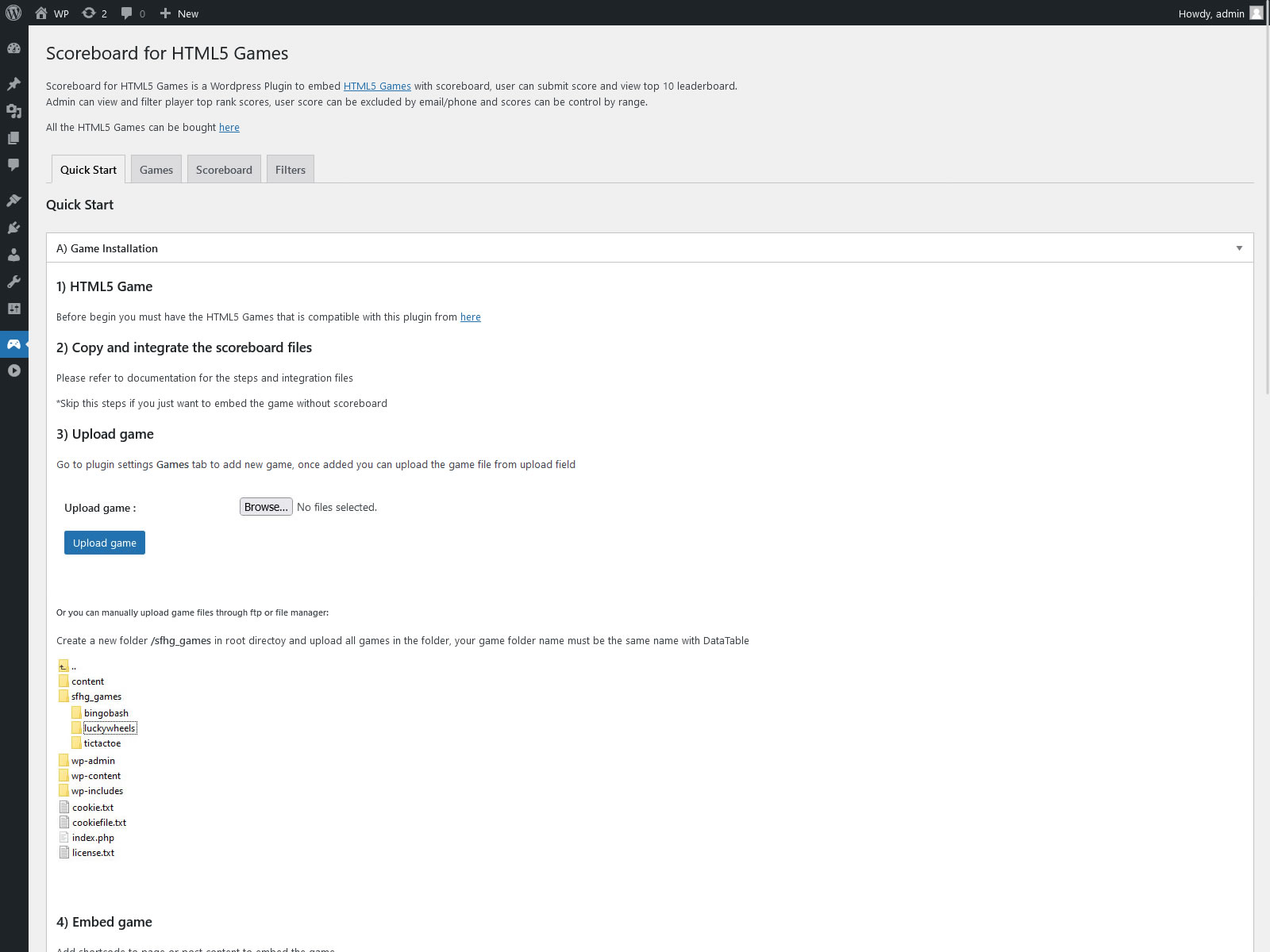
Quick Start for instruction

Add and upload game file

Add shortcode to post or page content

Embeded HTML5 Games
Changelog
1.2
- Fixed undefined constant
1.1
- Improve security
- Improve wordpress coding standard