

Scroll Triggered Widget Area
This plugin triggers a widget area when a user scrolls down the page. It comes with more than 20 animation effects and more customization options.
Plugin info
Maintenance & Compatibility
Maintenance score
Possibly abandoned • Last updated 1759 days ago • 1 reviews
Is Scroll Triggered Widget Area abandoned?
Possibly abandoned (last update 1759 days ago).
Compatibility
Languages
Similar & Alternatives
Explore plugins with similar tags, and compare key metrics like downloads, ratings, updates, support, and WP/PHP compatibility.
Description
Scroll Triggered Widget is not an actual widget. It defines a new widget area when activated. You can drag and drop any widget you wish like a normal widget area. The widget area gets triggered when you scroll down to the bottom of the page by default. But you can control the location where it gets triggered in the plugin options page. The plugin comes with lot of customization options.
Plugin features
– 25 unique animation effects
– Change the background color of the widget
– Change the Border color and width
– Choose where the widget should display
– Drag and drop any widget of your choice
– Controll how long the widget area should be remain hidden when closed
– Users can click the moving arrow in the bottom to revert the widget area
Installation
Using The WordPress Dashboard
- Navigate to the ‘Add New’ in the plugins dashboard
- Search for ‘scroll-triggered-widget-area’
- Click ‘Install Now’
- Activate the plugin on the Plugin dashboard
Uploading in WordPress Dashboard
- Navigate to the ‘Add New’ in the plugins dashboard
- Navigate to the ‘Upload’ area
- Select ‘scroll-triggered-widget-area.zip’ from your computer
- Click ‘Install Now’
- Activate the plugin in the Plugin dashboard
Using FTP
- Download ‘scroll-triggered-widget-area.zip’
- Extract the ‘scroll-triggered-widget-area’ directory to your computer
- Upload the ‘scroll-triggered-widget-area’ directory to the ‘/wp-content/plugins/’ directory
- Activate the plugin in the Plugin dashboard
Frequently Asked Questions
Review feed
Screenshots
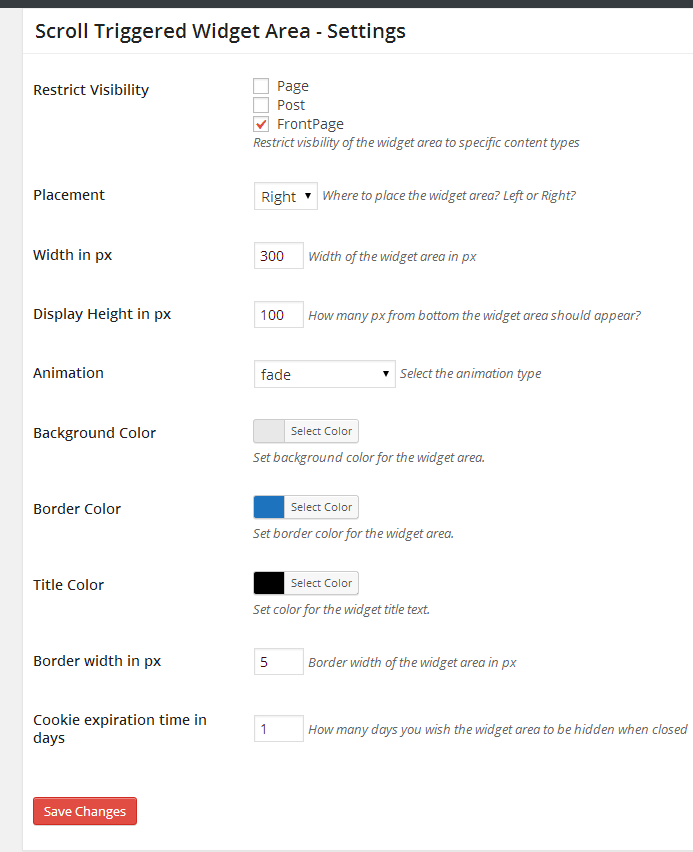
Settings page.

A Newsletter widget inside scroll-triggered-widget-area looks like this.
Changelog
=1.0.1=
Bug Fix – Setting menu not displaying in plugins page