

Maintenance 20/1002082d since update
Active installs
0
Downloads
869
Reviews
0
Age
5.7y
Plugin info
Total downloads: 869
Active installs: 0
Total reviews: 0
Average rating: 0
Support threads opened: 0
Support threads resolved: 0 (0%)
Available in: 1 language(s)
Contributors: 1
Last updated: 6/5/2020 (2082 days ago)
Added to WordPress: 6/5/2020 (5 years old)
Minimum WordPress version: 4.6
Tested up to WordPress version: 5.4.18
Minimum PHP version: 5.2.4
Maintenance & Compatibility
Maintenance score
Possibly abandoned • Last updated 2082 days ago
20/100
Is SEOCE – SEO Content Editor abandoned?
Possibly abandoned (last update 2082 days ago).
Compatibility
Requires WordPress: 4.6
Tested up to: 5.4.18
Requires PHP: 5.2.4
Similar & Alternatives
Explore plugins with similar tags, and compare key metrics like downloads, ratings, updates, support, and WP/PHP compatibility.
No similar plugins found yet.
Description
Attach to your posts your keyword research an other instructions to your editors. After your data recolection and keyword research, append your valuable requirements for your editors on posts.
Set on every posts your number of this requirements:
- Words
- Quantity of images
- Paragraphs & bold words
- H1 & H2 number of tags
- Internal & external links
- Keyword counting
- Highlighted & colored density keywords
- WordPress classic editor support
- JSON import data
- Free Generator
- Optional Analyze of Google Serp
- Shift key or mouse over to highlight
Installation
- Upload the plugin files to the
/wp-content/pluginsdirectory, or install the plugin through the WordPress plugins screen directly. - Activate the plugin through the ‘Plugins’ screen in WordPress
- A new metabox appear on your classic editor.
- A button on plugins page or in settings menu, for the generator form.
Frequently Asked Questions
Review feed
No reviews available
Screenshots
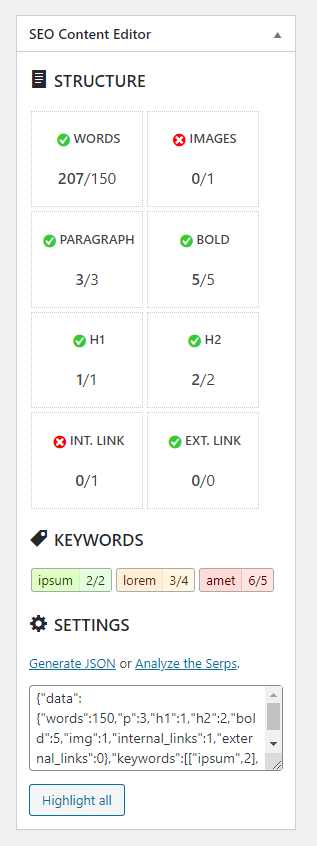
Metabox for classic editor

Highlighted text
Changelog
1.0
- First functional version.