

SEO Editor
Edit SEO Data in bulk to save time. Includes meta title, description, and keyword editing for all post types, taxonomies, and users.
Plugin info
Maintenance & Compatibility
Maintenance score
Possibly abandoned • Last updated 2190 days ago • 3 reviews
Is SEO Editor abandoned?
Possibly abandoned (last update 2190 days ago).
Compatibility
Developers
Similar & Alternatives
Explore plugins with similar tags, and compare key metrics like downloads, ratings, updates, support, and WP/PHP compatibility.
Description
Save time editing SEO data on multiple pages by using a single editor that pulls in meta title, description, and keyword into a single view. This plugin fully integrates with WordPress SEO and All In One SEO Pack plugins by auto-detecting what plugin you’re using.
Code
View the source on GitHub. You can also submit an issue or pull request for anything new.
Support
If you need support with this plugin, please Contact us on our contact form
Installation
- Upload the
seo-editorfolder to the/wp-content/plugins/directory - Make sure you have either the WordPress SEO by Yoast or All In One SEO Pack plugin installed and enabled.
- Activate the SEO Editor through the ‘Plugins’ menu in WordPress
- A new Bulk Editor submenu item will appear under the menu item for the seo plugin you are using.
Frequently Asked Questions
Does this work with custom post types?
Yes!
Can I edit taxonomy and user meta data in bulk?
Yes, as long as you are using the WordPress SEO plugin by Yoast.
The standard version of All in One SEO Pack does not support this functionality.
Review feed
Screenshots
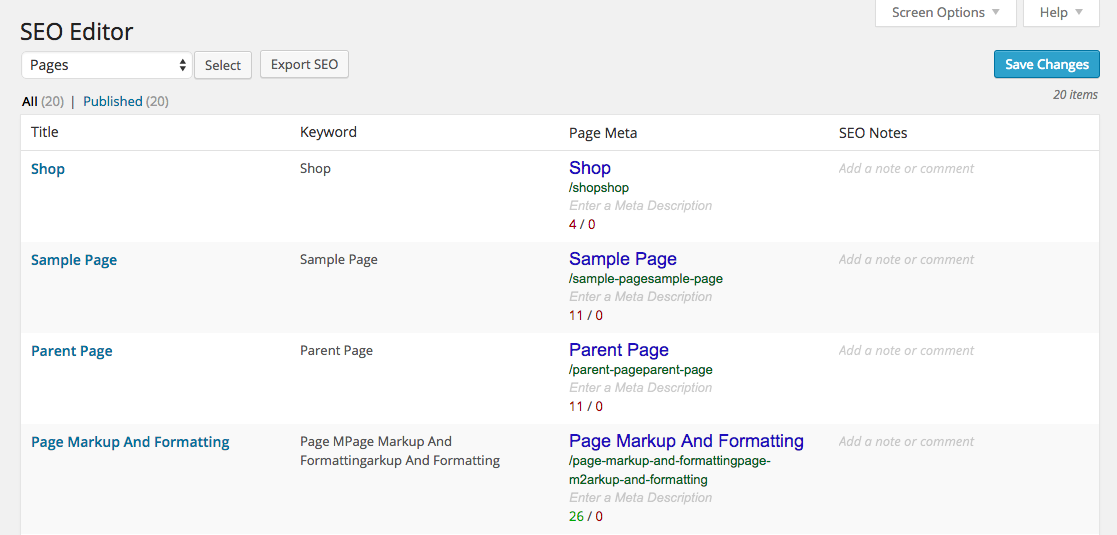
Full editor view using WordPress SEO by Yoast. Keywords, Page Meta, and SEO Notes are all inline-editable.

Close-up on the content type selector.
Changelog
1.0.7
- Added support for Yoast SEO Premium
1.0.6
- Fixed pagination for taxonomies
1.0.5
- Fixed issue with displaying international special characters
- Fixed bug when saving changes multiple times without switching pages
1.0.4
- Fixed minor PHP notice
- Fix default sort order for Users
1.0.3
- Updated menu ordering for compatibility with Yoast SEO 3+
1.0.2
- Updated menu ordering for compatibility with Yoast SEO 2.3+
1.0.1
- Bugfix for Save Changes
- Fix issue with saving of WordPress SEO Meta Description
1.0
- Initial Release