

SEO Magic – AI SEO Assistant
SEO Magic is an AI-powered SEO assistant that helps you write high-quality metadata, optimize content, improve image SEO and analyze your site’s techn …
Plugin info
Maintenance & Compatibility
Maintenance score
Maintained • Last updated 118 days ago
Is SEO Magic – AI SEO Assistant abandoned?
Likely maintained (last update 118 days ago).
Compatibility
Similar & Alternatives
Explore plugins with similar tags, and compare key metrics like downloads, ratings, updates, support, and WP/PHP compatibility.
Description
SEO Magic turns your WordPress dashboard into an AI-assisted SEO control center.
Instead of jumping between tools, you can:
- Generate SEO titles, meta descriptions and Open Graph tags in bulk.
- Ask the Content Assistant to improve your articles, add FAQs, or suggest schema.
- Fix missing alt text and improve image SEO automatically.
- Optimize WooCommerce products with consistent, on-brand SEO fields (PRO).
- Run a technical SEO audit and get actionable recommendations (PRO).
- Analyze backlinks, detect potentially harmful links and discover link opportunities (PRO).
- Discover internal and external link ideas with the Auto-Linking Assistant (PRO).
Everything is integrated into the WordPress admin UI so you keep full control of your content.
Note: SEO Magic requires a Google Gemini API key to generate AI-based content.
The plugin includes a guided setup to help you connect your key and start using the free or paid Gemini tiers.
SEO Magic lets you choose between multiple Gemini models (such as gemini-2.5-flash, gemini-2.5-flash-lite, gemini-2.5-pro and optional Gemini 3.x models like gemini-3-pro-preview).
By default, the plugin uses Gemini 2.5 Flash, which is optimized for the current free tier in Google AI Studio for most accounts.
Gemini 3.x models (for example gemini-3-pro-preview) always require billing to be enabled in your Google Cloud project.
Plugin website: https://seomagic.click/
Documentation: https://seomagic.click/documentation/
PRO license & pricing: https://seomagic.click/pricing/
Main Features (Free)
1. Metadata SEO – bulk editor for titles & descriptions
Manage all your post, page and custom post type metadata from a single screen:
- See SEO coverage bars for each content type.
- Edit SEO title and meta description in a clean modal.
- Generate suggestions for:
- SEO title and meta description.
- Facebook / Open Graph title and description.
- Twitter title and description.
- Check length indicators so you stay within common search and social limits.
- Generate metadata in batches of up to 20 items at a time to avoid overloading your server.
You can accept, edit or ignore AI suggestions at any time — nothing is changed automatically without your confirmation from this screen.
2. Multimedia SEO – image titles, alt text, captions and descriptions
Fix image SEO in bulk from the Media Library:
- List attachments with their current title, alt text, caption and description.
- Quickly see which images are missing important fields.
- Open a modal to:
- Edit text fields manually, or
- Generate all fields (Title, Alt Text, Caption, Description) with one click.
- Use the AI to create descriptive alt attributes based on file names and basic context.
This helps improve accessibility and image search visibility without manually editing each attachment.
3. Content Assistant – Google-optimized rewriting workflow
The Content Assistant is a dedicated interface to rewrite and optimize posts following Google-friendly best practices (E-E-A-T, readability, heading structure, etc.):
- Load an existing post using the built-in search and filters.
- Review the current content and featured image.
- Click Optimize Content to:
- Improve headings and paragraphs for clarity and flow.
- Generate a stronger, more emotional introduction.
- Suggest FAQs you can add to the post.
- Suggest schema types you may want to implement.
- See mobile and desktop previews of how your titles and snippets may look in search.
- Adjust metadata (SEO title, description, social tags) and featured image alt text from the same screen.
The assistant works on top of your content; it preserves protected blocks and layout shortcodes, and you decide what to keep before updating the post.
4. Autopilot – background metadata & image completion
Autopilot is an optional background task that fills in missing fields for you:
- Runs on a schedule using WordPress cron.
- Scans only the content types you selected in Settings Scan Content Types.
- Can generate:
- Content fields: SEO title, meta description, Facebook / Twitter titles and descriptions.
- Image fields: Title, Alt Text, Caption, Description.
- Focuses on missing fields; existing values are generally preserved.
You stay in control of the schedule and which fields Autopilot is allowed to touch.
You can turn Autopilot off at any time if you prefer a fully manual workflow.
PRO Features (optional upgrade)
The PRO license unlocks advanced automation and analysis features inside the same plugin (no separate download):
1. WooCommerce Assistant – inline AI for product copy
If you use WooCommerce, SEO Magic adds pink AI buttons directly inside the product editor:
- Product title – generate or refine a clear, keyword-rich product name.
- Long description – generate or rewrite a structured, benefit-oriented description.
- Short description – create a concise summary focused on key features.
- Product tags – suggest relevant tags for internal navigation and search.
The AI reads existing product information (title, price, attributes, descriptions, categories, etc.) and writes directly into the field you chose.
You can edit the result, undo the change, or generate a new suggestion in seconds.
SEO titles and meta descriptions for products are managed from the Metadata SEO tools, together with your posts and pages.
2. Auto-Linking Assistant (Internal & External links)
- Analyze a post to see how many internal and external links it already has.
- Get suggestions for:
- Internal links to other relevant posts from your own site.
- External links from your Google Programmable Search Engine.
- Insert links manually into your content or paste a custom URL.
All suggestions are manual – the plugin never injects links into your content without your explicit action.
3. Backlink Audit & Toxicity Analysis
- Connect to Google Search Console (via OAuth) and fetch linking domains, or upload a CSV export.
- Group backlinks by referring domain so you can see where most links come from.
- Use AI-assisted labels (high-authority, suspicious, etc.) to understand quality at a glance.
- Optionally check domains against Google Safe Browsing to detect potentially risky sources.
- Export a disavow file or use the data to update your own disavow list.
4. Site Health & Technical SEO Audit
Run a one-click audit that combines:
- An Overall Site SEO Score (0–100) based on internal content scores and mobile performance.
- PageSpeed Insights (Mobile) data:
- Performance score.
- Core Web Vitals when available (LCP, FID, CLS).
- Lighthouse category scores (SEO, Accessibility, Best Practices).
- Basic technical SEO checks:
- robots.txt presence.
- Indexability settings.
- HTTPS status.
- PHP version, memory and basic cache information.
- A list of Content Requiring Attention, sorted from lowest to highest internal score, with quick links to edit each post.
Use this report as a practical roadmap for improving your site over time.
5. Advanced Settings: Google APIs, ACF & AI Model Rules
PRO also unlocks advanced configuration options:
- Google API Settings – centralize your:
- Google Search API key (Custom Search, Safe Browsing, PageSpeed).
- Programmable Search Engine ID for external links.
- Google OAuth credentials for Search Console.
- ACF Integration – choose which text-based ACF fields should be included as context when generating metadata or content.
- AI Model Rules – define conditions to use different Gemini models for specific post types or categories.
These tools give more control to power users managing large or complex sites.
External Services & Privacy
SEO Magic integrates with several external services to provide its functionality.
Below is an overview of each service, when it is used, and what data is sent.
Google Gemini API
SEO Magic uses the Google Gemini API to generate:
- SEO titles and meta descriptions.
- Open Graph and social metadata suggestions.
- Content improvements, FAQs and schema ideas.
- Image alt text suggestions based on file names and context.
When you click a generation button, run the Content Assistant or enable Autopilot, the plugin sends:
- Text from your posts, pages, products or media descriptions.
- Optional context (post type, focus keywords, language and desired tone).
The plugin does not send your WordPress login credentials, database credentials or full site backups.
Google may store prompts and responses according to its own Gemini API Terms and applicable privacy policies.
For more information, please refer to Google’s official documentation and terms for the Gemini API.
Google PageSpeed Insights API (PRO)
The Site Health & Technical SEO Audit feature (PRO) can use the PageSpeed Insights API to:
- Analyze performance for your site on mobile.
- Retrieve Core Web Vitals and optimization suggestions.
When you run the audit, the plugin sends URLs that belong to your own site.
Results are stored in your WordPress database so you can review them later.
Google Custom Search / Programmable Search Engine (Auto-Linking Assistant – PRO)
The Auto-Linking Assistant (PRO) can use a Google Programmable Search Engine to:
- Discover potential external resources related to your content.
- Suggest authoritative links based on your own CSE configuration.
When you request suggestions, the plugin sends search queries derived from your content and the link phrase you are analyzing.
Results are only shown inside your WordPress dashboard; you choose which links to insert, if any.
Google Search Console (Backlink Audit – PRO)
The Backlink Audit feature (PRO) can import backlink data from Google Search Console, either via API or from CSV exports.
* Data imported typically includes referring domains, URLs and link counts.
* The plugin stores this data locally in your WordPress database for analysis and reporting.
* OAuth tokens are handled via Google’s standard flow; the plugin does not store your Google account password.
Google Safe Browsing API (Backlink Toxicity – PRO)
The Backlink Audit module (PRO) can optionally check referring domains or URLs against the Google Safe Browsing API to help you detect potentially harmful sources.
When you enable this check, the plugin sends the domains or URLs you selected for analysis.
Safe Browsing responses are used only to flag potentially risky links inside your WordPress dashboard.
SEO Magic License Server (PRO)
If you activate a PRO license, the plugin communicates with our license server to:
- Validate your license key.
- Register or deactivate site activations.
- Check license status (active, expired, etc.).
Data sent to our license server typically includes:
- Your license key.
- Your site URL and WordPress environment information (plugin version, WordPress version, PHP version).
We use this data solely to manage licensing and updates.
Details about data handling and retention are documented in the Privacy Policy on our website.
Privacy Notice
By using SEO Magic and enabling integrations with external services (Google Gemini, PageSpeed Insights, Safe Browsing, etc.), you agree to respect the terms of those services and to configure your site in compliance with applicable laws (including data protection and privacy regulations).
You are responsible for informing your visitors and users about any processing of personal data on your site and for updating your own privacy policy accordingly.
Installation
- Upload the
seo-magicofolder to the/wp-content/plugins/directory, or install the plugin via the WordPress Plugins screen. - Activate the plugin through the Plugins menu in WordPress.
- Click Settings in the plugin row on the Plugins screen, or go to SEO Magic Settings in the admin menu.
- Paste your Google Gemini API key and save.
- (Optional) Purchase and activate a PRO license from https://seomagic.click/pricing/ to unlock Autolinking, Backlink Audit, Site Health Audit and advanced settings.
- Open a post, page, product or media item and start using the Metadata, Content, WooCommerce and Multimedia tools.
You can deactivate the plugin at any time. Data stored in your posts (titles, descriptions, alt text, etc.) remains in WordPress.
Frequently Asked Questions
Yes. SEO Magic uses the Google Gemini API to generate AI-powered suggestions.
You must create a key in your own Google Cloud / AI Studio account and paste it into the plugin settings.
The plugin does not provide or resell API keys.
Google currently offers a free tier for the Gemini API with a limited number of requests per day, plus paid tiers for heavier usage.
SEO Magic is configured by default to use Gemini 2.5 Flash, which is compatible with the current free tier for most Google AI Studio accounts.
However, exact limits, eligible models and prices are managed by Google and may change over time;
please check your Google account and the official documentation for up-to-date details.
Gemini 3.x models (such as gemini-3-pro-preview) are only available when billing is enabled in your Google Cloud project.
When you request AI suggestions, the plugin sends:
- Text from your post (title, content, excerpt and some relevant metadata).
- Optional context such as focus keywords, language and content type (post, product, etc.).
- Descriptions or names of media items for alt text generation (not the image files themselves).
The plugin does not send your WordPress admin credentials or database credentials to Gemini.
You decide when to trigger AI calls by clicking the generation buttons or enabling Autopilot.
No. SEO Magic runs fully inside your WordPress site.
The plugin sends prompts to external APIs (Gemini, PageSpeed, Safe Browsing, etc.) only when you trigger a feature that needs them, and it stores the results in your own WordPress database.
It does not implement its own remote storage for your content.
Each external service may retain request and response data according to its own terms and privacy policy.
The free features work without a license key.
When you purchase a PRO license at https://seomagic.click/pricing/, you receive a license key that you can activate inside SEO Magic License Activation.
The plugin sends your domain and license key to our license server to validate and manage activations.
You can deactivate your license from inside WordPress or by contacting support.
The same plugin file is used for Free and PRO; activating the license simply unlocks the additional features.
Yes. SEO Magic is designed to complement your existing SEO setup.
You can use it as:
- An AI assistant to write better titles, descriptions and content.
- A helper to fix image alt text and metadata quickly.
- A technical companion to your existing SEO plugin.
We recommend testing on a staging site if you have heavy customizations or multiple SEO plugins editing the same fields.
Review feed
Screenshots
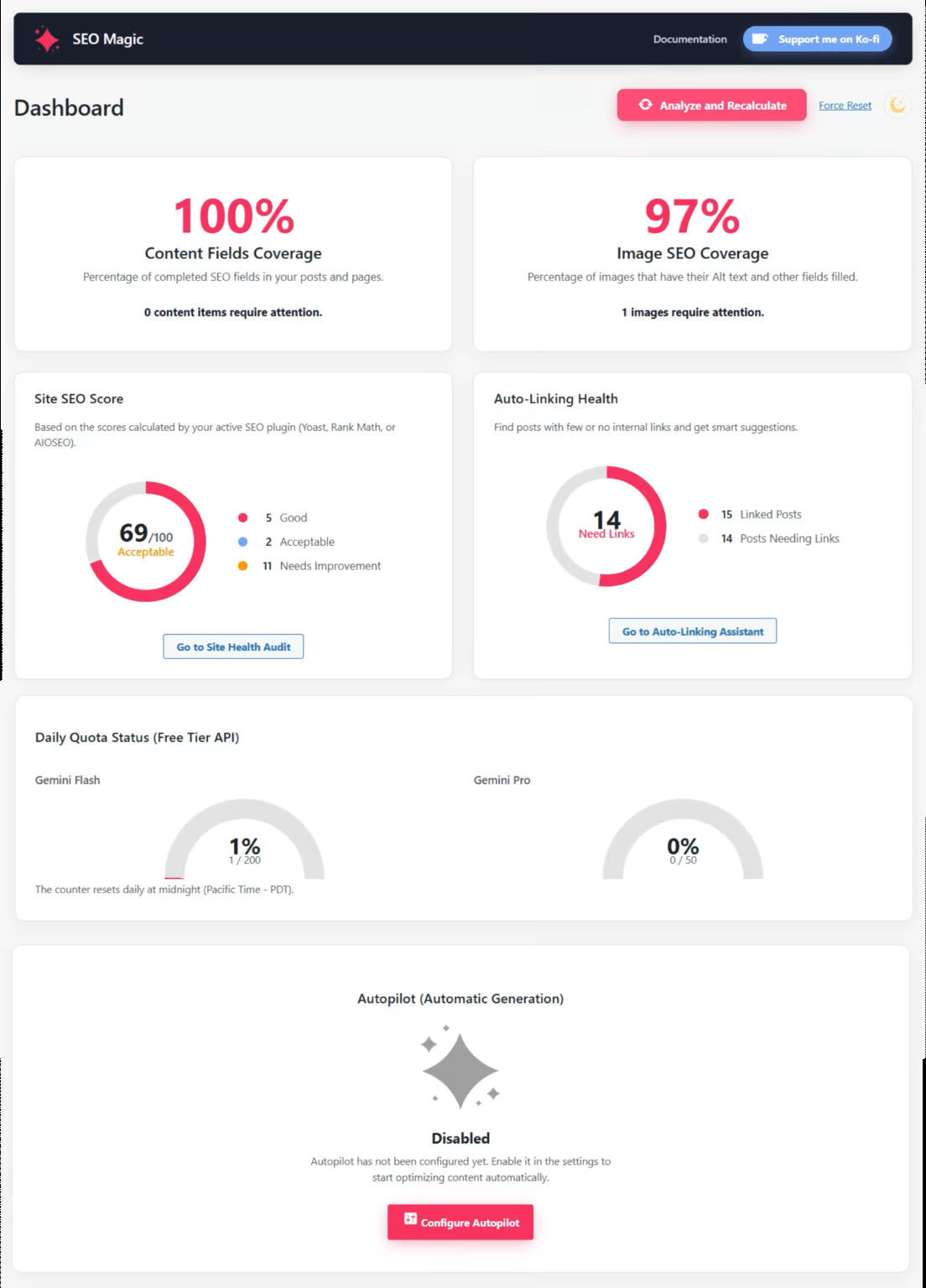
SEO Magic dashboard with coverage bars and quick access to metadata, content and media tools.
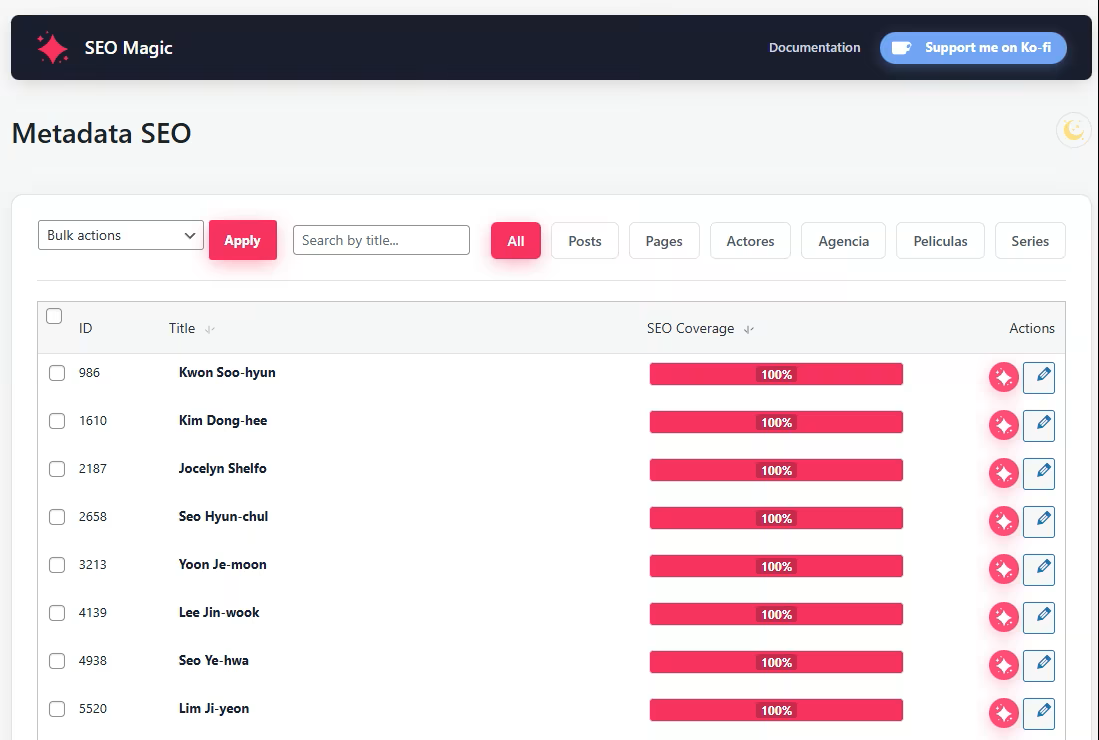
Metadata SEO screen showing the list of posts with coverage indicators and the modal editor for titles and descriptions.
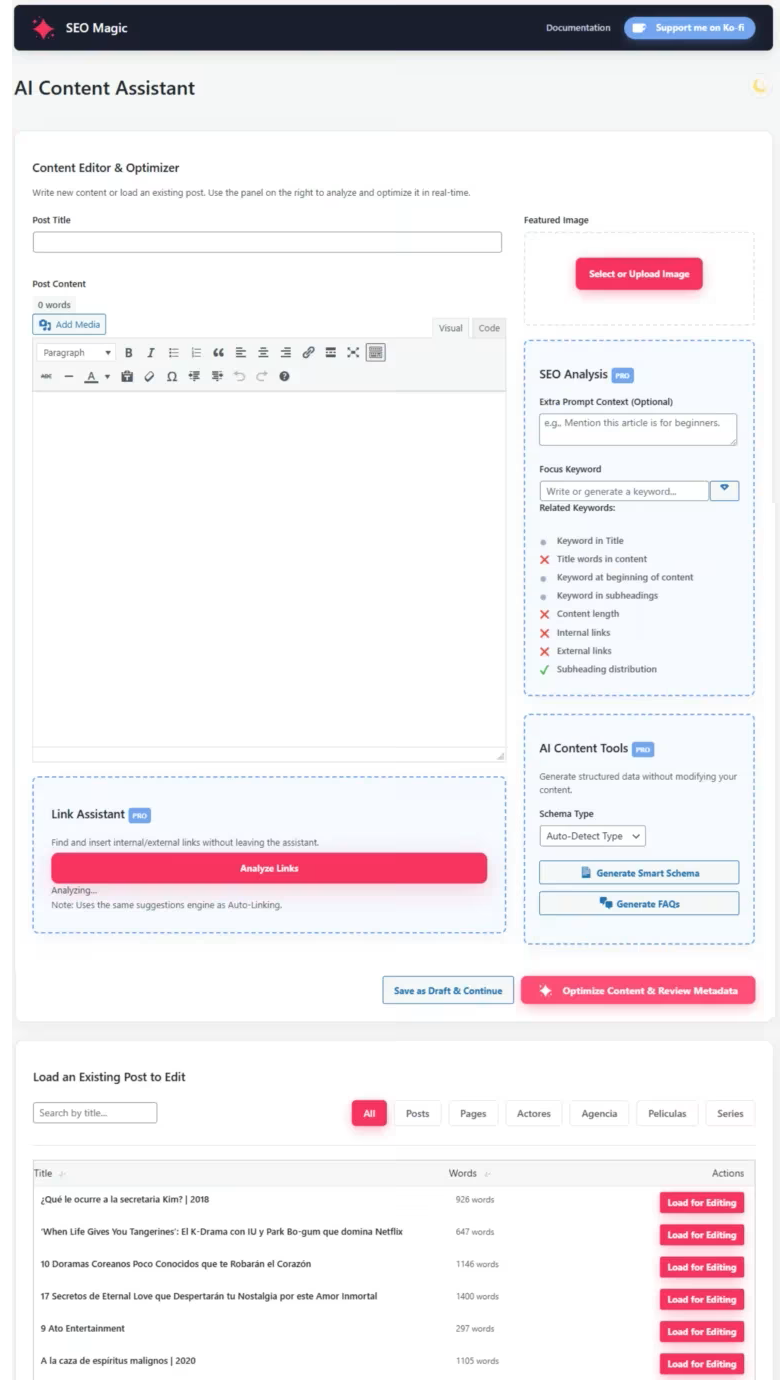
Content Assistant interface with the optimized post preview, mobile / desktop snippet preview and metadata controls.
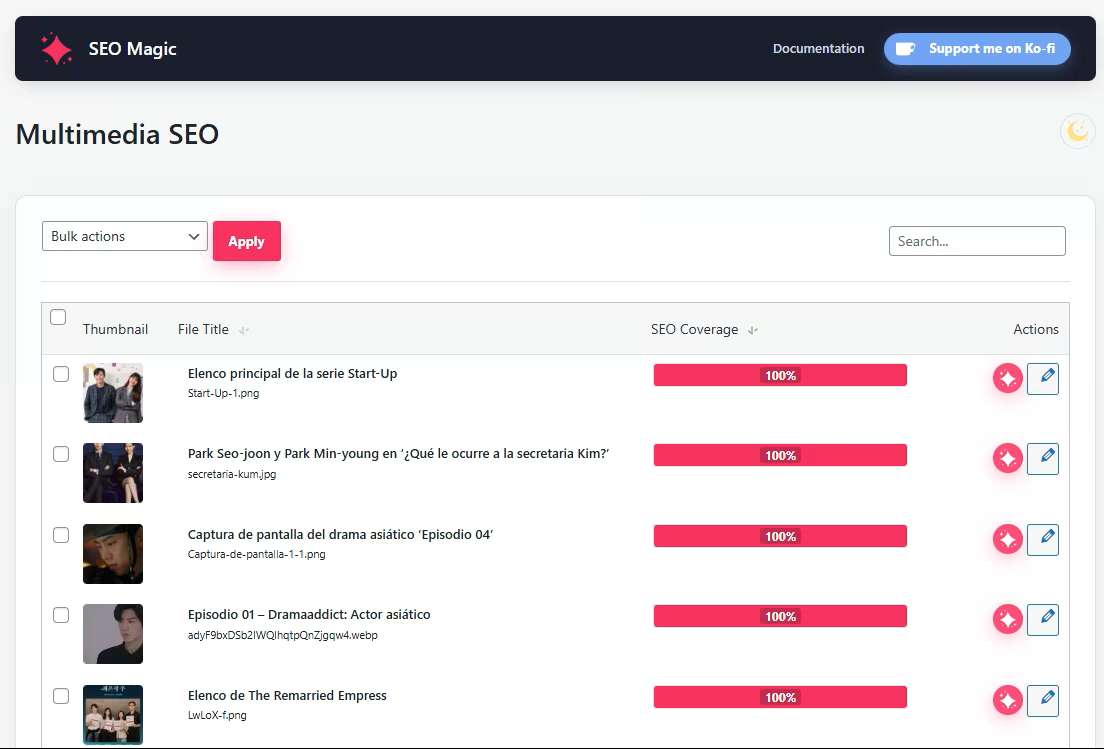
Multimedia SEO panel listing images and the modal to generate titles, alt text, captions and descriptions.
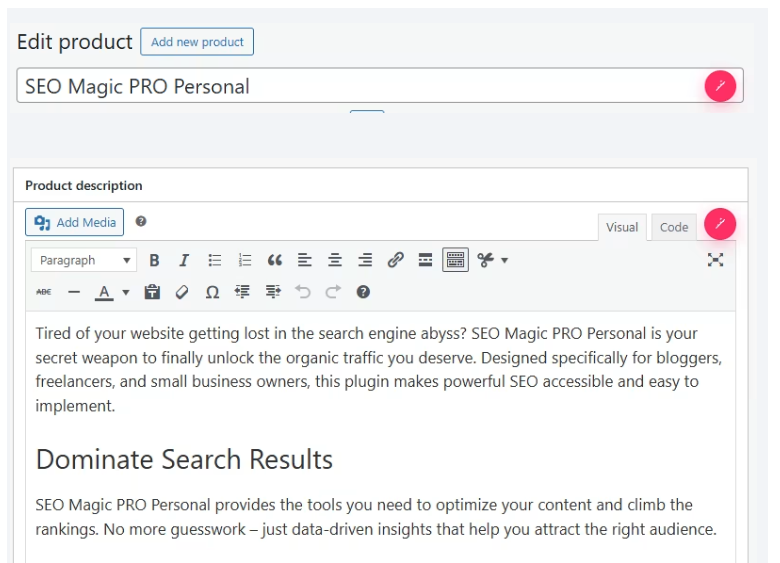
WooCommerce product editor (PRO) with pink AI buttons next to the title, long description, short description and tags.
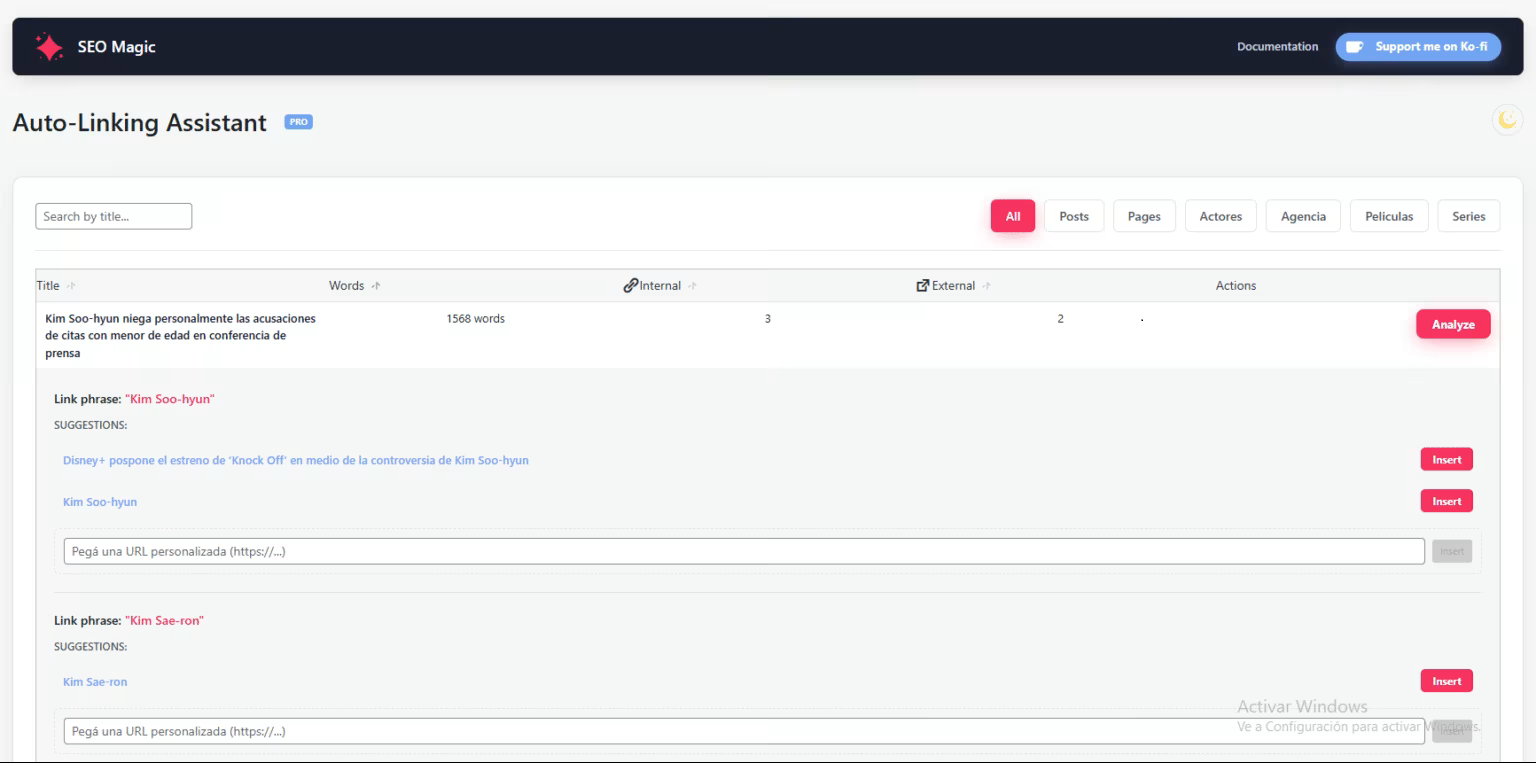
Auto-Linking Assistant (PRO) with suggested internal and external links based on your content.
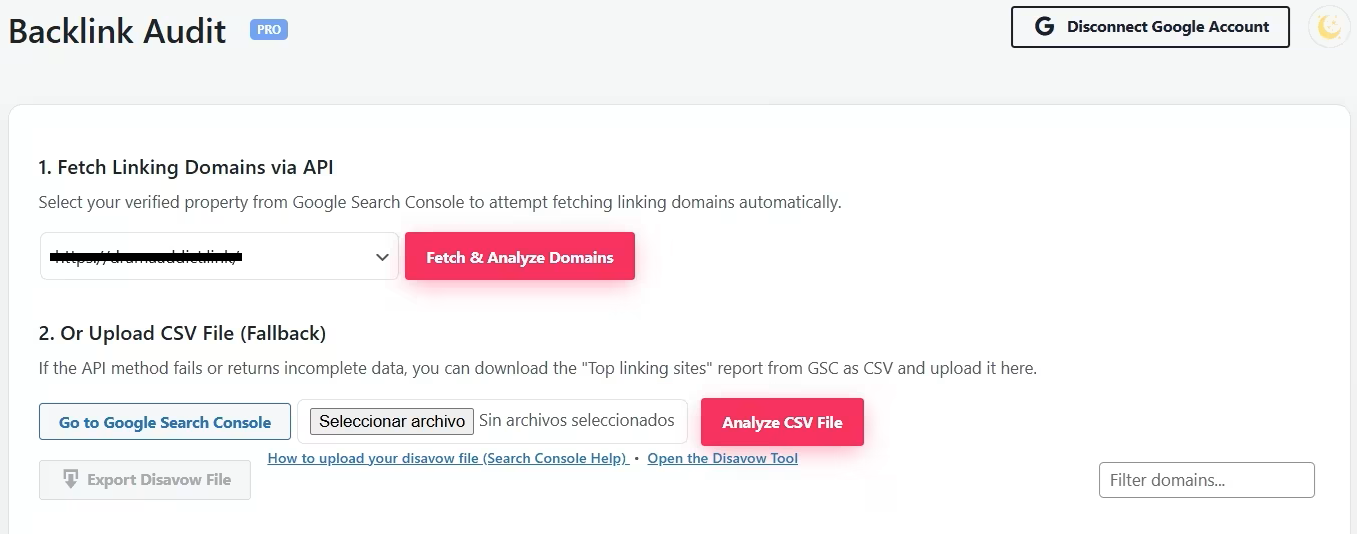
Backlink Audit (PRO) with risk labels, AI analysis and recommendations for each referring domain.
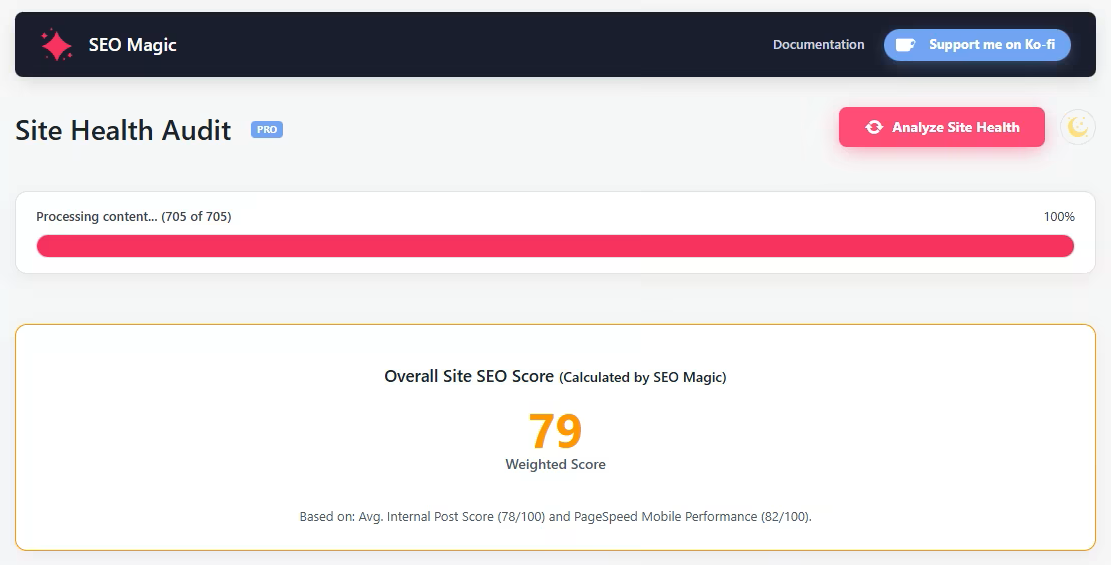
Site Health Audit (PRO) showing the overall site SEO score, PageSpeed Insights data and technical SEO checks.
Changelog
1.0.5
- Security & Architecture: Major security upgrade. All AI prompt logic has been migrated to a secure proxy server, reducing plugin weight and increasing safety.
- Metadata Module: Improved Metadata generation with Search Intent detection (Informational vs Transactional).
- Metadata Module: Implemented AIDA formula (Attention, Interest, Desire, Action) for higher CTR meta descriptions.
- Multimedia SEO: Enhanced Image Alt Text generation focusing on WCAG accessibility standards and semantic context (“reading” the image, not just guessing).
- WooCommerce: Improved Long Description generation using the “Benefits over Features” method with better HTML structure (H3, lists, bolding).
- WooCommerce: Short Descriptions now use an “Elevator Pitch” style to target customer pain points immediately.
- Content Assistant: Upgraded to “Editor-in-Chief” mode prioritizing reader retention and semantic structure (H2/H3).
- Content Assistant: FAQs are now optimized for Zero-Click searches with direct and concise answers.
- Auto-Linking: Smart Auto-Linking update. The system now detects semantic concepts for internal linking opportunities instead of just exact keyword matches.
- Schema: Fixed validation errors in Schema generation (specifically preventing ‘frequentlyAskedQuestions’ inside Person type).
- UI/UX: Redesigned AI Usage Panel and improved API quota error messaging for better clarity.
- Backlink Audit: Refined toxicity analysis prompts for more accurate risk assessment.
1.0.4
- Updated default Gemini model to gemini-2.5-flash and added new model options (gemini-2.5-flash-lite, gemini-2.5-pro) aligned with Google AI Studio’s current free tier.
- Updated the Content Assistant and other tools to use the selected model instead of forcing gemini-2.5-pro.
- Added a Settings link in the WordPress Plugins screen for quicker access to the main configuration panel.
- Updated documentation to clarify that Gemini 3.x models (for example
gemini-3-pro-preview) require billing to be enabled in your Google Cloud project.
1.0.3
- Fixed review button error.
- Updated translations for Spanish, French, Italian, Arabic, and Chinese.
- Fixed error when creating a draft: “Cannot update post. Invalid post ID received.”
1.0.2
- Major refactor to follow WordPress.org coding standards and security best practices.
- Improved sanitization, validation and escaping of user input and output.
- Added nonces and capability checks to AJAX handlers and admin forms.
- Implemented a secure license proxy on our server to avoid exposing API keys in the plugin code.
- Switched all remote requests to use SSL verification.
- Introduced new admin UI for Metadata SEO, Multimedia SEO and Content Assistant.
- Added WooCommerce inline assistant for product titles, descriptions and tags.
- Added Autopilot for background metadata and image completion.
- Added Auto-Linking Assistant, Backlink Audit and Site Health Audit as PRO-only tools.
- Updated readme with detailed information about features, external services and privacy.
1.0.1
- Added Content Assistant for posts and pages.
- Introduced Media SEO tools for bulk alt text optimization.
- Initial support for WooCommerce product SEO.
- UI improvements in the admin pages.
1.0.0
- Initial release of SEO Magic – AI-powered metadata assistant for WordPress.