

Maintenance 22/1004230d since update
Active installs
90
Downloads
30,970
Reviews
2
Age
12.3y
Plugin info
Total downloads: 30,970
Active installs: 90
Total reviews: 2
Average rating: 5
Support threads opened: 0
Support threads resolved: 0 (0%)
Available in: 1 language(s)
Contributors: 1
Last updated: 9/2/2014 (4230 days ago)
Added to WordPress: 12/23/2013 (12 years old)
Minimum WordPress version: 2.8
Tested up to WordPress version: 3.9.40
Minimum PHP version: f
Maintenance & Compatibility
Maintenance score
Possibly abandoned • Last updated 4230 days ago • 2 reviews
22/100
Is SEO Stats Widget abandoned?
Possibly abandoned (last update 4230 days ago).
Compatibility
Requires WordPress: 2.8
Tested up to: 3.9.40
Requires PHP: f
Similar & Alternatives
Explore plugins with similar tags, and compare key metrics like downloads, ratings, updates, support, and WP/PHP compatibility.
Post-Analytics
Rating 3.0/5 (2 reviews) • Active installs 10
WP-SEOstats
Rating 4.5/5 (2 reviews) • Active installs 10
WP Keywords Report
Rating 2.5/5 (2 reviews) • Active installs 10
Description
SEO Stats Widget Plugin collects SEO statistic from various sources like Google, SemRush, Alexa, Dmoz and shows all stats in admin dashboard and sidebar widget.
Currently this plugin shows following stats
- Google Pagerank
- Google Indexed Pages
- Google Backlinks
- Keywords in Google
- Keywords Cost (PPC)
- Organic Traffic (From Google)
- SemRush Rank
- Alexa Rank
- Alexa Backlink
- Dmoz Listing
- Website Load time
SEO Stats Widget by 99webtools
Installation
Using the Plugin Manager
- Click Plugins
- Click Add New
- Search for
seo-stats-widget - Click Install
- Click Install Now
- Click Activate Plugin
Manually
- Upload
seo-stats-widgetfolder to the/wp-content/plugins/directory - Activate the plugin through the ‘Plugins’ menu in WordPress
Frequently Asked Questions
No FAQ available
Review feed
No reviews available
Screenshots
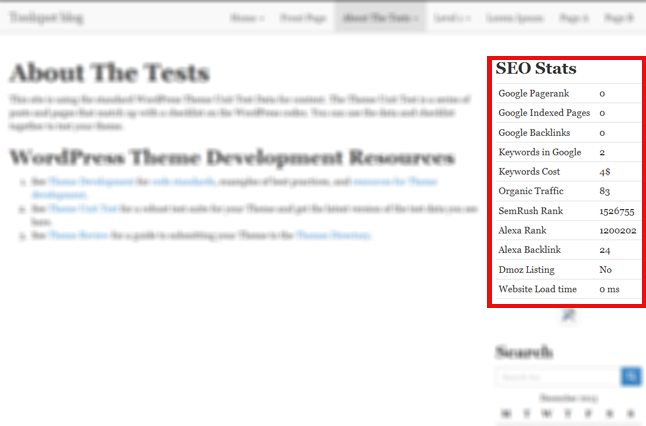
SEO Stats sidebar widget demo

SEO Stats dashboard widget demo
Changelog
1.1
- fixed some bugs
1.0
- Initial release