

Server-Side Tracking via GTM for GA4, Meta CAPI & Google Ads
WooCommerce GTM server-side tracking for GA4, Meta CAPI, Google Ads & more. Bypass ad blockers, boost accuracy on Safari and iOS browsers.
Plugin info
Maintenance & Compatibility
Maintenance score
Stale • Last updated 267 days ago • 3 reviews
Is Server-Side Tracking via GTM for GA4, Meta CAPI & Google Ads abandoned?
Likely maintained (last update 267 days ago).
Compatibility
Developers
Similar & Alternatives
Explore plugins with similar tags, and compare key metrics like downloads, ratings, updates, support, and WP/PHP compatibility.
Description
Track eCommerce Events Reliably on All Browsers and Devices
Browser-side scripts can be blocked or restricted, resulting in gaps in conversion data. This plugin delivers server‑side tracking for WooCommerce through Google Tag Manager – no custom code required.
It transmits privacy‑compliant data from your server to:
- Google Analytics 4 (GA4)
- Meta Pixel with Facebook Conversion API
- Google Ads (Enhanced Conversions supported)
- TikTok, Snapchat, and Pinterest
How It Works
WooCommerce events, such as product view, add-to-cart, checkout, and purchase, are collected client-side, forwarded to a GTM server container, and sent to the selected platforms using first-party cookies. A custom loader keeps tracking active when browser scripts are blocked.
Setup in Minutes
A guided wizard generates ready‑made GTM templates – enter your container IDs and start tracking.
Reviews
“All‑in‑One solution with exceptional support. Integration is seamless and the team is responsive.”
— @tizianokappa (Read full review)
Benefits
- Reduce data loss from ad‑blockers and privacy‑focused browsers by routing events server‑side.
- Maintain attribution accuracy across GA4, Google Ads, and Meta by using first‑party cookies.
- Improve compliance with privacy regulations by limiting third‑party scripts.
- Lower client‑side script load, contributing to better Core Web Vitals and site speed scores.
- Provide multi‑channel event data (Google, Meta, TikTok, Snapchat, Pinterest) from a single GTM configuration.
Free Features
- Server‑side tracking via Google Tag Manager web and server containers
- Automatic WooCommerce eCommerce events (pageview, addtocart, checkout, purchase)
- Support for GA4, Google Ads (including Enhanced Conversions), Meta Pixel +CAPI, TikTok, Snapchat and Pinterest
- First‑party cookie extension for browsers that limit third‑party cookies (Safari/iOS)
- Custom loader to continue tracking when ad‑blockers are active
- Includes 300,000 server hits (lifetime) on the free plan
- GA4 eCommerce reports available inside WordPress (free tier)
- No‑code setup wizard with GTM container templates
Premium Features
Upgrade to the Premium Plan (US $499 / year) for additional capacity and hands‑on help. See full pricing details.
- Higher server‑hit quota for high‑traffic stores
- Expert configuration assistance for server‑side GTM and conversion APIs
- Priority support with responses within 24 hours — contact [email protected] or WhatsApp +91 72848 54854
- GA4 general reports and Google Ads reports (premium only)
- Enhanced Conversions for Google Ads — contact [email protected] or WhatsApp +91 72848 54854
Integrations
- Google Analytics 4 (GA4)
- Google Tag Manager (web and server containers)
- Google Ads (Conversions & Enhanced Conversions)
- Meta Pixel & Conversion API
- TikTok Pixel & Events API
- Snapchat Pixel and Conversion API
Support
For assistance:
– Email – [email protected]
– WhatsApp – +91 72848 54854
– Documentation – Help Center
Privacy Policy
You can view our detailed privacy policy here.
Third-Party Services
Google APIs – authentication and data exchange.
Terms | Privacy
Google Tag Manager – tag management.
Terms | Privacy
Google Analytics – traffic and event reporting.
Terms | Privacy
Tatvic API – supplementary plugin functionality.
Privacy
Installation
For a step-by-step walkthrough, see the full setup guide.
- Install via the WordPress plugin directory or upload the ZIP.
- Open Conversios SST in your dashboard.
- Add your GTM web and server container IDs and domain.
- Select the platforms to receive server-side events.
- Save settings and verify events in GTM Preview or platform diagnostics.
Frequently Asked Questions
Yes. During setup you can generate a managed server container or connect an existing one. See the setup guide for details.
Yes, general tracking works on any WordPress site; WooCommerce events are added automatically when WooCommerce is active.
Up to 300,000 server hits (lifetime). Upgrade if you need more capacity.
The Premium Plan is US $499 / year. It lifts the free‑tier hit limit and adds automated sGTM deployment on Google Cloud, full GA4 eCommerce & Enhanced Conversions support, multi‑channel tracking (Google Ads, Meta, TikTok, Snapchat) and priority email/WhatsApp support. See the full pricing page for details.
Server‑side delivery, combined with first‑party cookies, can improve EMQ scores because more parameters reach Meta. See our detailed walkthrough on how to improve Facebook Event Match Quality for practical tips.
Yes. The plugin can send the required hashed user data server‑side to enable Enhanced Conversions in Google Ads. See Google’s reference here.
Yes. Use Google Tag Manager to map additional client‑side or server‑side events to any supported platform. If you’d like assistance, email [email protected] and we’ll walk you through the steps.
Moving most tracking scripts off the browser reduces JavaScript load and can improve Core Web Vitals.
Review feed
Screenshots

GTM Web & Server Container Configuration

GA4 Setup Panel

Google Ads Conversion Setup
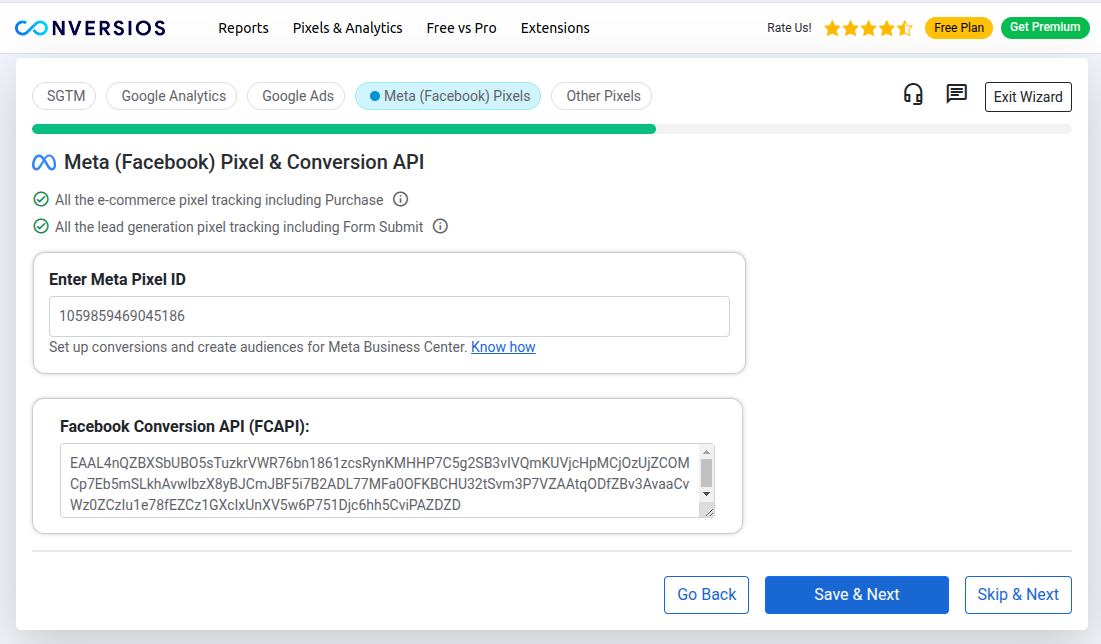
Meta Pixel & CAPI Configuration

TikTok & Snapchat Pixel Configuration
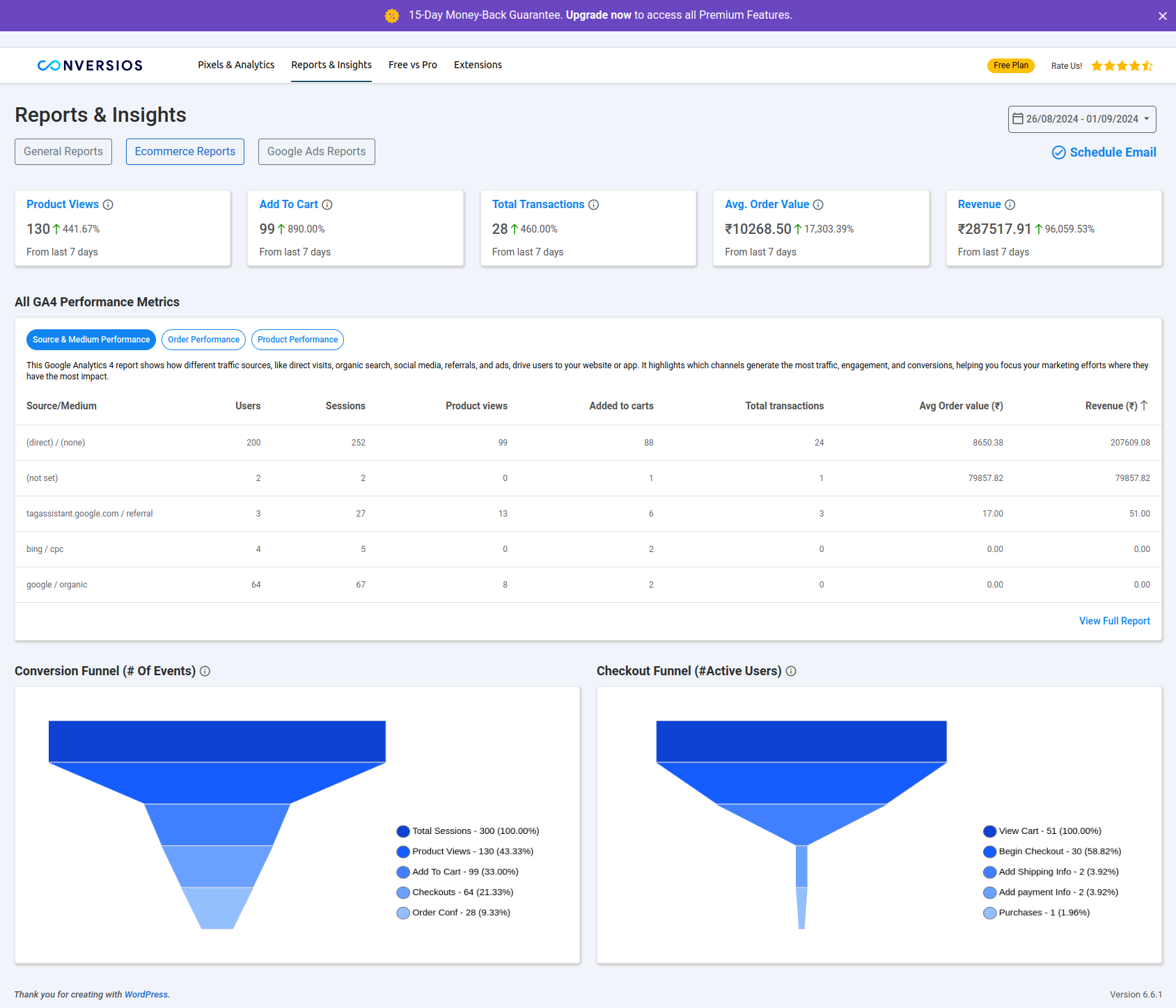
GA4 and Google Ads Reporting Dashboard

Advanced Settings Panel
Changelog
1.1.1 – 11 Jul 2025
- Security Updates.
1.1.0 – 17 Feb 2025
- Major Update: Automates tracking and grants 300K lifetime server hits.
- Free Lifetime Hits: Track server‑side events at no cost.
- Automated Web & Server Containers: Faster setup with no manual effort.
- Cloud‑Run Deployment: Hassle‑free server‑side infrastructure.
- Wizard‑Based UI: Step‑by‑step onboarding experience.
- Performance & Stability Fixes: Speed optimisations and bug resolutions.
1.0.9 – 23 Sep 2024
- Knowledge‑Base Docs Added
- GA4 & Google Ads Validation Fixes
- User‑Experience Enhancements
1.0.8 – 10 Sep 2024
- E‑commerce Reports Added
- Multiple Bug Fixes & Stability Improvements
1.0.7 – 14 Aug 2024
- UI Improvements
- Extensions Page Added
1.0.6 – 31 Jul 2024
- Free vs Pro Menu Template Updated
- WooCommerce‑less Design Break Fixed
1.0.5 – 26 Jul 2024
- Uninstall Feedback Form Added
- Minor UI Changes
1.0.4 – 22 Jul 2024
- PHP 8.3 Compatibility
1.0.3 – 02 Jul 2024
- Initial Release