

Session Save User
This plugin works in a very simple way allowing you to save the users that have logged in to your wodpress page from your computer, giving them a quic …
Plugin info
Maintenance & Compatibility
Maintenance score
Possibly abandoned • Last updated 3046 days ago • 5 reviews
Is Session Save User abandoned?
Possibly abandoned (last update 3046 days ago).
Compatibility
Similar & Alternatives
Explore plugins with similar tags, and compare key metrics like downloads, ratings, updates, support, and WP/PHP compatibility.
Description
This plugin works in a very simple way allowing you to save the users that have logged in to your wodpress page from your computer, giving them a quick access to your user account when they return again and no less important style to the wordpress login
Installation
You can either install it automatically from the WordPress admin, or do it manually:
Using the Plugin Manager
- Click Plugins
- Click Add New
- Search for
Session Save User - Click Install
- Click Install Now
- Click Activate Plugin
Manually
- Upload
session-save-userfolder to the/wp-content/plugins/directory - Activate the plugin through the ‘Plugins’ menu in WordPress
Frequently Asked Questions
Installation Instructions
You can either install it automatically from the WordPress admin, or do it manually:
Using the Plugin Manager
- Click Plugins
- Click Add New
- Search for
Session Save User - Click Install
- Click Install Now
- Click Activate Plugin
Manually
- Upload
session-save-userfolder to the/wp-content/plugins/directory - Activate the plugin through the ‘Plugins’ menu in WordPress
Review feed
Probado en WP 4.1
Screenshots
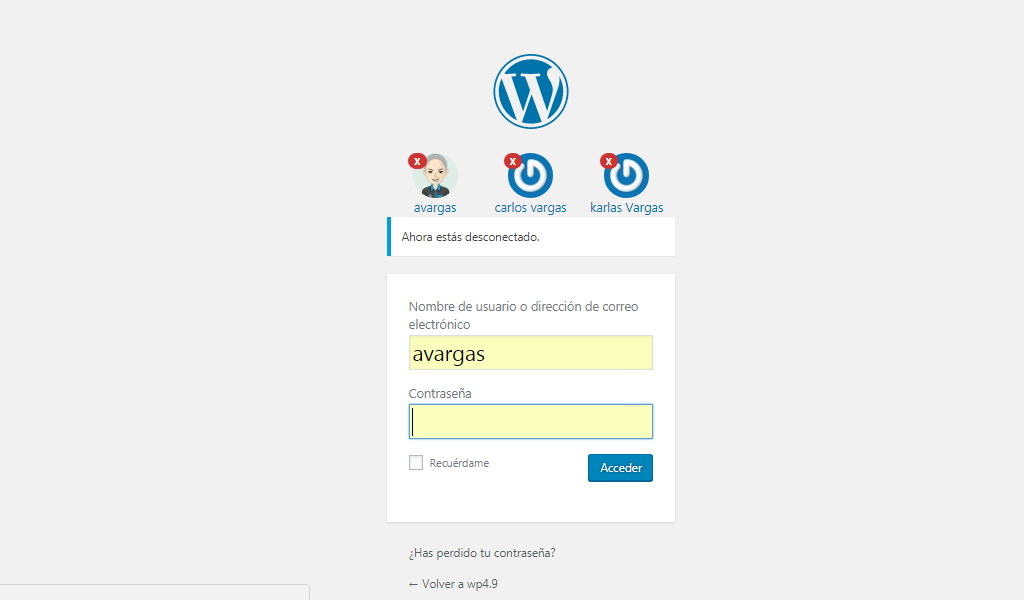
When you start a session with a wordpress account, this logged-in user is saved and when you close the session you can view it as shown in the screenshot, thus clicking on the avatar will insert the user name in the field but not the password. security
Changelog
1.1
First approach to Session Save User.