

SF Pages For Custom Posts
Allows you to easily assign to a page your custom post types with a settings panel, like you can do with normal posts.
Plugin info
Maintenance & Compatibility
Maintenance score
Possibly abandoned • Last updated 4568 days ago
Is SF Pages For Custom Posts abandoned?
Possibly abandoned (last update 4568 days ago).
Compatibility
Similar & Alternatives
Explore plugins with similar tags, and compare key metrics like downloads, ratings, updates, support, and WP/PHP compatibility.
Description
This plugin is not maintained anymore!
Please see my other plugin SF Archiver which does quite the same thing.
Description
Sick of creating custom page templates with a specific loop for your custom post types?
This plugin allows you to easily assign to a page your custom post types with a settings panel, like you can do with normal posts.
Go to Settings > Pages for C. Posts, all your public custom post types will be listed.
You can choose the page where they will be displayed (of course), the number of posts per page, and also the template to use if needed (e.g. Page, Archive, Home page…). In most cases you don’t have to specify a template, just let it as it is (but this can be useful with some themes).
You can also choose to display a custom post type on your home page: just specify the same page as you have chosen in Settings > Reading, and optionally, specify the “Home page” template.
Note that this plugin is not for creating a secondary loop in your page, it will replace the original loop.
This plugin is still in beta-test, so it may not work for everybody. So far, it works fine with WP 3.2.1 and TwentyEleven for me.
Translations
- English
- French
Installation
- Extract the plugin folder from the downloaded ZIP file.
- Upload SF Pages For Custom Posts folder to your /wp-content/plugins/ directory.
- Activate the plugin from the “Plugins” page in your Dashboard.
- Go to settings.
Frequently Asked Questions
What is the best setting for the template option?
It depends of your theme, but generally :
* If the post type is displayed in any normal page, you won’t have to set a template, leave this empty.
* If the post type is displayed in the front page, the best choices are probably “Page” or “Home Page”.
Eventually, check out my blog (sorry, it’s in french)
Review feed
Screenshots
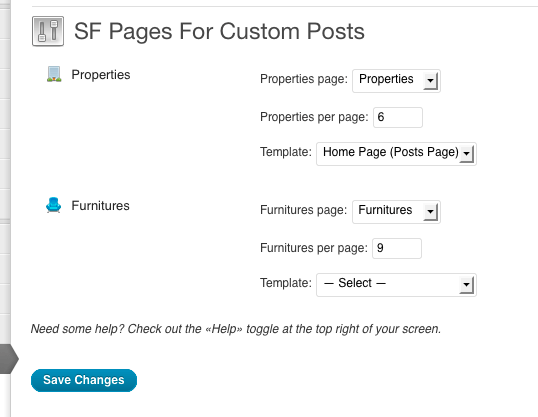
screenshot-1.png
Changelog
0.5
- 2011/09/15
- Major rewrite, stability improvement
- Todo : settings page will be rewritten in the next release, you’ll can choose a post type for each page, instead of the inverse
0.4
- 2011/09/12
- First public release
- Thanks to Juliobox for the security review