

SGT Carousel Gallery
This is a 3d rotating carousel image gallery that displays all images attached to a post or page, along with associated captions and descriptions.
Plugin info
Maintenance & Compatibility
Maintenance score
Possibly abandoned • Last updated 4566 days ago • 1 reviews
Is SGT Carousel Gallery abandoned?
Possibly abandoned (last update 4566 days ago).
Compatibility
Similar & Alternatives
Explore plugins with similar tags, and compare key metrics like downloads, ratings, updates, support, and WP/PHP compatibility.
Description
This gallery uses CSS3 3d transforms to create a rotating image carousel.
The gallery shows all images attached to the current post or page. To show the desired images in the post, simply add the images as attachments. These images do not need to be inserted into the post to be displayed in the gallery.
When the front face is clicked, the image is shown in a new window, expanding to full size. This window provides navigation arrows and displays the image caption and description.
Here is a link to a working demo
Readme Generator
This Readme file was generated using wp-readme, which generates readme files for WordPress Plugins.
Installation
-
Upload the
sgt_carousel_galleryfolder to thewp-content/pluginsdirectory -
Activate the plugin through the ‘Plugins’ menu in WordPress
-
To display the gallery in a post or page, first upload images to the media library.
-
Next, attach these images to the desired post or page.
-
Finally, write the [sgt_gallery] shortcode in posts or pages in which you want to display the gallery. This shortcode accepts two parameters: the “radius” parameter and the “size” parameter. The radius parameter determines the distance from the center of the carousel to the midpoint of any image in the carousel. The size parameter can be one of 5 sizes: “sgt_small_square” (150px * 150px), “sgt_medium_square” (200px * 200px), “sgt_small_landscape” (200px * 100px), “sgt_medium_landscape” (300px * 150px), and “sgt_large_landscape” (400 * 250). This determines the dimensions in which the images will be displayed.
Example usage: [sgt_gallery size=”sgt_small_square”]
Frequently Asked Questions
Why are the images in the gallery not cropping?
WordPress generates thumbnails of different sizes when an image is uploaded. Since this gallery uses custom image sizes, the custom sized thumbnails will not have been generated if the images were uploaded to your blog before this plugin was installed. To regenerate plugins, the aptly named Regenerate Thumbnails plugin is recommended.
Can I display an image in the gallery that is not attached to that specific page or post?
Unfortunately, the gallery can only display images attached to the post or page that it will be displayed in.
Review feed
Screenshots
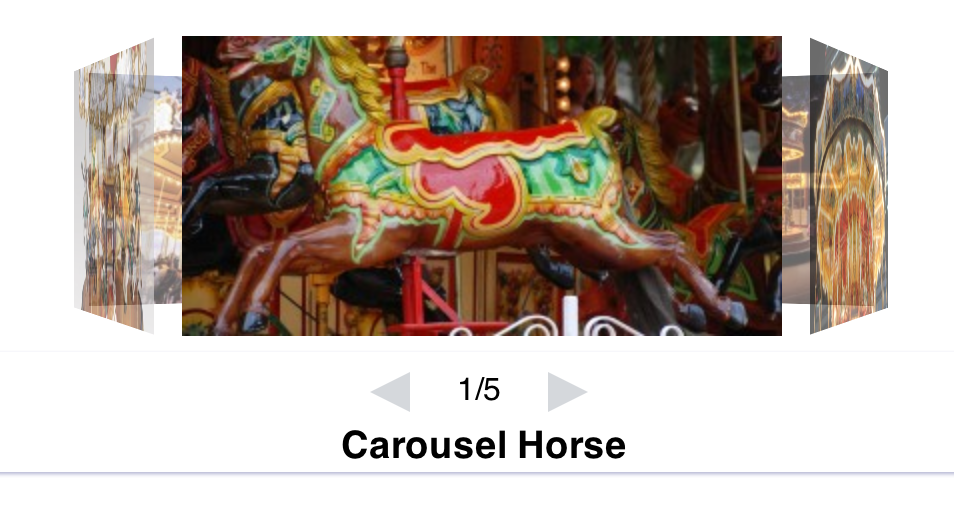
Example images with size="sgt_medium_landscape\":

Full-screen mode:
Changelog
Now with an improved lightbox.