

Share Cart for WooCommerce
Enable customers to share WooCommerce carts via URL for collaborative shopping, gift planning, and social commerce.
Plugin info
Maintenance & Compatibility
Maintenance score
Maintained • Last updated 120 days ago • Support resolved 0% • 2 reviews
Is Share Cart for WooCommerce abandoned?
Likely maintained (last update 120 days ago).
Compatibility
Similar & Alternatives
Explore plugins with similar tags, and compare key metrics like downloads, ratings, updates, support, and WP/PHP compatibility.
Description
Share Cart for WooCommerce is a powerful yet lightweight plugin that revolutionizes the shopping experience by enabling customers to share their WooCommerce cart contents with a single click. Perfect for collaborative shopping, gift registries, wish lists, and social commerce strategies.
Why Share Cart for WooCommerce?
In today’s social shopping environment, customers want to share their finds with friends, family, and colleagues. This plugin makes cart sharing effortless, helping you:
- Increase Sales – Enable group purchases and collaborative decision-making
- Boost Customer Engagement – Make shopping more social and interactive
- Reduce Cart Abandonment – Allow customers to save and share carts for later
- Enhance User Experience – Simplify gift planning and wish list creation
- Improve Marketing – Leverage social sharing for organic promotion
Key Features
- One-Click Cart Sharing – Generate shareable URLs instantly from the cart page
- Flexible Button Placement – Choose from multiple hook positions to match your theme
- Seamless WooCommerce Integration – Native integration with WooCommerce settings
- Easy Configuration – Simple settings interface in WooCommerce admin
- Lightweight & Fast – Minimal impact on site performance
- Mobile Responsive – Works perfectly on all devices
- Developer Friendly – Clean code with hooks for customization
- Translation Ready – Fully compatible with WPML and multilingual setups
Perfect For
- Gift Planning – Share cart contents with gift givers
- Group Purchases – Collaborate on bulk orders with friends or colleagues
- Event Shopping – Plan purchases for weddings, parties, or corporate events
- Wish Lists – Create and share shopping wish lists
- Sales Teams – B2B stores can share quotes and product selections
- Social Commerce – Enable customers to share finds on social media
- Customer Support – Help customers by reviewing their cart remotely
How It Works
- Customer adds products to their WooCommerce cart
- A “Share Cart” button appears on the cart page (position customizable)
- Clicking the button generates a unique shareable URL
- The URL can be copied and shared via email, messaging apps, or social media
- Recipients click the link and see the exact cart contents
- Products are automatically added to the recipient’s cart
Configuration Options
Navigate to WooCommerce > Settings > Share Cart to access:
- Button Position – Select from multiple WooCommerce cart hooks
- Button Display – Control when and where the share button appears
- Easy Customization – Style the button with custom CSS
Available button positions include:
* Before Cart Table
* After Cart Table
* Before Cart Totals
* After Cart Totals
* Cart Collaterals
* Before Cart Contents
* After Cart Contents
Privacy & Security
This plugin respects user privacy and follows WordPress security best practices. Cart URLs are generated using WooCommerce’s built-in functionality, ensuring data security and compliance.
Installation
Automatic Installation
- Log in to your WordPress admin panel
- Navigate to Plugins > Add New
- Search for “Share Cart for WooCommerce”
- Click Install Now then Activate
- Go to WooCommerce > Settings > Share Cart to configure
Manual Installation
- Download the plugin ZIP file
- Upload the
share-cart-url-for-woocommercefolder to/wp-content/plugins/ - Activate the plugin through the Plugins menu in WordPress
- Navigate to WooCommerce > Settings > Share Cart to configure
Requirements
- WordPress 5.0 or higher
- WooCommerce 5.0 or higher
- PHP 7.4 or higher
Note: This plugin requires WooCommerce to be installed and active. If WooCommerce is not active, the plugin will automatically deactivate with an admin notice.
First-Time Setup
- After activation, visit WooCommerce > Settings
- Click on the Share Cart tab
- Select your preferred button position from the dropdown
- Click Save Changes
- Visit your cart page to see the share button in action
Frequently Asked Questions
Navigate to WooCommerce > Settings > Share Cart after activation. Select your desired hook position from the dropdown menu and save your settings. You can choose from multiple positions including before/after cart table, before/after cart totals, and more.
The plugin automatically checks for WooCommerce during activation. If WooCommerce is not installed or active, the plugin will deactivate itself and display an admin notice informing you that WooCommerce is required.
Yes! You can easily customize the button’s appearance using CSS. Add custom styles through your theme’s stylesheet, the WordPress Customizer, or a custom CSS plugin. The button has specific CSS classes for easy targeting.
Share Cart for WooCommerce is designed to work with any WooCommerce-compatible theme. The plugin uses WooCommerce’s standard hooks and follows WordPress coding standards, ensuring broad compatibility.
Currently, shared cart URLs do not expire. Recipients can use the link at any time to load the cart contents.
Yes, once products are added to the recipient’s cart via the shared URL, they can modify quantities, remove items, or add additional products just like a normal shopping cart.
Absolutely! The plugin preserves all product variations, quantities, and configurations when sharing cart URLs.
Yes, Share Cart for WooCommerce is fully translation-ready and compatible with WPML and other multilingual plugins.
Yes! The plugin is fully responsive and works seamlessly on smartphones, tablets, and desktop devices.
The share button only appears when there are items in the cart, preventing confusion from sharing empty carts.
For support, please use the WordPress.org support forum for this plugin. We monitor and respond to questions regularly.
Review feed
Screenshots
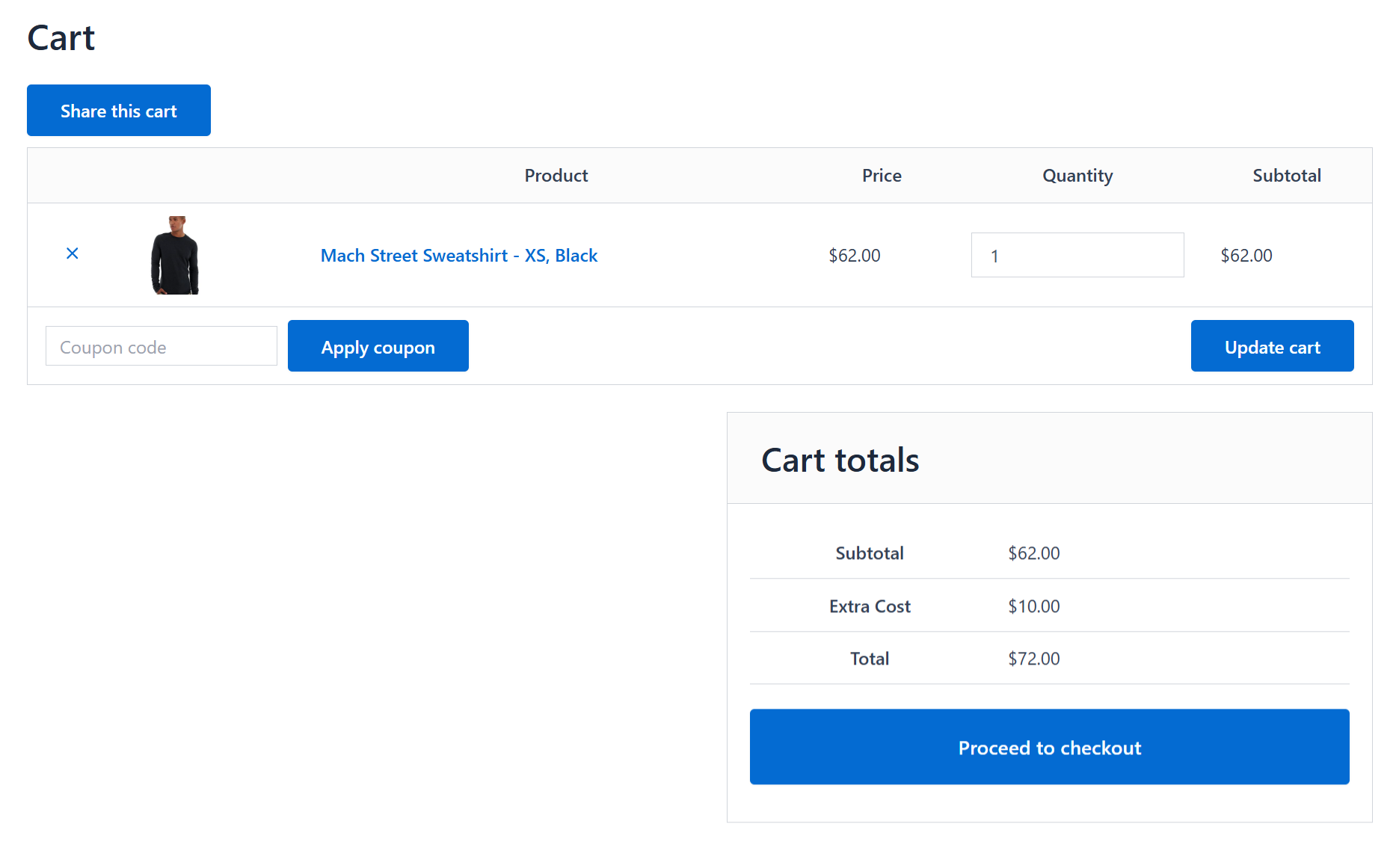
Cart Page with Share Button
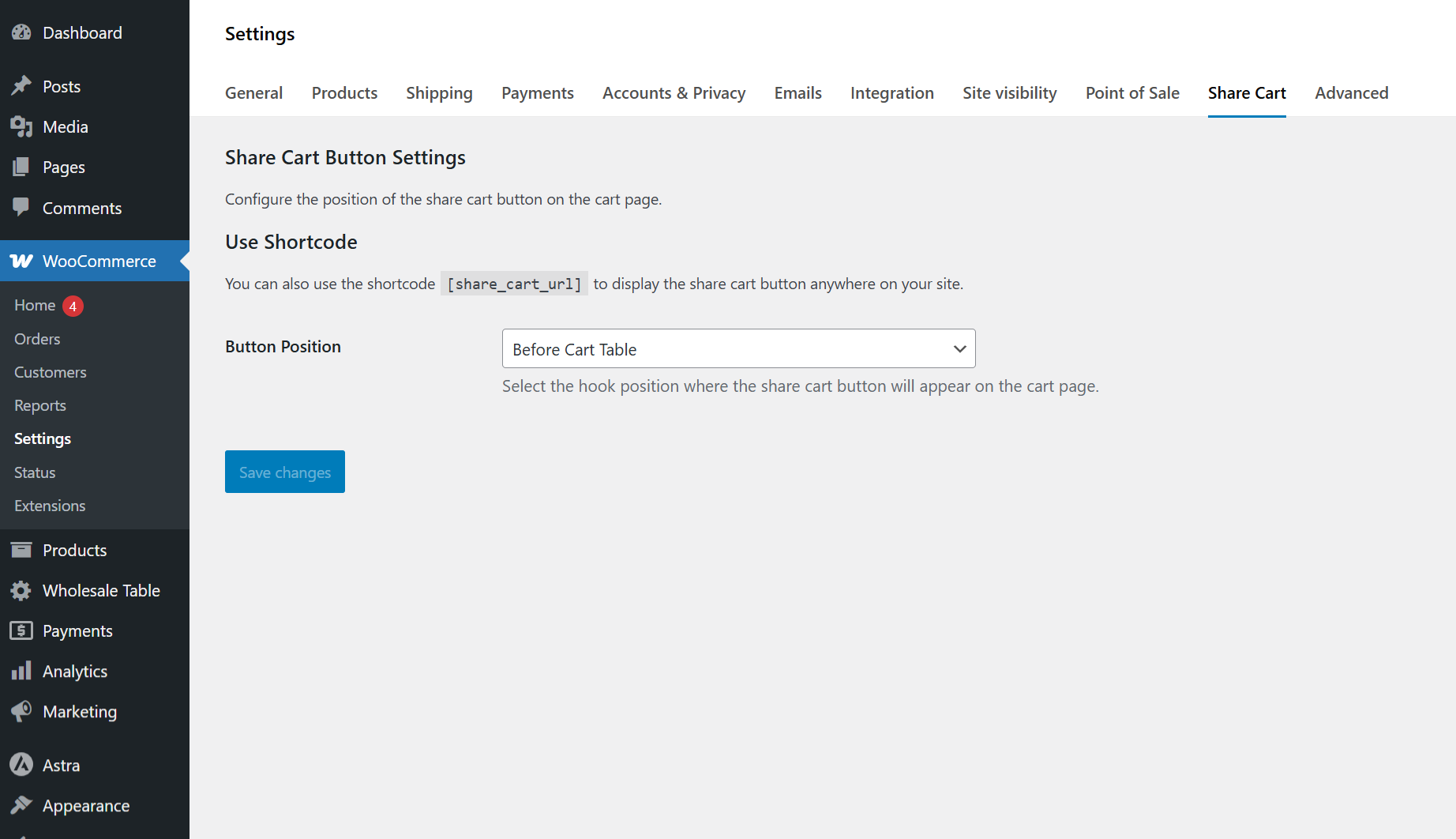
Share Cart Settings Tab under WooCommerce settings
Changelog
1.2
- Compatibility with 6.9
- Fixed issue: link generation on iPhones
1.1
- Compatibility
- Enhanced readme documentation with SEO optimization
- Improved feature descriptions and use cases
- Added comprehensive FAQ section
- Updated compatibility information
- Minor bug fixes and performance improvements
1.0
- Initial release of Share Cart for WooCommerce
- Added WooCommerce settings tab for plugin configuration
- Implemented customizable hook positions for button display
- Added WooCommerce dependency check on activation
- Cart URL sharing functionality
- Mobile-responsive design
- Translation-ready code