

Shaun's WP Query Shortcode
This extensible plugin allows you to run a custom WP_Query using a simple shortcode, then display the results using compatible nested shortcodes.
Plugin info
Maintenance & Compatibility
Maintenance score
Possibly abandoned • Last updated 4913 days ago • 1 reviews
Is Shaun's WP Query Shortcode abandoned?
Possibly abandoned (last update 4913 days ago).
Compatibility
Similar & Alternatives
Explore plugins with similar tags, and compare key metrics like downloads, ratings, updates, support, and WP/PHP compatibility.
Description
Written as a platform for plugin developers, this simple-yet-powerful plugin allows you to run a custom WP_Query using shortcode, then display the results any way imaginable using compatible nested shortcodes.
How It Works
Add the following shortcode to any WordPress post or page:
[wpquery orderby="rand"] [wpq_index] [/wpquery]
In the example above, the [wpquery] shortcode performs a WP_Query using orderby=”rand” to display the results in random order. A full list of query parameters can be found here: WP_Query.
Next, the nested [wpq_index] shortcode displays the results of the custom WP_Query as an unordered list of post title links.
Why It Rocks
Written as a platform for plugin developers, this simple-yet-powerful plugin allows developers to write compatible plugins that manipulate the way post data is displayed – without needing to write functions and shortcode parameters to first retrieve the post data.
The [wpq_index] shortcode function included in this plugin is just a simple example of what it can do. Any plugin that performs a WP_Query could be rewrtitten and optimized to work with this plugin, eliminating a lot of unnecessary code.
Best of all, this plugin gives users total control over the WP_Query being performed!
Installation
- Upload
shauns-wp-query-shortcode.phpto the/wp-content/plugins/directory - Activate the plugin through the ‘Plugins’ menu in WordPress
- In a post or page, place the nested shortcode:
[wpquery] [wpq_index] [/wpquery] - Replace
[wpq_index]with shortcode from any other compatible plugin
Frequently Asked Questions
Why did you develop this plugin?
Two of my earlier plugins – SortTable Post and jqDock Post Thumbs – essentially did the same thing: They got post data via WP_Query, then used a Javascript library to display certain information in a unique and interesting way.
Many of the feature requests I received for those plugins came from folks who wanted more granular control over the data that was retrieved by WP_Query (e.g. only show posts of a particular category / tag / post-type / taxonomy).
The only way I could accommodate those feature requests was to add more shortcode parameters to the plugin, but I was also adding shortcode parameters to handle how the post data was displayed. After a while, things started getting out of hand.
This plugin was the solution.
By separating the shortcode for ‘getting post data’ from the shortcode for ‘displaying post data’, I was able to simplify the shortcodes for users.
What shortcode parameters does `[wpquery]` accept?
It accepts all of the same parameters as WP_Query.
Where can I find compatible plugins?
Going forward, all of my plugins that use WP_Query will require this plugin to be installed. You can find my plugins here: Shaun’s Profile
To find compatible plugins written by other authors, try searching the WP Plugin Repository for “Shaun’s WP Query Shortcode”.
If you’re real savvy, you can even write your own compatible plugins! Just use the mnsp_wpq_index function that comes with this plugin as a template…and if you upload it to the repository, make sure you let people know that it requires Shaun’s WP Query Shortcode to work!
How can I request support or report a bug?
Please post your question as a comment on the apporpriate plugin page of my website: MyNewSitePreview.com
Review feed
Screenshots
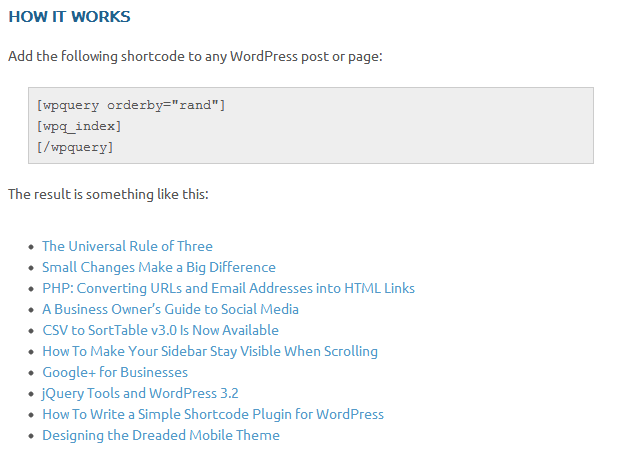
A basic example of how to use this plugin

Code that can be used as a template to write a compatible plugin
Changelog
1.2
- Modified the
wpq_indexshortcode function to exclude the current post/page from the list.
1.1
- Added function to detect array expressions in shortcode parameters and convert them to arrays. This allows you to set WP_Query parameters such as
category__and,category__in,category__not_in, etc. - Thanks to Netcoder for providing this solution!
1.0
- First public release.