

ShopPanel
Shopify-style administration panel fully focused on ecommerce with WooCommerce.
Plugin info
Maintenance & Compatibility
Maintenance score
Actively maintained • Last updated 78 days ago
Is ShopPanel abandoned?
Likely maintained (last update 78 days ago).
Compatibility
Similar & Alternatives
Explore plugins with similar tags, and compare key metrics like downloads, ratings, updates, support, and WP/PHP compatibility.
Description
ShopPanel for WooCommerce transforms the WordPress administration panel into a modern experience focused on online store management, similar to Shopify. The plugin completely reorganizes the administration menu to show only ecommerce-relevant sections, hiding unnecessary WordPress options.
Features
- Custom administration panel: Modern Shopify-style interface
- Dashboard with statistics: Clear summary of sales, orders, products and customers
- Reorganized menu: Highlights only the sections relevant to WooCommerce store management
- Globe Map analytics: Visualize your WooCommerce sales in real time on an interactive world map, inspired by Shopify’s Live View and Marc Lou’s DataFast
- Panel switching: Instantly switch between ShopPanel and the standard WordPress admin panel with a single click in the admin bar
- Non-intrusive integration: ShopPanel does not replace or modify the native WordPress/WooCommerce menus — your original admin remains intact
- Responsive design: Optimized for mobile and tablet management
- Flexible configuration: Choose which panel loads by default according to your workflow
Requirements
- WordPress 6.0 or higher
- PHP 7.4 or higher
- WooCommerce 8.0 or higher
Usage
Once activated, ShopPanel will automatically redirect to the custom panel when accessing wp-admin. You can switch between the ShopPanel and standard WordPress panel from the top administration bar.
Configuration
Go to Settings > ShopPanel to:
– Activate/deactivate ShopPanel
– Select which panel to display by default (ShopPanel or WordPress)
External services
This plugin uses Mapbox GL JS to display an interactive globe map showing customer locations and orders in real-time.
What data is sent and when:
– Mapbox access token: Sent when the globe map page is loaded (if configured by the user)
– Geographic coordinates: Customer and order location data (latitude/longitude) is sent to Mapbox servers when rendering the map
– This data is sent only when the globe map feature is accessed and a valid Mapbox token is configured
Service provider:
This service is provided by Mapbox. For more information:
– Terms of service: https://www.mapbox.com/legal/tos/
– Privacy policy: https://www.mapbox.com/legal/privacy/
Note: Users must configure their own Mapbox access token in the plugin settings. The plugin does not send any data to Mapbox if no token is configured.
Support
For support and questions, visit https://kamalyon.com
License
GPL v2 or later
Installation
- Upload the
shoppanelfolder to the/wp-content/plugins/directory - Activate the plugin from the WordPress Plugins menu
- Go to Settings > ShopPanel to configure the plugin
Frequently Asked Questions
Review feed
Screenshots
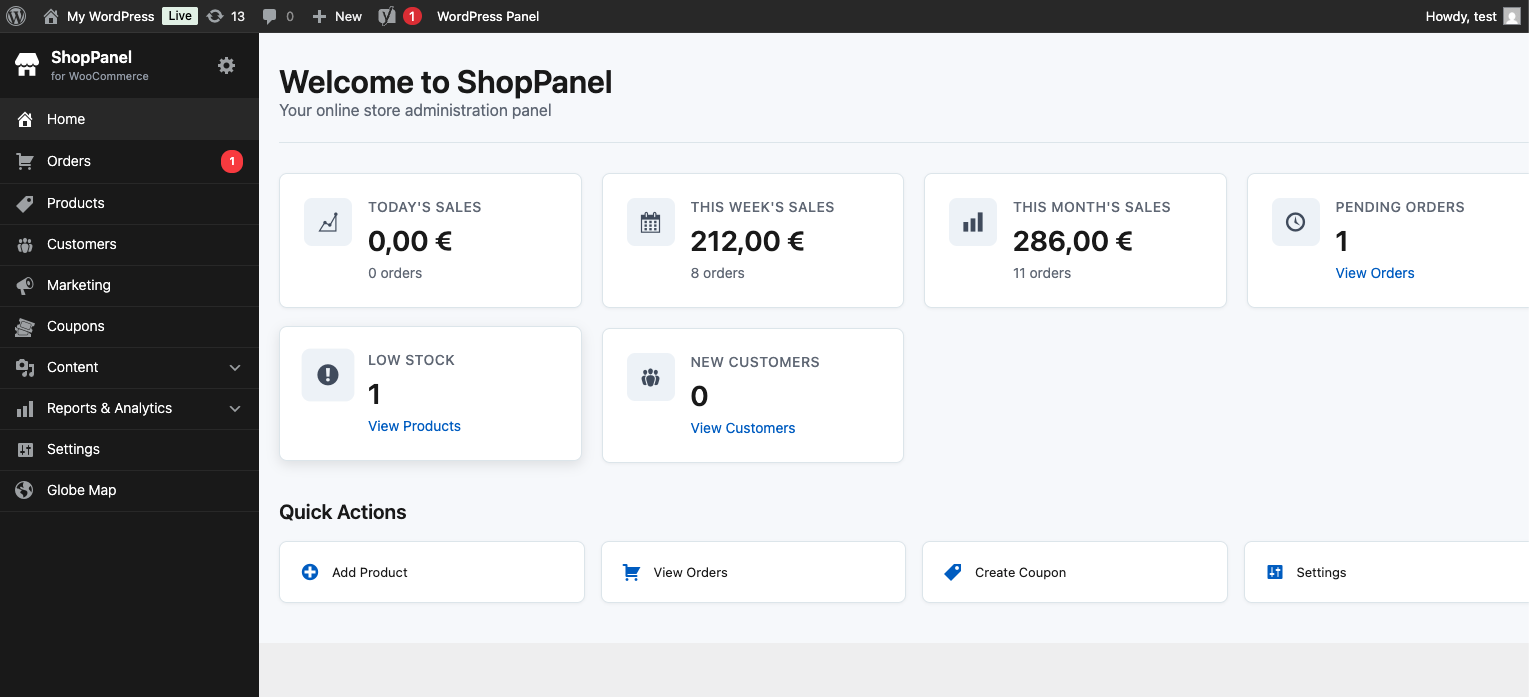
ShopPanel Dashboard - Modern administration panel with sales statistics, orders, products and customers overview
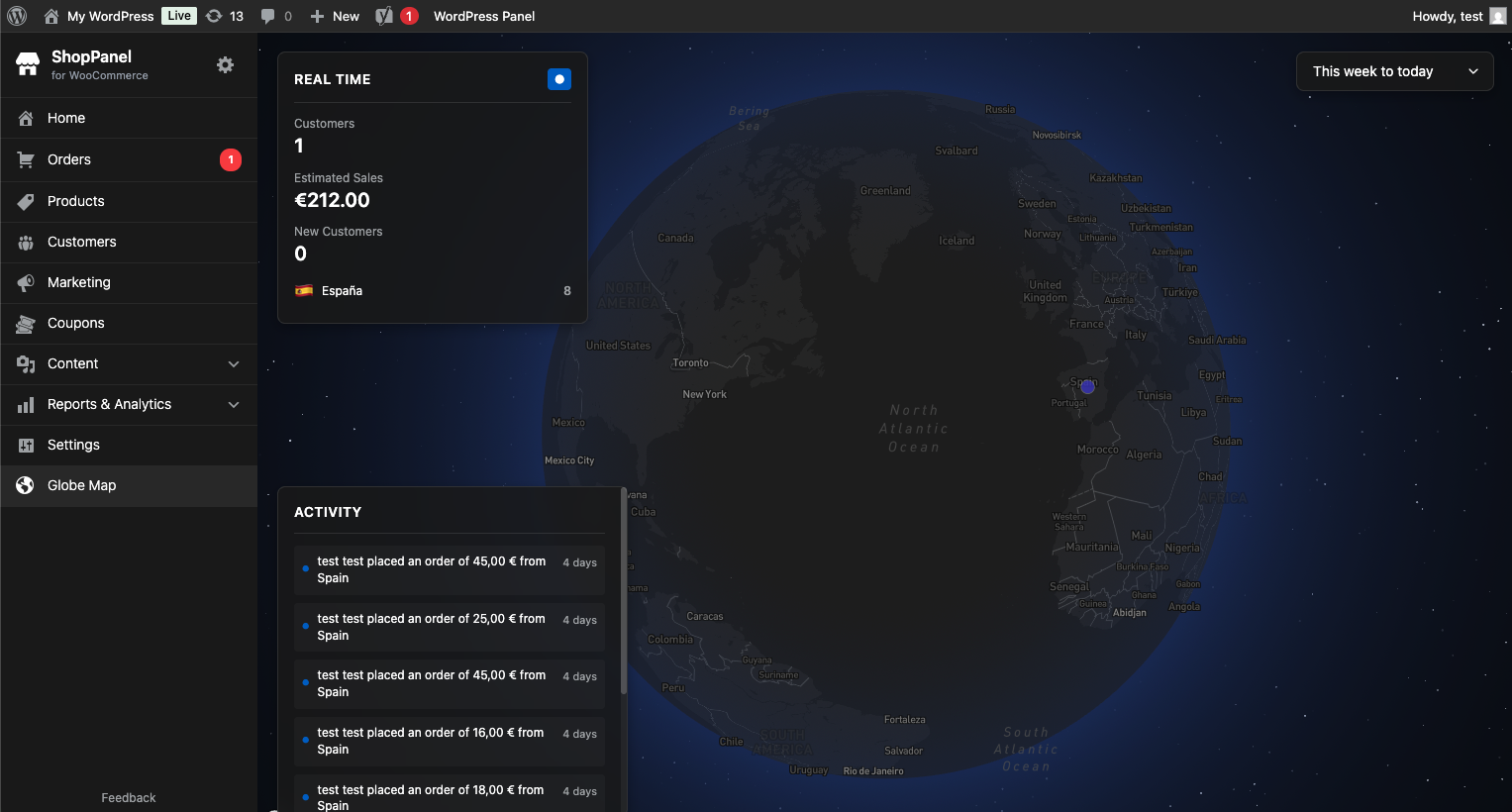
Globe Map with real-time orders - Interactive world map showing customer locations and orders in real-time
Changelog
1.0.6
- Security improvements: Fixed nonce verification in class-admin-menu.php – verify nonce before accessing $_GET[‘post’]
- Security improvements: Fixed nonce verification in class-admin-redirect.php – made nonce verification strict and non-bypassable for $_GET[‘shoppanel’]
- Added screenshots section to readme.txt
1.0.5
- Improved plugin description and feature list in readme
- Enhanced documentation with clearer feature details
1.0.4
- Tested with WordPress 6.9
- Tested with WooCommerce 10.3.5
1.0.3
- Fixed menu not rendering when switching from WordPress Panel to ShopPanel via admin bar
- Improved hook registration to check ShopPanel active state dynamically when hooks execute
- Fixed nonce verification for $_GET[‘page’] parameters in class-admin-redirect.php
- Enhanced security by verifying nonce before accessing $_GET parameters in redirect logic
- Fixed admin bar toggle links to properly include nonce for ShopPanel activation/deactivation
- Updated support URL in readme.txt
1.0.2
- Security improvements: Added proper nonce verification for all $_GET and $_POST parameter access
- Fixed nonce verification in class-admin-redirect.php for post_type and post parameters
- Fixed nonce verification in class-admin-menu.php for post_type and post parameters
- Improved security by using get_current_screen() and global variables instead of direct $_GET access when possible
- Fixed admin bar links to include nonce for ShopPanel toggle functionality
- Fixed menu rendering when switching between WordPress Panel and ShopPanel via admin bar
- Updated phpcs comments to reflect proper nonce verification status
1.0.1
- WordPress.org compliance improvements
- Moved inline styles and scripts to wp_add_inline_style() and wp_add_inline_script()
- Included Mapbox GL JS locally instead of CDN
- Added nonce verification for GET parameters in admin navigation
- Added translators comments for plural strings
- Replaced date() with gmdate() for timezone-safe date formatting
- Added caching for direct database queries
- Documented external service (Mapbox) in readme
- Complete English translation of readme.txt
- Fixed security and code quality issues
1.0.0
- Initial release
- Shopify-style administration panel
- Dashboard with WooCommerce statistics
- Reorganized menu for ecommerce
- Panel switching system