

Shortcodes for Divi
Shortcodes for Divi by WP Zone Allows you to use Divi Shortcodes everywhere where text comes.
Maintenance 28/100598d since update
Active installs
10,000
Downloads
51,924
Reviews
7
Age
6.4y
Plugin info
Total downloads: 51,924
Active installs: 10,000
Total reviews: 7
Average rating: 5
Support threads opened: 0
Support threads resolved: 0 (0%)
Available in: 10 language(s)
Contributors: 2
Last updated: 8/13/2024 (598 days ago)
Added to WordPress: 10/30/2019 (6 years old)
Minimum WordPress version: f
Tested up to WordPress version: 6.6.4
Minimum PHP version: f
Maintenance & Compatibility
Maintenance score
Possibly abandoned • Last updated 598 days ago • 7 reviews
28/100
Is Shortcodes for Divi abandoned?
Possibly abandoned (last update 598 days ago).
Compatibility
Requires WordPress: f
Tested up to: 6.6.4
Requires PHP: f
Developers
Similar & Alternatives
Explore plugins with similar tags, and compare key metrics like downloads, ratings, updates, support, and WP/PHP compatibility.
Supreme Modules Lite – Divi Theme, Extra Theme and Divi Builder
Rating 4.8/5 (105 reviews) • Active installs 200,000
Divi Torque Lite – Divi Theme, Divi Builder & Extra Theme
Rating 4.7/5 (115 reviews) • Active installs 50,000
Divi Carousel Free – Create Stunning Carousels for Divi Builder
Rating 4.8/5 (145 reviews) • Active installs 30,000
Squad Modules Lite – Advanced Divi Modules for Divi Theme, Extra Theme and Divi Builder
Rating 5.0/5 (10 reviews) • Active installs 1,000
Charts for Divi – Divi Theme, Extra Theme and Divi Builder
Rating 5.0/5 (1 reviews) • Active installs 70
Fixed Header Jumping Issue Divi Theme
Rating 1.0/5 (1 reviews) • Active installs 60
Description
Shortcodes for Divi by WP Zone Allows you to use Divi Shortcodes everywhere where text comes.
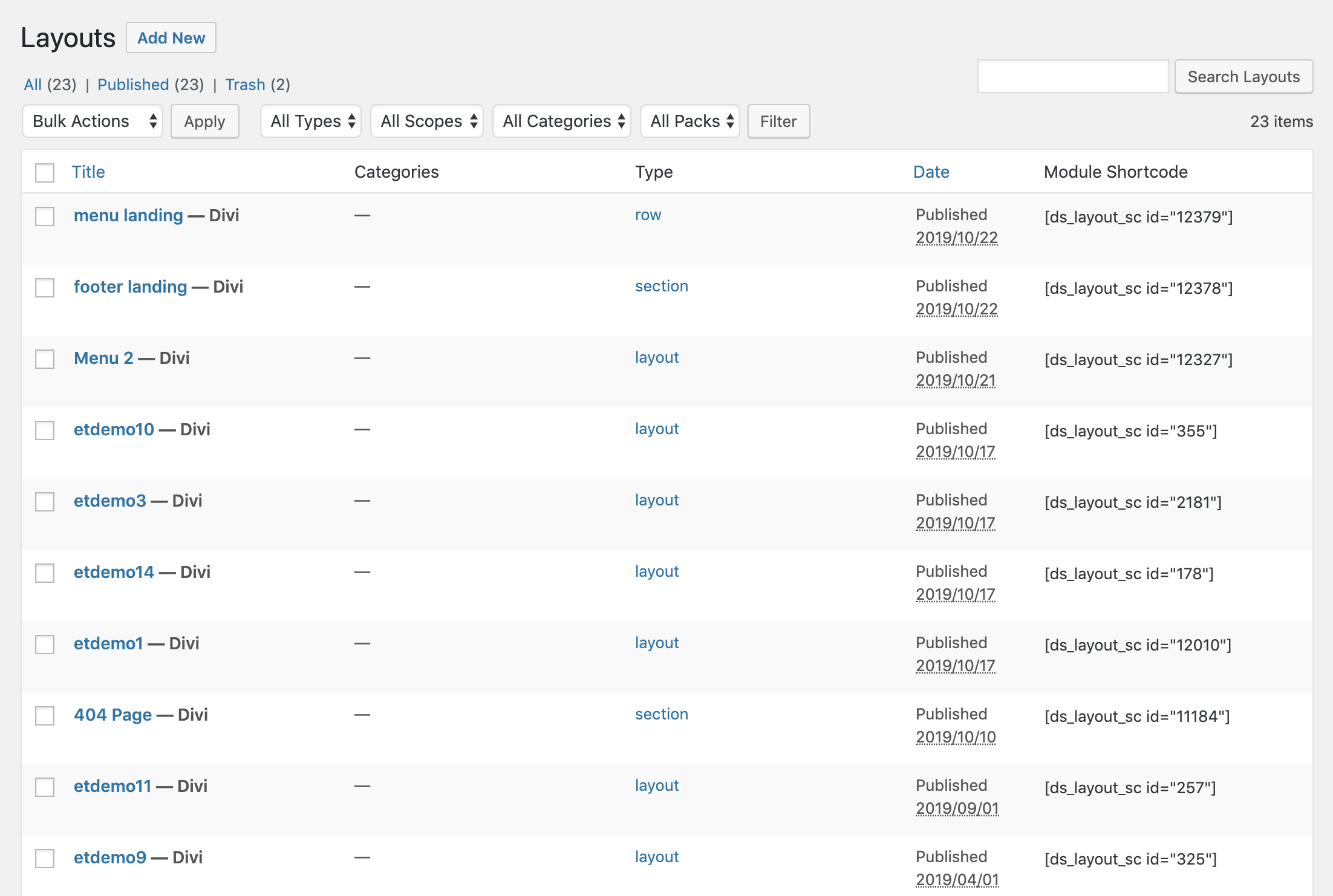
Plugin allows you to display any divi library template as a shortcode. It adds a new column to the Divi Library from where you can just copy the shortcode.
Installation
Minimum Requirements
- WordPress 4.5 or greater
- PHP version 5.6 or greater
- MySQL version 5.0 or greater
We recommend your host supports:
- PHP version 7.0 or greater
- MySQL version 5.6 or greater
- WP Memory limit of 64 MB or greater (128 MB or higher is preferred)
Installation
- Install using the WordPress built-in Plugin installer, or Extract the zip file and drop the contents in the
wp-content/plugins/directory of your WordPress installation. - Activate the plugin through the ‘Plugins’ menu in WordPress.
- Copy the shortcode from the Divi Library
- Go to Pages > Add New
- Click on “Use The Divi Builder” and Click on “Use Visual Builder”.
- Put the shortcodes anywhere you want.
Frequently Asked Questions
You must have Divi theme or the Divi Builder installed in order for this plugin to work. Divi by ElegantThemes
Review feed
annaqq
Works great
Works great
camper2020
Works really well
I was looking for a way to add Divi functionality to my custom taxonomy template and this plugin worked like a dream to just add the relevant shortcode and Divify my custom template. Thanks for putting this together!
Screenshots
Changelog
1.2.2 – 6.09.2022
- Fix: shortcodes are not working after update
1.2.1 – 31.08.2022
- Fix: Potential styling issues in the VB due to module class name overlap
1.2.0 – 10.08.2020
- Translation ready
- Fix errors
- Added link to divi library on the plugin’s page
1.1.0 – 29.10.2019
1.0.0 – 19.08.2019
- Official Public Release