

Shortlinks
Shortlinks allows you to easily retrieve the shortlink for your WordPress posts, pages, categories, post_tags, attachments, custom post types, and cus …
Plugin info
Maintenance & Compatibility
Maintenance score
Possibly abandoned • Last updated 5831 days ago • 1 reviews
Is Shortlinks abandoned?
Possibly abandoned (last update 5831 days ago).
Compatibility
Similar & Alternatives
Explore plugins with similar tags, and compare key metrics like downloads, ratings, updates, support, and WP/PHP compatibility.
Description
Shortlinks allows you to easily retrieve the shortlink for your WordPress posts, pages, categories, post_tags, attachments, custom post types, and custom taxonmies.
By default, WordPress uses links a query string ( ie: http://blog.aizatto.com/?page_id=3565 ) to load up your posts, pages, categories, etc. But when you enable permalinks, the query string is hidden by the WordPress rewrite rules. Having pretty urls is great, but also makes the website less flexible. For example, changing a posts published date will change the URL.
While we can’t control how other people will link to our site, we can control how we link to our internal sites.
By default, with permalinks enabled, when visiting WordPress with a shortlink, WordPress will redirect you to the permalink URL.
How It Works
Shortlinks hooks into the WordPress filter get_shortlink to enable shortlinks for all WordPress types.
You can use Shortlinks in your own theme or plugin.
To return the shortlink for a post, page, or custom post type, where $id represents the ID:
To return the shortlink for a category, where $id represents the category id:
To return the shortlinks for custom taxonomy, where $id represents the term id, and $taxonomy represents the custom taxonomy:
Why I Created It
WordPress supports shortlinks by default, but only allows the user to get the shortlink for a post. Finding it unacceptable, I created a plugin to get shortlinks for all content types.
Installation
- Upload the
shortlinksfolder into your plugin directory. - Activate the plugin through the ‘Plugins’ menu in WordPress
Frequently Asked Questions
Review feed
Screenshots
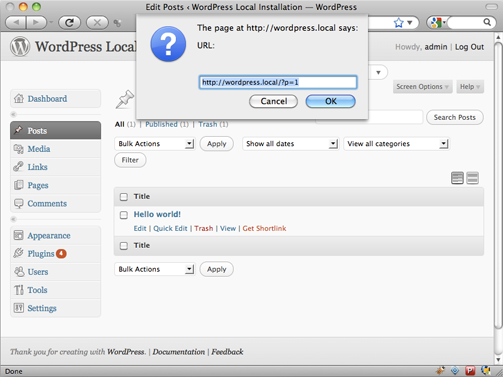
Easily get shortlinks for posts

Easily get shortlinks for pages

Easily get shortlinks for a single page

Easily get shortlinks for categories
Changelog
0.1
- Initial version