
Maintenance 20/1002234d since update
Active installs
10
Downloads
910
Reviews
0
Age
6.1y
Plugin info
Total downloads: 910
Active installs: 10
Total reviews: 0
Average rating: 0
Support threads opened: 0
Support threads resolved: 0 (0%)
Available in: 1 language(s)
Contributors: 1
Last updated: 2/21/2020 (2234 days ago)
Added to WordPress: 2/21/2020 (6 years old)
Minimum WordPress version: 2.6.1
Tested up to WordPress version: 5.3.20
Minimum PHP version: f
Maintenance & Compatibility
Maintenance score
Possibly abandoned • Last updated 2234 days ago
20/100
Is Show Apache and PHP version abandoned?
Possibly abandoned (last update 2234 days ago).
Compatibility
Requires WordPress: 2.6.1
Tested up to: 5.3.20
Requires PHP: f
Similar & Alternatives
Explore plugins with similar tags, and compare key metrics like downloads, ratings, updates, support, and WP/PHP compatibility.
Redirection
Rating 4.4/5 (682 reviews) • Active installs 2,000,000
Spider Blocker
Rating 4.0/5 (5 reviews) • Active installs 20,000
Custom PHP Settings
Rating 4.4/5 (15 reviews) • Active installs 10,000
Hyper Cache
Rating 4.5/5 (82 reviews) • Active installs 9,000
phpinfo() WP
Rating 4.2/5 (5 reviews) • Active installs 3,000
PageSpeed Module
Rating 4.5/5 (4 reviews) • Active installs 200
Description
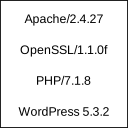
Displays Apache and PHP version in footer of admin section for easy access.
These information are usually needed if reporting bugs or checking hosting service configuration. WordPress displays only it’s own version which is not enough.
Plugin is very simple and uses almost no resources. After all, it just displays version information.
Installation
- Extract package and upload to plugins directory
- Activate the plugin through the ‘Plugins’ menu in WordPress
Frequently Asked Questions
None
Review feed
No reviews available
Screenshots
No screenshots available
Changelog
0.1
Initial release