

Show Current Template
A WordPress plugin which shows the current template file name, the current theme name and included template files' name in the tool bar.
Plugin info
Maintenance & Compatibility
Maintenance score
Stale • Last updated 237 days ago • Support resolved 0% • 71 reviews
Is Show Current Template abandoned?
Likely maintained (last update 237 days ago).
Compatibility
Developers
Languages
Similar & Alternatives
Explore plugins with similar tags, and compare key metrics like downloads, ratings, updates, support, and WP/PHP compatibility.
Description
A WordPress plugin which shows the current template file name, the current theme name and included template files’ name in the tool bar. If you like this plugin, you can buy me a coffee! 😉
Inspired by (and big thanks to):
- https://gist.github.com/gatespace/4482529
- https://wordpress.org/plugins/reveal-template/
Installation
The Good Way
- In your WordPress Admin, go to the Add New Plugins page
- Search for: Show Current Template
- Show Current Template should be the first result. Click the Install link.
The Old Way
- Upload the plugin to the
/wp-content/plugins/directory - Activate the plugin through the ‘Plugins’ menu in WordPress
Frequently Asked Questions
No. This plugin is useless when using block themes, and it shows a message that this plugin is useless when using block themes.
Is the Toolbar (Show Toolbar when viewing site) option in your profile page is checked?
You can find your profile page is in your WordPress admin -> Users -> Profile.
Do you logged in as “Administrator”? Other role users like “Editor” can’t see the file name. If your WordPress is multisite, only super admin can see the file name.
Please try below:
- Activate one of the default themes.
Now the plugin work properly? Then it means there may be a compatibility issue between your theme and this plugin, so let me know your theme’s name and where I can get it.
- Try to stop all plugins other than this plugin.
Now the plugin work properly? Then it means there may be a compatibility issue between one of those other plugins and this plugin, so let me know those plugins names and where I can get them.
Review feed
Useful
Helpful for development
Screenshots
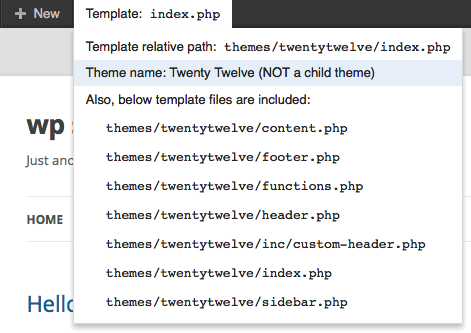
Shows the current template file.
Changelog
0.5.3
- Fix: Addressed PHP 8.x deprecation warning for passing null to parameter #3 ($subject) of str_replace(). Special thanks to @rembem for reporting the issue!
0.5.2
- Update required WordPress version to 5.9. Special thanks to @dmchale for reporting the issue!
0.5.1
- Delete unnecessary files.
0.5.0
- Display a message that this plugin is useless when using block themes.
- Remove stray language file. Special thanks to @szepeviktor for reporting the issue!
0.4.6
- Fix JS Error when No Admin Bar. Special thanks to @taupecat for reporting the issue!
0.4.5
- Fix showing included files at bottom when your WordPress site is multisite and you are a normal admin (not super admin). Special thanks to @dmchale for reporting the issue!
0.4.4
- Fix not showing included files on Windows local. Special thanks to @lindt01 for helping me identify the cause!
0.4.3
- Fix the JavaScript error reported by @flexer. Special thanks to @dmchale for the fix!
0.4.2
- Fix showing included files at bottom when the logged in user’s roles other than admin.
0.4.1
- Fix showing included files at bottom when visitor visits the site. This issue was reported by @tsato. Thank you very much!
0.4.0
- Fix not showing all included files with WordPress version 5.4 or greater.
- Clean up some code.
0.3.4
- No functional change at all except the version number in the plugin php file and donation url.
0.3.3
- No functional change at all except the version number in the plugin php file and donation url.
0.3.2
- No change at all except the version number in the plugin php file.
0.3.1
- Just add a donate link.
0.3.0
- UPDATED: Make the file list scrollable.
- UPDATED: Change css to sass.
0.2.2
- Oops, too short.
0.2.1
- UPDATED: Make the height of included files names shorter
0.1.8
- UPDATED: update for 3.8.
0.1.6
- FIXED: update for 3.8.
0.1.5
- FIXED: Fixed the issue of not displaying the parent theme name when using a child theme.
0.1.4
- UPDATED: Make not to show the current file in the included files list.
0.1.3
- FIXED: Fixed some notices.
0.1.2
- FIXED: Fixed potential conflict text domain (https://github.com/tekapo/show-current-template/pull/1).
Thanks to @wokamoto san.
0.1.1
- UPDATED: readme.txt
0.1.0
- Initial release