

Show Category Posts Fade in/out
The Random Featured Post plugin allows you to display a random post from a designated category as a "featured" post.
Plugin info
Maintenance & Compatibility
Maintenance score
Possibly abandoned • Last updated 5621 days ago
Is Show Category Posts Fade in/out abandoned?
Possibly abandoned (last update 5621 days ago).
Compatibility
Similar & Alternatives
Explore plugins with similar tags, and compare key metrics like downloads, ratings, updates, support, and WP/PHP compatibility.
Description
The Random Featured Post plugin allows you to display a random post from a designated category. Ideally this should draw readers landing on your homepage to some of your best posts. The featured post will display the title “Featured Post” (customizable) along with the post’s title, an excerpt and a link to continue to the full post.
Using it
Please go here for now for documentation: http://geegood.com/wordpress/
Installation
- Download and unzip to your plugin folder.
- Activate the plugin from the Plugins section of your dashboard.
- (Optional) Create a “Featured” category.
- Go to the “Featured Post” options in your dashboard and select the categories from which you would like posts to be randomly selected.
- Check the “Show Posts” box and click “Update” to save your changes.
- Place a call to the show_posts_fade() function in your template, most likely in your main index template just before the loop.
Frequently Asked Questions
Please see the plugin home page for more information.
Review feed
Screenshots
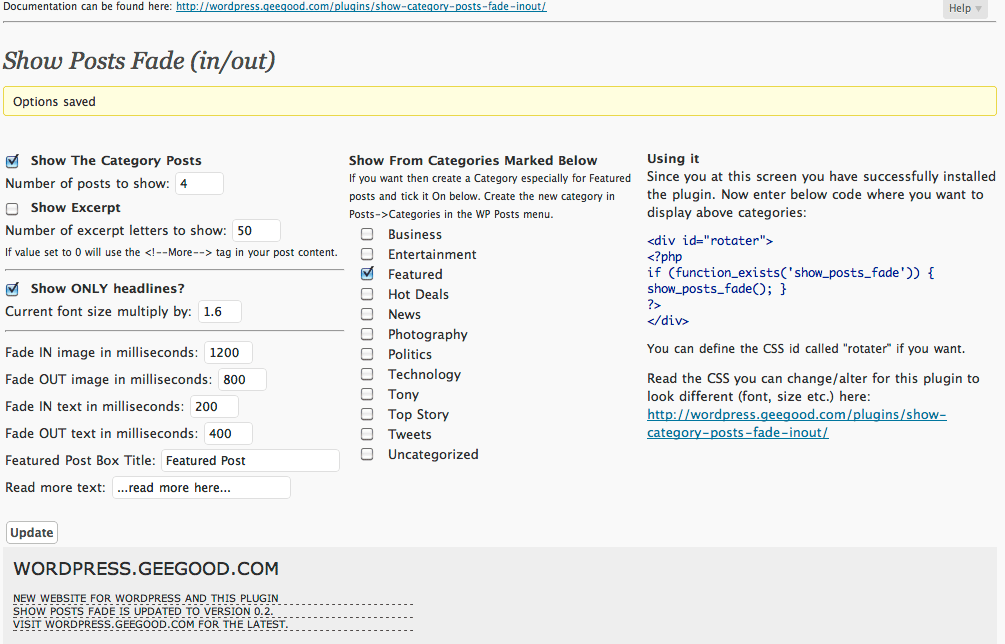
Setup screen. You can customize which things to show via this screen.

The menu in the Wordpress Dashboard

Example use real life screenshot as seen on http://geegood.com
Changelog
0.2.3
- Forgot to hide() the top story fade frame so the links did not changed. Fixed.
0.2.2
- Added can show HEADLINES only and change the size of the HEADLINES
0.2.1
- Updated author URLs and CSS links. Updating to reflect new website wordpress.geegood.com. So a few but vital bugs fixed.
0.2
- The ability to show excerpts as how-many-letters or using the More Tag in your post.
- Added a help screen to get you started.