

Maintenance 20/1006448d since update
Active installs
200
Downloads
5,356
Reviews
0
Age
17.8y
Plugin info
Total downloads: 5,356
Active installs: 200
Total reviews: 0
Average rating: 0
Support threads opened: 0
Support threads resolved: 0 (0%)
Available in: 1 language(s)
Contributors: 1
Last updated: 8/6/2008 (6448 days ago)
Added to WordPress: 6/30/2008 (17 years old)
Minimum WordPress version: 2.5
Tested up to WordPress version: 2.5.1
Minimum PHP version: f
Maintenance & Compatibility
Maintenance score
Possibly abandoned • Last updated 6448 days ago
20/100
Is Sidebars abandoned?
Possibly abandoned (last update 6448 days ago).
Compatibility
Requires WordPress: 2.5
Tested up to: 2.5.1
Requires PHP: f
Similar & Alternatives
Explore plugins with similar tags, and compare key metrics like downloads, ratings, updates, support, and WP/PHP compatibility.
WooSidebars
Rating 3.9/5 (48 reviews) • Active installs 100,000
Ocean Custom Sidebar
Rating 5.0/5 (8 reviews) • Active installs 30,000
Simple Page Sidebars
Rating 4.9/5 (54 reviews) • Active installs 20,000
Advanced Sidebar Menu
Rating 4.5/5 (37 reviews) • Active installs 10,000
RaraTheme Companion
Rating 0.0/5 (0 reviews) • Active installs 10,000
Pojo Sidebars
Rating 0.0/5 (0 reviews) • Active installs 10,000
Description
Create sidebars through an admin interface and apply widgets. Using conditions, apply the sidebars to certain pages / posts depending on what you select.
Versions
- Version 1.0 – Initial Release
- Version 1.1 – Passed slug to dynamic_sidebar at end of control mechanism (lost in original changes)
Installation
- Upload the entire folder of the plugin (‘sidebars’ folder) to your plugins directory (‘/wp-content/plugins/’ folder).
- Activate the plugin through the ‘Plugins’ menu in WordPress.
- A new item on the menu will appeared that says ‘Sidebars’.
- Also, in your template files, location the function
dynamic_sidebarand replace it withgo_sidebar. The dynamic_sidebar function could be anywhere but it will mostly likely be in the sidebar.php file.
Frequently Asked Questions
In what order do the conditions apply?
- The ID of the post / page
- The parent of the post / page
- The category of the post / page
- Get the default sidebar
Do you need any other template tags besides replacing dynamic_sidebar with go_sidebar?
No. As long as you replace dynamic_sidebar with go_sidebar it will work fine.
Review feed
No reviews available
Screenshots

The manage sidebars panel where you can delete or edit a sidebar.
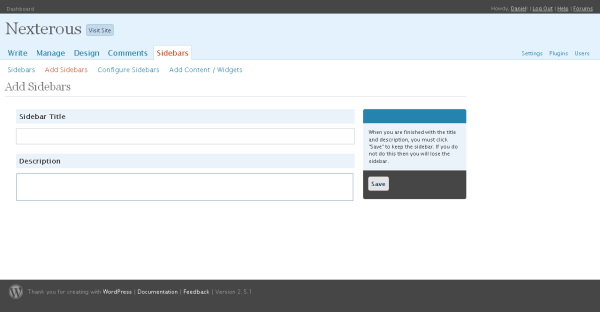
The add sidebars panel where you can add a new sidebar.
Changelog
No changelog available