

Simple Auto-Poster for Bluesky
Simple Auto Poster for Bluesky is a set and forget plugin that automatically shares on bluesky whenever a post is published from WordPress.
Plugin info
Maintenance & Compatibility
Maintenance score
Possibly abandoned • Last updated 466 days ago • Support resolved 0% • 7 reviews
Is Simple Auto-Poster for Bluesky abandoned?
Possibly abandoned (last update 466 days ago).
Compatibility
Similar & Alternatives
Explore plugins with similar tags, and compare key metrics like downloads, ratings, updates, support, and WP/PHP compatibility.
Description
Simple Auto Poster for Bluesky is a set and forget plugin that automatically shares on ATProto networks such as bluesky whenever a post is published from WordPress. It only requires a bluesky account and its APP password.
PLEASE NOTE: At the moment the plugin only works if the posts are published with featured images (new versions and features coming soon)
Features:
- Minimal settings
- High compatibility
- Enhanced security
Third-Party Service Usage
This plugin relies on the bluesky social network API as a third-party service to post content automatically. The plugin interacts with the bluesky API in the following circumstances:
When authenticating the user’s bluesky account
When uploading images to bluesky
When creating posts on bluesky
Service Information
Service Name: Bluesky
Service Website: https://bsky.app
API Documentation: https://docs.bsky.app/
Terms of Service and Privacy Policy
Bluesky Terms of Service: https://bsky.social/about/support/tos
Bluesky Privacy Policy: https://bsky.social/about/support/privacy-policy
Rate Limiting
Please read how rate limits work to avoid having your account restricted: https://docs.bsky.app/docs/advanced-guides/rate-limits
** Please review these documents to understand how your data is handled when using this plugin with the bluesky (ATProto) service. **
Installation
- Upload “simple-auto-poster-for-bluesky.zip” to the “/wp-content/plugins/” directory.
- Activate the plugin through the “Plugins” menu in WordPress.
- Browse Settings / Bluesky Auto-poster.
- Enter your bluesky Credentials (your bluesky username and the APP password set on https://bsky.app/settings/app-passwords)
- Save settings & Forget
** NOTE ABOUT BLUESKY CREDENTIALS **
Let’s say your bluesky account is https://bsky.app/profile/mywebsitename.org – in that case, the username would be: mywebsitename.org.
You can find your APP password from https://bsky.app/settings/app-passwords – The password is structurate in this format: xxxx-xxxx-xxxx-xxxx
Frequently Asked Questions
Simple Auto-Poster for Bluesky is fully automated, just publish posts from a WordPress website and find them automatically published to the designated blueSky account.
Yes, if the post has a featured image set.
Yes, you will be able to read a log of the operations performed from here: /wp-content/uploads/bluesky_poster_log.txt
Review feed
Screenshots
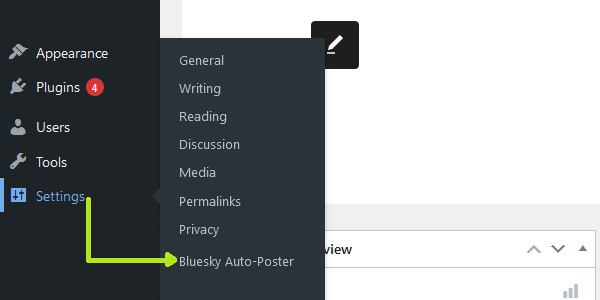
Plugin settings path
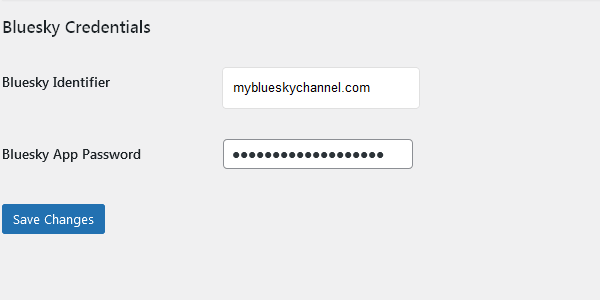
Plugin settings page
Changelog
1.3
- Add ‘thumb’ only if an image blob is available
1.2
- Fixed multiple hooks triggering handle_post and possible conflicts
- Fixed published_time to get the real date of published posts
1.1
- Initial release.