

Simple Course Creator – Updates
Use the SCC Updates addon to list the newest posts from your courses and stories in a timeline format.
Plugin info
Maintenance & Compatibility
Maintenance score
Possibly abandoned • Last updated 4202 days ago • 2 reviews
Is Simple Course Creator – Updates abandoned?
Possibly abandoned (last update 4202 days ago).
Compatibility
Similar & Alternatives
Explore plugins with similar tags, and compare key metrics like downloads, ratings, updates, support, and WP/PHP compatibility.
Description
The Simple Course Creator Updates addon (SCC Updates) is an extension for the Simple Course Creator plugin. With it, you can create a timeline of updates from your courses and display them anywhere on your WordPress site with a shortcode. For example:
- News sites can easily post updates to stories broken apart into multiples posts
- Course creators can use it to tease previews of their full course
- Developers can use it to document the progress of their work on their blog, or as a changelog
See SCC Updates in action:
- None. If your site is using SCC Updates, send me an email and I may showcase it here.
Templates and styling are handled out of the box, but SCC Updates is very simple to customize both with the shortcode and template files/stylesheets.
Follow Simple Course Creator Updates development on Github
Installation
- Upload
simple-course-creator-updatesto the/wp-content/plugins/directory - Activate the plugin through the ‘Plugins’ menu in WordPress
- Use the
[scc_updates]shortcode to output all courses by default, or[scc_updates course="coursename"]for single courses
Frequently Asked Questions
How can I change the headline and description text of the course?
By default, the title of the course is the same name you give it when you create the course in Dashboard > Posts > Courses. You can set a custom title by filling in the Post Listing Title field on the course’s edit screen.
The same process applies to the course description, except you’d fill in the Description text box on the course edit screen.
How can I add my own styles?
You can override the default styles the SCC Updates plugin outputs by following these simple steps:
NOTE: It is highly encouraged you only make these changes using a child theme. If you use a parent theme, and then update it, you will lose all customizations you made with this plugin. Read more about child themes: https://codex.wordpress.org/Child_Themes
- Via FTP, open the
simple-course-creator-updatesplugin file and browse toincludes/scc_templatesand open thesccu.cssfile - Now, copy the entire file and go to your child theme root folder (the same folder
style.cssis in) - Unless you’ve already created it, create a new folder called
scc_templates - Inside the
scc_templatesfolder, create asccu.cssfile. - Paste in the CSS, and you can now freely make changes to the appearance of SCC Updates!
How can I edit the template?
You have complete customization control of not just the way SCC Updates looks, but also how it functions. Following a nearly identical process as above, editing the template file can be done by following these simple steps:
NOTE: It is highly encouraged you only make these changes using a child theme. If you use a parent theme, and then update it, you will lose all customizations you made with this plugin. Read more about child themes: https://codex.wordpress.org/Child_Themes
- Via FTP, open the
simple-course-creator-updatesplugin file and browse toincludes/scc_templatesand open thesccu-output.phpfile - Now, copy the entire file and go to your child theme root folder (the same folder
style.cssis in) - Unless you’ve already created it, create a new folder called
scc_templates - Inside the
scc_templatesfolder, create asccu-output.phpfile. - Paste in the template code, and you can now freely make changes to the functionality of SCC Updates!
Review feed
Screenshots
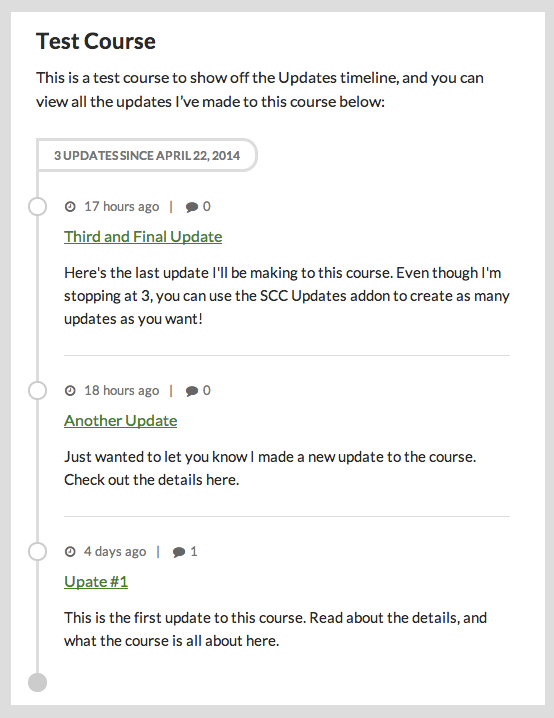
What the timeline looks like with posts added to a course
Changelog
1.0.0
- first stable version