

Simple Custom Login Page
A simple, lightweight plugin to easily customise the admin login page with your brand's logo and colors.
Plugin info
Maintenance & Compatibility
Maintenance score
Stale • Last updated 280 days ago • 3 reviews
Is Simple Custom Login Page abandoned?
Likely maintained (last update 280 days ago).
Compatibility
Developers
Similar & Alternatives
Explore plugins with similar tags, and compare key metrics like downloads, ratings, updates, support, and WP/PHP compatibility.
Description
Simple Custom Login Page is a simple but robust plugin to customise the login screen of your WordPress website. You can change the logo, the link and the colors (background, text, links) of the login page to match your brand’s identity.
Considering all the bloated plugins and resource intensive implementations floating around, this lightweight and efficient solution is a must-have for all WordPress users/developers. It is also regularly updated to be compatible with the latest versions of WordPress and PHP.
Features
- You can change login logo image
- You can change login logo link
- You can change page background color
- You can change form background color
- You can change label text color
- You can change links text color
- Changes are also applied to the forgot-password form
- Changes are also applied to the notification messages
Installation
Manual
- Upload the Simple Custom Login Page folder to the plugins directory in your WordPress installation
- Activate the plugin.
- Navigate to the Admin -> Settings -> Simple Custom Login page.
Admin Installer via Zip
- Visit the Add New plugin screen and click the “Upload Plugin” button.
- Click the “Browse…” button and select zip file from your computer.
- Click the “Install Now” button.
- Once done uploading, activate Custom Post Type UI.
- Navigate to the Admin -> Settings -> Simple Custom Login page.
That’s it! Now you can easily customize the login page and change the logo.
Frequently Asked Questions
I’d like to keep this plugin simple, but if you think you have a good idea leave a comment on the support forum and I will definitely consider it.
Absolutely not. No technical knowledge is needed. With a few clicks your login page will be personalised in a minute.
Of course! “Simple Custom Login Page” is compatible with any theme and plugin because it uses native WordPress functions. It also abides to the WPCS coding standards and best practices.
Review feed
Screenshots

The settings page with default options.

Easily customize the styling options.
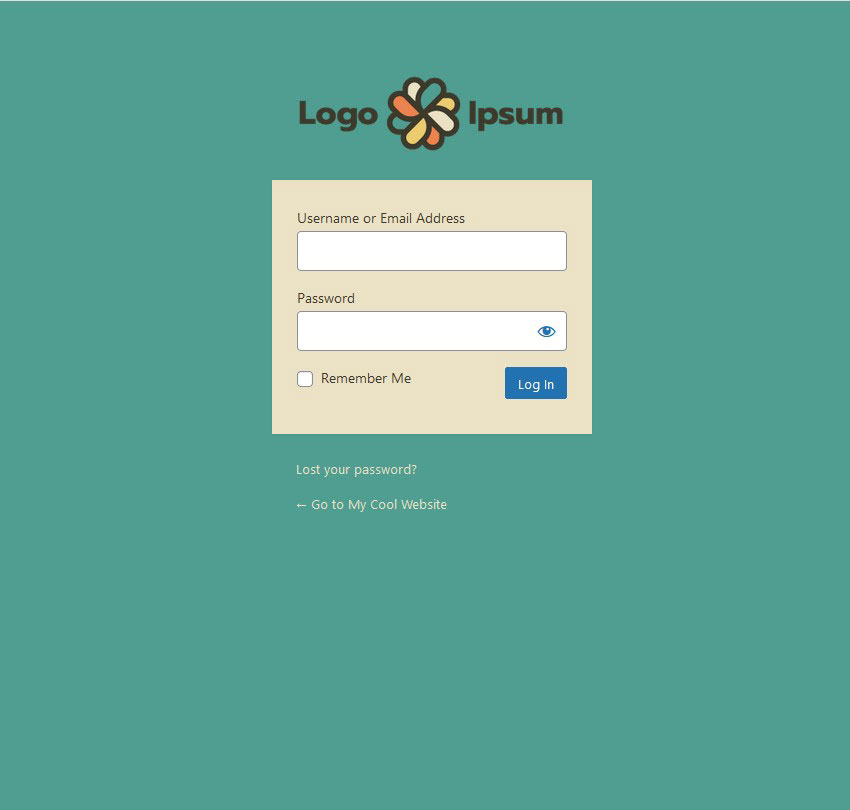
A customised login screen using this plugin.
Changelog
Version 1.0.3
- Ensure compatibility with WP 6.8
- Reduced tags to the 5 most useful and relevant ones
- Ensured full WordPress coding standards compliance (PHPCS)
Version 1.0.2
- Compatible with WP 6.7
Version 1.0.1
- Compatible with WP 6.4
- Update translation files
- Add new languages
Version 1.0.0
- Initial release.
- Compatible with WP 6.3