

Simple Front End Edit Buttons
Add edit buttons to the front end of your website. The buttons makes it easy to changing the order of a pages, adding pages, and editing pages.
Plugin info
Maintenance & Compatibility
Maintenance score
Possibly abandoned • Last updated 5379 days ago
Is Simple Front End Edit Buttons abandoned?
Possibly abandoned (last update 5379 days ago).
Compatibility
Similar & Alternatives
Explore plugins with similar tags, and compare key metrics like downloads, ratings, updates, support, and WP/PHP compatibility.
Description
** This plugin will no longer be updated. **
This plugins adds functions for adding edit buttons on the front end of your website.
By using the icons you can change the order (sometimes called priority)
of a page without the need to change the order manually within WordPress.
The edit icons are added automatically to standard WordPress pages widget (when sorting by page order)
and you can manually add the edit icons to any list of pages that you create yourself in your template.
It’s of great help when using WordPress as a regular CMS for a website with lots of pages,
where the pages are not sorted by date but rather by menu order.
Features
- Add icon for changing the menu order/prio of an page, so you don’t have to enter the admin area an change the menu order manually.
Also, you will see the changes take effect immediately. It’s a time saver! - Add icon for editing article (uses less space than the usual edit-text + looks good together with the move-buttons)
- Automatically adds icons for moving page up or down in the standard pages widget
- Easy add new pages. Click the plus-sign when your’re at a page and then this plugin makes sure that the new page gets a
correct menu_order and places the new page after the previous page.
Template Usage
To enable/show the icons use the following code:
Donation and more plugins
- If you like this plugin don’t forget to donate to support further development.
- More WordPress CMS plugins by the same author.
Installation
Frequently Asked Questions
Review feed
Screenshots
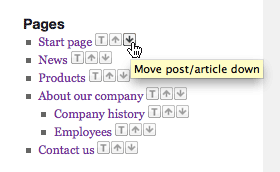
This is how the icons look on the front end using WordPress own pages widget.

Easily add new pages at the end of a list of pages.

The edit icons can be used on single pages too.

The code used for screenshot 2, using the Twenty Ten theme.
Changelog
0.1
- First version. Works for me, so I’m happy.