

Plugin info
Maintenance & Compatibility
Maintenance score
Stale • Last updated 312 days ago
Is Simple Guestbook abandoned?
Likely maintained (last update 312 days ago).
Compatibility
Developers
Languages
Similar & Alternatives
Explore plugins with similar tags, and compare key metrics like downloads, ratings, updates, support, and WP/PHP compatibility.
Description
This plugin is based on the comments feature from WordPress and creates a paged output that can be displayed in a WordPress page by simply putting the shortcode [simple-guestbook] as its content.
Since the plugin just uses existing core functionality it should respect all WP settings and integrate seemless into most of the themes out there.
You can tweak some basic settings in the options section of the plugin like:
- sort order
- entries per page
- avatar size
- custom avatar
- reply functionality for editors
- JavaScript based validation for the WP comment form
Manual Installation
- Download
simple-guestbook[version].zipand unzip to the/wp-content/plugins/directory - Activate the plugin through the ‘Plugins’ menu in WordPress
- Change settings in the ‘Options’ menu as needed or leave them default
Usage
Just place the shortcode [simple-guestbook] in an (empty) WordPress page. If you like to have some small content on that page, please make sure to put the shortcode at the very end of the page.
Arbitrary section
Since this plugin uses WP comments I highly recommend that you protect yourself against spam by using e.g. at least one of these plugins:
This plugin was tested with hCaptcha and the included JavaScript Validation functionality for the comment form comes with an integration for hCaptcha already.
Enjoy!
—
Installation
Frequently Asked Questions
Please check the settings of your page where you put in the shortcode and make sure that the option “Allow Comments” is enabled.
Review feed
Screenshots
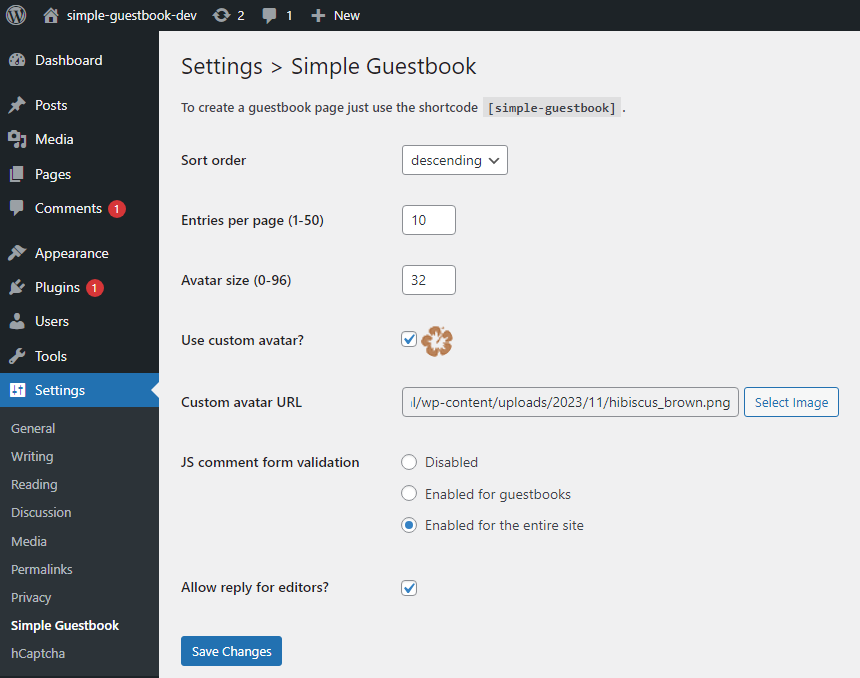
The admin page of Simple Guestbook
Changelog
1.0.0
- Inital version.