

Maintenance 37/100346d since update
Active installs
100,000
Downloads
2,860,695
Reviews
236
Age
15.9y
Plugin info
Total downloads: 2,860,695
Active installs: 100,000
Total reviews: 236
Average rating: 4.3
Support threads opened: 1
Support threads resolved: 0 (0%)
Available in: 22 language(s)
Contributors: 1
Last updated: 4/21/2025 (346 days ago)
Added to WordPress: 5/29/2010 (15 years old)
Minimum WordPress version: 5.3
Tested up to WordPress version: 6.8.3
Minimum PHP version: 5.6.20
Maintenance & Compatibility
Maintenance score
Stale • Last updated 346 days ago • Support resolved 0% • 236 reviews
37/100
Is Simple Lightbox abandoned?
Likely maintained (last update 346 days ago).
Compatibility
Requires WordPress: 5.3
Tested up to: 6.8.3
Requires PHP: 5.6.20
Developers
Languages
Spanish (Spain)32,360Dutch30,206Russian27,196French (France)20,849German19,853Spanish (Venezuela)17,048Japanese14,019Spanish (Mexico)13,287Dutch (Formal)11,736Czech10,389English (UK)9,973German (Formal)9,953Polish9,087Spanish (Chile)8,024Chinese (Taiwan)6,927Danish6,292Norwegian (Bokmål)6,152Greek5,862Portuguese (Portugal)5,491Slovak5,058Galician4,008
Similar & Alternatives
Explore plugins with similar tags, and compare key metrics like downloads, ratings, updates, support, and WP/PHP compatibility.
Meow Lightbox
Rating 4.9/5 (171 reviews) • Active installs 10,000
picu – Online Photo Proofing Gallery
Rating 4.7/5 (55 reviews) • Active installs 2,000
Gutenberg Gallery Blocks Lightbox
Rating 4.8/5 (11 reviews) • Active installs 1,000
FCP Lightest Lightbox
Rating 5.0/5 (2 reviews) • Active installs 100
ShutterPress Gallery – Masonry, justified and grid galleries, lightbox and infinite scroll
Rating 5.0/5 (4 reviews) • Active installs 30
Description
Simple Lightbox is a very simple and customizable lightbox that is easy to add to your WordPress website.
Features
Options for customizing the lightbox behavior are located in the Appearance > Lightbox admin menu (or just click the Settings link below the plugin’s name when viewing the list of installed plugins)
- Automatically activate links (no manual coding required)
- Automatically resize lightbox to fit in window
- Customize lightbox with themes
- Mobile-optimized responsive themes included
- Customizable lightbox animations
- Infinitely customizable with add-ons
- Supports WordPress image attachment links
- Supports links in widgets
- Keyboard Navigation
- Display media metadata (caption, description, etc.) in lightbox
- Enable Lightbox depending on Page Type (Home, Pages, Archive, etc.)
- Group image links (play as a slideshow)
- Group image links by Post (separate slideshow for each post on page)
Usage
- Insert links to images/image attachments into your posts/pages
That’s it! The image will be displayed in a lightbox automatically.
- For more usage tips, go to Simple Lightbox’s official page
- See Simple Lightbox’s documentation for in-depth information on using and customizing SLB.
Installation
- Install and activate SLB
- Verify that your site’s theme uses the
wp_head(),wp_footer(), &the_content()template tags (standard in any professional theme)
Frequently Asked Questions
Get more information on Simple Lightbox’s official page
Review feed
thedoctorcoernel
Installed. Used. Simple!
I installed it, linked a picture and it worked. I could not find an embed of Google Fonts (using Firefox Inspector) so the GDPR-Complaint seems to be outdated.
Screenshots
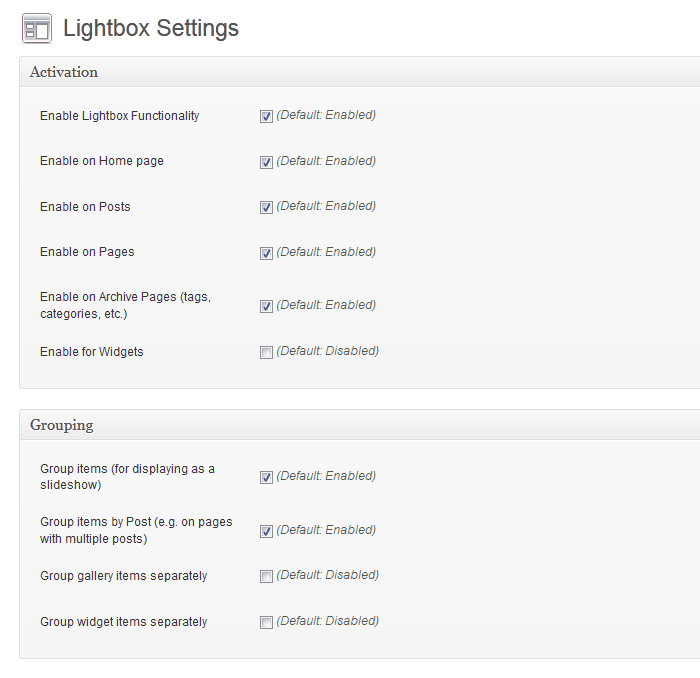
Lightbox Customization Options

Light Theme

Dark Theme
Changelog
2.9.4
- Optimize: Escape special characters in DOM attributes.
- Update: Confirm WordPress 6.2-6.8 compatibility.
2.9.3
- Hotfix: WordPress 6.1
wp_rand()bug (32-bit platforms) (#974) - Update: Confirm WordPress 6.1 compatibility
- Optimize: Media item cache key generation
- Optimize: Prune build tasks
2.9.2
- Optimize: Symbolic link handing for file/directory paths.
2.9.1
- Fix: Validate hook priority values (Let’s Getz Prioritized)
2.9.0
- Add: Support WebP image format
- Add: Support AVIF image format
- Add: Documentation link to readme file
- Optimize: Code cleanup/refactoring
- Optimize: WPCS validation (Phase 1)
- Optimize: Activate links after all other filters
- Optimize: Plugin metadata retrieval
- Update: Confirm WordPress 6.0 compatibility
- Update: Build dependencies
- Update: GitHub issue templates
2.8.1
- Update: PHP 5.6 Compatibility
- Add: PHPCS configuration
- Add: GitHub Issue templates
2.8.0
- Update: WordPress 5.3+ required.
- Update: PHP 7.2+ required.
- Optimize: Link detection up to 2x faster.
- Optimize: Options data handling.
- Optimize: Default title filtering.
- Optimize: Standardize media item data structure to avoid conflicts with third-party data.
- Optimize: Load only necessary media item properties in browser.
- Optimize: Filter all media items (instead of each individual item).
- Filter Removed:
media_item_properties(single item). - Filter Added:
media_items(all items).
- Filter Removed:
- Fix:
areaelements included in link detection (This is Jim’s Area).