

Simple ParsPal Shopping Cart
Very easy to use Simple WordPress ParsPal Shopping Cart Plugin. Great for selling products online in one click from your WordPress site.
Plugin info
Maintenance & Compatibility
Maintenance score
Possibly abandoned • Last updated 4682 days ago • 1 reviews
Is Simple ParsPal Shopping Cart abandoned?
Possibly abandoned (last update 4682 days ago).
Compatibility
Similar & Alternatives
Explore plugins with similar tags, and compare key metrics like downloads, ratings, updates, support, and WP/PHP compatibility.
Description
Simple ParsPal Shopping Cart allows you to add an ‘Add to Cart’ button on any posts or pages and your customers can pay product price with parspal service. It also allows you to add/display the shopping cart on any post or page or sidebar easily. The shopping cart shows the user what they currently have in the cart and allows them to remove the items. It can be easily integrated with the NextGen Photo Gallery plugin too.
Usage
- To add the ‘Add to Cart’ button simply add the trigger text [wp_cart:PRODUCT-NAME:price:PRODUCT-PRICE:end] to a post or page next to the product. Replace PRODUCT-NAME and PRODUCT-PRICE with the actual name and price.
- To add the ‘Add to Cart’ button on the sidebar or from other template files use the following function:
Replace PRODUCT-NAME and PRODUCT-PRICE with the actual name and price.
- To add the shopping cart to a post or page (eg. checkout page) simply add the shortcode [show_wp_shopping_cart] to a post or page or use the sidebar widget to add the shopping cart to the sidebar. The shopping cart will only be visible in a post or page when a customer adds a product.
Using Shipping
1. To use shipping cost use the following trigger text
[wp_cart:PRODUCT-NAME:price:PRODUCT-PRICE:shipping:SHIPPING-COST:end]
or use the following php function from your wordpress template files
Using Variation Control
1. To use variation control use the following trigger text
eg. [wp_cart:Demo Product 1:price:15:var1[Size|Small|Medium|Large]:end]
-
To use variation control with shipping use the following trigger text:
eg. [wp_cart:Demo Product 1:price:15:shipping:2:var1[Size|Small|Medium|Large]:end] -
To use multiple variation option use the following trigger text:
eg. [wp_cart:Demo Product 1:price:15:shipping:2:var1[Size|Small|Medium|Large]:var2[Color|Red|Green]:end]
Installation
- Unzip and Upload the folder ‘simple-parspal-shopping-cart’ to the ‘/wp-content/plugins/’ directory
- Activate the plugin through the ‘Plugins’ menu in WordPress
- Go to Settings and configure the options eg. your email, Shopping Cart name, Return URL etc.
- Use the trigger text to add a product to a post or page where u want it to appear.
Frequently Asked Questions
- Can this plugin be used to accept ParsPal payment for a service or a product? Yes
- Does this plugin have shopping cart? Yes.
- Can the shopping cart be added to a checkout page? Yes.
- Does this plugin has multiple currency support? Yes.
- Is the ‘Add to Cart’ button customizable? Yes.
- Does this plugin use a return URL to redirect customers to a specified page after ParsPal has processed the payment? Yes.
Review feed
Screenshots
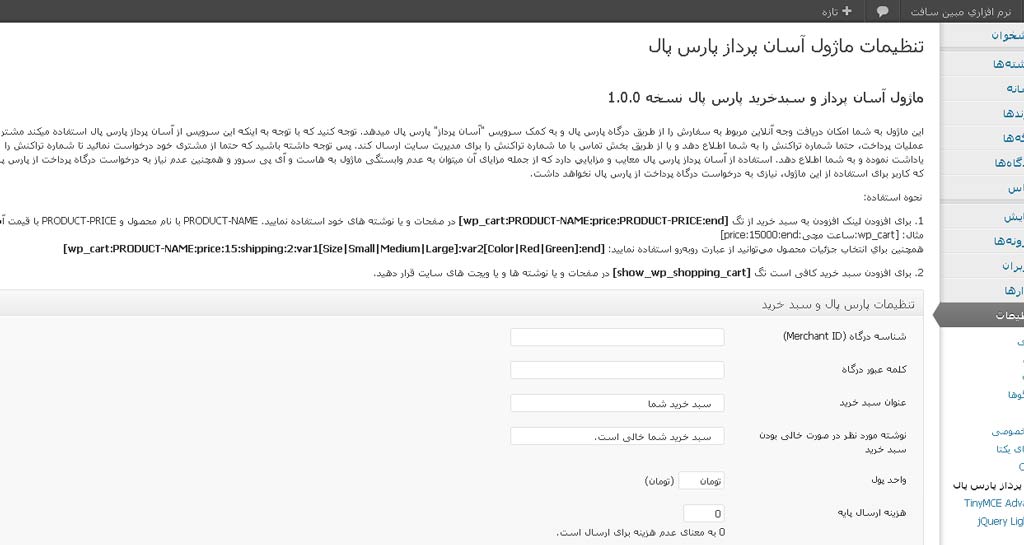
Administration interface in WordPress 3.4.1

Shopping cart user interface
Changelog
Changelog can be found at the following URL
http://www.mobinsoft.net/parspal-simple.html