

Simple Site Map Page
Build your HTML site map page easily and manually with WordPress native menus.
Plugin info
Maintenance & Compatibility
Maintenance score
Maintained • Last updated 126 days ago • 6 reviews
Is Simple Site Map Page abandoned?
Likely maintained (last update 126 days ago).
Compatibility
Similar & Alternatives
Explore plugins with similar tags, and compare key metrics like downloads, ratings, updates, support, and WP/PHP compatibility.
Description
Simple Site Map Page can be used to build a HTML site map page easily and manually.
It uses WordPress native menus manager so you can customize your site map yourself, and it’s translation ready (Polylang, WPML and others).
Native WP menu manager is good to choose exactly what must be displayed or not in the site map, e.g if you want to prevent visitors to access private parts of your website.
If you use custom links with # target, ce plugin will automatically remove the link and replace it with a element. It can be usefull to create unlinked virtual pages to structure your sitemap.
Credits :
- Jean-Baptiste Audras, project manager at Whodunit and WordPress developer. @audrasjb on Twitter or Github.
Add your own language pack on GlotPress or do pull requests on Github. Contributors will be credited here 🙂
Installation
- Install the plugin and activate.
- Go to Reading options to select the sitemap page.
- Go to Appearance > Menus to build your site map and register it under “Site map” location.
- Done! The site map will be displayed under the page main content.
Frequently Asked Questions
After selecting your site map page in reading options, you have to build a new menu in Appearance > Menus and register it under the “Site map” location. See the screenshots provided for visual indications.
Use custom link and the target / URL #. It will be automatically converted into simple <span> element instead of <a href="#">.
Sure! The site map list markup is wrapped with <div class="menu-site-map-menu-container"><ul id="menu-site-map-menu" class="ssmp simple-site-map"> … </ul></div> so you can customize it quite easily.
Review feed
Add a sitemap with just a few clicks
Screenshots

Choose a page under Settings > Readings options.
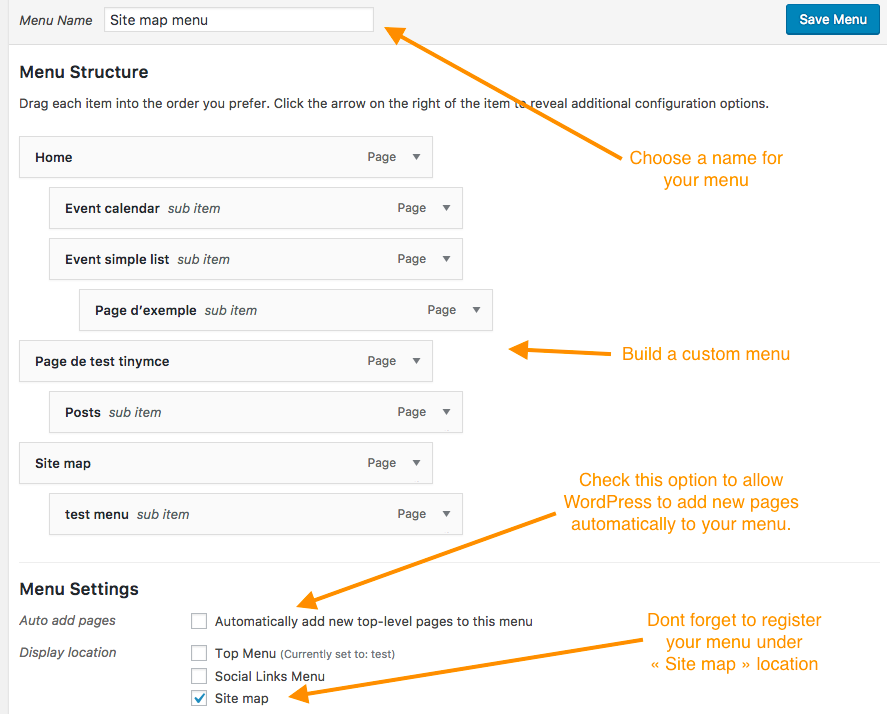
Build your site map under Appearance > Menus and register it under "Site map" location.
Changelog
1.2.2
Fix hook priority order. Props to Virginie Garnier for spotting the issue <3
1.2.1
- Small fix on Polylang compatibility. Props @bastienmartinent.
1.2
- Polylang compatibility
1.1.1
- Gutenberg compatibility
1.1
- Internationalization bug fix.
1.0
- Plugin initial commit. Works fine 🙂