
Simple Taxonomy Ordering
Quickly and easily reorder taxonomy terms with an easy to use and intuitive drag and drop interface.
Plugin info
Maintenance & Compatibility
Maintenance score
Possibly abandoned • Last updated 1108 days ago • Support resolved 0% • 28 reviews
Is Simple Taxonomy Ordering abandoned?
Possibly abandoned (last update 1108 days ago).
Compatibility
Similar & Alternatives
Explore plugins with similar tags, and compare key metrics like downloads, ratings, updates, support, and WP/PHP compatibility.
Description
Order all of the taxonomy terms on your site with a simple to use, intuitive drag and drop interface. The plugin works for WordPress core taxonomies — Categories and Tags — and any custom taxonomies you have created.
Activate the plugin, enable your taxonomy on the settings page, and drag and drop the taxonomies into the desired position. It couldn’t be easier.
On the front end of the site your taxonomy terms will display in the order set in the dashboard.
Requires WordPress 4.4 or later due to the use of the term meta.
Query Usage
- If you’re trying to query for taxonomy terms (e.g. using
WP_Queryor functions likeget_terms()), and you’d like them to be returned in the order specified by the plugin, you need to add the tax_position parameter in your call. For example:'meta_key' => 'tax_position'and'orderby' => 'tax_position'. Thanks to @certainlyakey on GitHub for pointing this out.
Installation
- Unzip and upload contents to your plugins directory (usually wp-content/plugins/).
- Activate the plugin.
- Head to the settings page, ‘Settings > Simple Tax. Ordering’.
- Select the taxonomies you want to enable drag and drop ordering on. Save the settings.
- Head to the taxonomy edit page and re-order the taxonomies as needed.
- Profit
Frequently Asked Questions
Review feed
Simple
Works like a charm - use it
Thanks so much!!
Screenshots
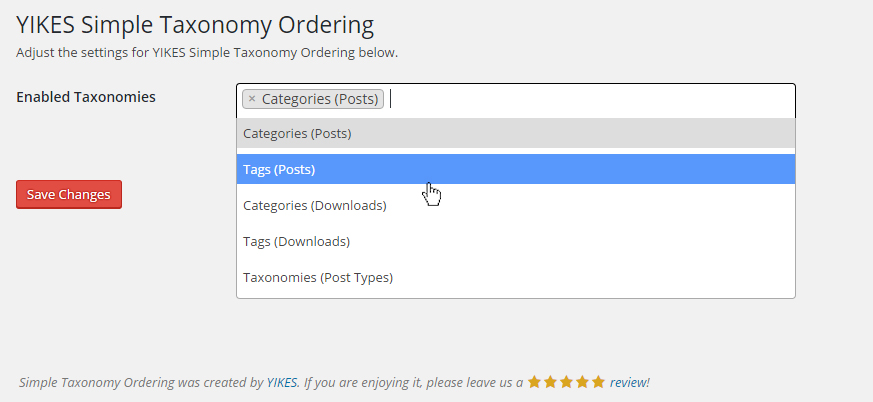
Simple Taxonomy Ordering settings page, allows you to specify which taxonomy you want to enable drag & drop ordering on.
Changelog
2.3.4
- Fixes custom order not being displayed on edit-tags pages.
2.3.3
- Housekeeping
2.3.2
- Fixes column span bug present after updating to WordPress 5.5.
2.3.0
- Fixes bug with illegal string offset when disabling taxonomies under certain conditions.
2.2.0
- Added action
yikes_sto_taxonomy_order_updatedto hook into updated Taxonomy event. Thanks @d4mation!
2.1.0
- Singleton Pattern. This approach makes removing the filter, which sets the custom order, a lot easier.
2.0.3
- Fixed uninstall method. The plugin should now uninstall and clean up after itself without error.
2.0.2
- Fixed footer callout URLs and placement. It should only display on the settings page now.
2.0.1
- Fixed an issue with PHP versions < 7 (renaming class method from
includetoinclude_files). - Fixed an issue where new taxonomies were not being saved.
- Fixed an issue where the plugin’s action link to the settings page was going to the admin dashboard.
- Updated the plugin’s pot file with the proper text domain.
2.0.0
- Completely rewrote the plugin: it is now fully WPCS linted, assets are minified, inline styles and javascript have been removed, nonces are included in AJAX requests.
- Fixed bugs with defaulting a taxonomy’s order.
- Fixed bug where ordering on a subsequent page would overwrite the first page’s order.
1.2.7
- Added some variable checks to prevent PHP Notices.
1.2.6
- Changed the global (localized) JS variable from
localized_datatosimple_taxonomy_ordering_datato avoid any potential conflicts.
1.2.5
- Fixed an issue where terms weren’t being returned if the termmeta table was empty. A big thanks to @doppiogancio on GitHub for finding this and helping us reach the solution.
1.2.4
- Fixed a JS issue that occurs when HTML is added to category description. A big thanks to @mateuszbajak for finding this and fixing it!
1.2.3
- Fixed a bug where the same SQL join statement was being added to a query twice on the front end (props to @burisk for calling this out)
1.2.2
- Added a CAST call to order taxonomies as integers instead of strings (props to Timothy Couckuyt / @devplus_timo for calling this out)
1.2.1
- Removed the
disableSelection()call to allow selection of quick edit fields
1.2
- Added i18n: added domain path, languages folder, .pot file, and load_text_domain() hook
1.1
- Reverted query, added missing ORDER BY argument.
1.0
- Altered the query run when ordering terms (Props to Daniel Schwab for the pull request.
0.1
- Initial release