

Simply Excerpts
A simple plugin for exceprts that allows you to change the word count and to replace the elipsis (...) with text. Not compatible with all themes.
Plugin info
Maintenance & Compatibility
Maintenance score
Possibly abandoned • Last updated 500 days ago • 2 reviews
Is Simply Excerpts abandoned?
Possibly abandoned (last update 500 days ago).
Compatibility
Similar & Alternatives
Explore plugins with similar tags, and compare key metrics like downloads, ratings, updates, support, and WP/PHP compatibility.
Description
Version 1.7
Donations for extended support are appreciated but are never required!
For quicker support, please visit our website www.shooflysolutions.com
Please be kind and rate this plugin. Everything helps!
This plugin is a very simple plugin the allows you to change the number of words that are displayed in excerpts and to replace the elipsis with text.
The settings for this plugin can be found on the Settings Menu in the Admin Panel. Check the box for the option you wish to manage and enter the value. There are two options: “Maximum number of words to display in an excerpt” and “Read More Text”. You should not use this plugin with other plugins that modify excerpts.
Arbitrary section
Need more? Customization is available. Contact [email protected] for more information.
Installation
Download the Plugin
How to install this plugin
Method 1:
Install this plugin using the built-in plugin installer:
Go to Plugins > Add New.
Under Search, type “Simple Excerpt”
Click Install Now.
A popup window will ask you to confirm your wish to install the Plugin.
Click Proceed to continue with the installation. The resulting installation screen will list the installation as successful or note any problems during the install.
If successful, click Activate Plugin to activate it, or Return to Plugin Installer for further actions.
Method 2:
Download the plugin. In the WordPress admin panel, click on Plugins. Select Add New to get to the “Install Plugins” page. Click on browse and choose the downloaded file.
Click on the “Install Now” button to install the plugin. Once the plugin is installed, select “Activate Plugin”.
Method 3: (Advanced Users):
Unzip the file. Using FTP, upload the thumbnailgrid folder to the contents/plugins folder in your wordpress directory.
Frequently Asked Questions
Please visit the FAQ page on our site at http://www.shooflysolutions.com/faq/
–
Review feed
Screenshots
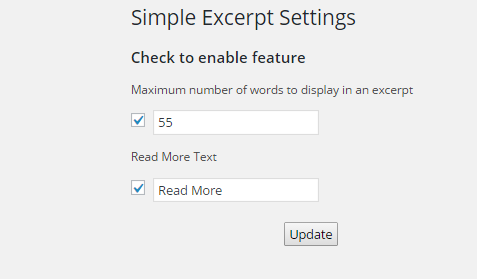
Settings
Changelog
1.7
Fix typo
1.6
Requested sanitation update!!
1.5
Add option to limit length to characters instead of words
= update version information
* 1.4
update version information / test with 5.7
minor fix to filter
* 1.3
= update version information / tested with evolve theme
* =1.2
* Update version information
* =1.1
* Add recommended script check and escape output, fix tested till, correct donation link
* =1.0
* Initial release