

Simply Show Hooks
Simply Show Hooks helps theme and plugin developers to quickly see where all the action and filter hooks are on any WordPress page.
Plugin info
Maintenance & Compatibility
Maintenance score
Possibly abandoned • Last updated 3444 days ago • 63 reviews
Is Simply Show Hooks abandoned?
Possibly abandoned (last update 3444 days ago).
Compatibility
Developers
Similar & Alternatives
Explore plugins with similar tags, and compare key metrics like downloads, ratings, updates, support, and WP/PHP compatibility.
Description
Up until now the way theme and plugin developers find where to hook into with their add_action() and add_filter() functions is either to search through the WordPress code base, or find find a reference to the hook in the codex.
What Simply Show Hooks does is give you a simpler way to see these hooks by displaying them in-line on the page that you are on. All that’s left to do then is copy the hook you need, and paste it in to your add_action and add_filter functions like this:
add_action( ‘wp_enqueue_scripts’, ‘my_enqueue_scripts_action’ );
add_filter( ‘the_title’, ‘my_the_title_filter’ );
I made this plugin so I could find WordPress hooks quicker and I use it all the time, so I thought I’d share it and see if it could help others.
Enjoy!
Please note that in odd cases, due to the nature of actions and filters, the plugin may display a hook in place that disrupts the display of your site – in which case we always display the ‘Hide Hooks’ button so you can switch it back off. This won’t disrupt the look of you site to anyone but you so don’t worry.
Installation
- Install either via the WordPress.org plugin directory, or by uploading the files to your server.
- Activate the plugin through the ‘Plugins’ menu in WordPress.
- Once the plugin is activated you will see ‘Simply Show Hooks’ in the Admin Bar at the top of your site or admin pages.
- Clicking the ‘Show Hooks’ button will start showing you all the action hooks in the page you’re on.
- You can continue to navigate around until you’ve found the action hook you’re looking for, then switch off by clicking ‘Hide Hooks’.
- Simple but effective. Enjoy!
Frequently Asked Questions
Review feed
Good
Screenshots
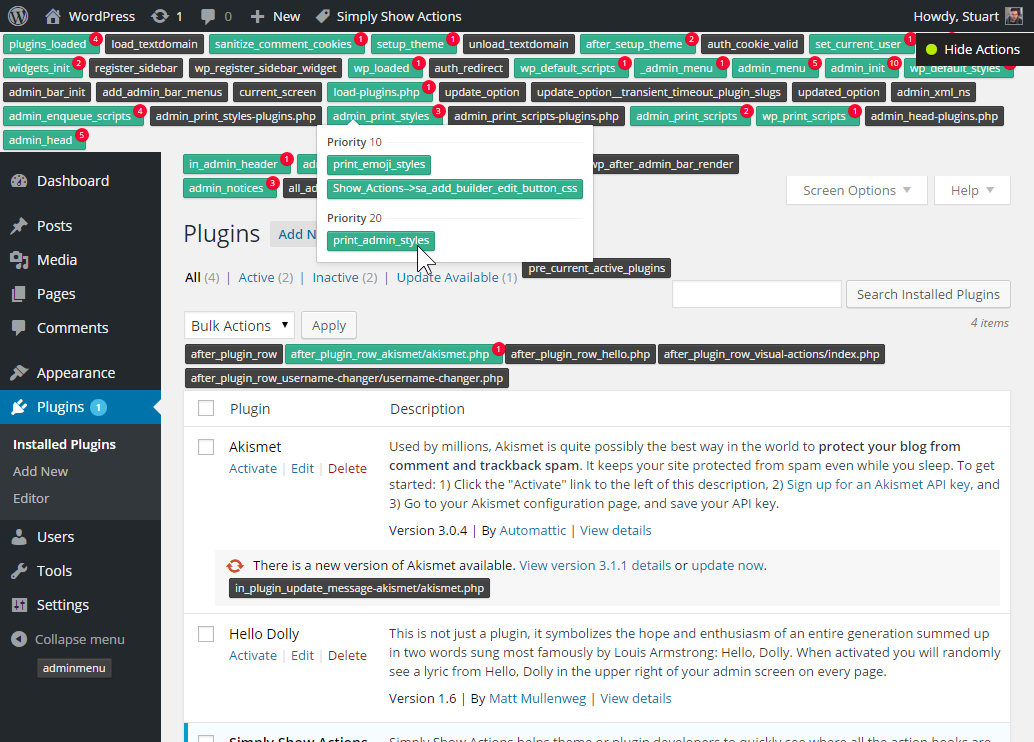
Here you can see how you can quickly find any action hook by using Simply Show Hooks while you're on any WordPress wp-admin page.

Here you can see Simply Show Hooks doing it's thing on any page of your website.
Changelog
1.2.1
- Respect existing query strings when switching the Show Hooks on and off.
- Changed the prefix slug
sshto a more uniquecxssh. - Use mono-space font to display hooks.
- Added filters to allow you to deactivate our plugin on the frontend, backend or sitewide –
simply_show_hooks_active, simply_show_hooks_backend_active, simply_show_hooks_frontend_active.
1.1.1
- Fixed small typo showing Filter as Action in heading.
1.1.0
- Added ‘Show Action & Filter Hooks’ that shows all the Actions and Filters in a Sidebar.
- Added a hook name heading to the dropdown menu to easier identify, copy and use the hooks.
- Added an A and F to identify whether a hook is an Actions and Filter.
- Changed the color of the Actions and Filters hook markers.
1.0.0
- Initial release.