

Single Mailchimp
Single Opt-In AJAX Mailchimp Newsletter form for Wordpress. You can switch between single opt-in and double opt-in. Use it as Widget or Shortcode.
Plugin info
Maintenance & Compatibility
Maintenance score
Possibly abandoned • Last updated 3698 days ago • 1 reviews
Is Single Mailchimp abandoned?
Possibly abandoned (last update 3698 days ago).
Compatibility
Similar & Alternatives
Explore plugins with similar tags, and compare key metrics like downloads, ratings, updates, support, and WP/PHP compatibility.
Description
Single Opt-In AJAX Mailchimp Newsletter form for WordPress. You can switch between single opt-in and double opt-in. Use it as Widget or Shortcode and style it however you want. It uses the Bootstrap3 classes, therfore it will perfectly fit in a Bootstap3 Theme for WordPress.
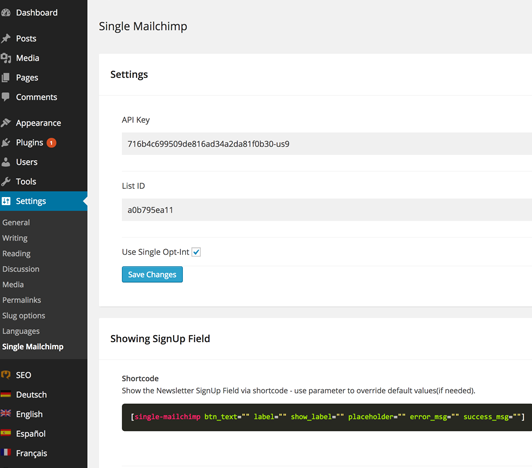
You only need your API Key and the List ID. Within the settings Tab you can choose what kind of Opt-In you want to use. Also you can define the error/success message but also the placeholder and labels.
A short guidance within the settings is also provided.
Roadmap:
– functionality to add more than one list
– predefined stylings you can choose from
– switch between responsive and fixed width
A brief Markdown Example
Ordered list:
- Double Opt-In Newsletter
- Single Opt-In Newsletter
- Shortcode to display form
- Widget to display form
- Labels are editable
- Ajax
Unordered list:
- Double Opt-In Newsletter
- Single Opt-In Newsletter
- Shortcode to display form
- Widget to display form
- editable labels
- ajax
Installation
Install via your WordPress admin interface or follow these instructions:
- Download the Plugin from here.
- Extract all files.
- Copy all files, without changing anything, to ‘/wp-content/plugins/’.
- Activate the plugin through the ‘Plugins’ menu in WordPress.
- Go to ‘Settings -> Single Mailchimp’ to edit the settings. You will need a Mailchimp API Key and List ID.
- Use the shortcode, widget or the html markup described in the Settings Tab, to show the form on your website.
Frequently Asked Questions
Review feed
Screenshots
Wordpress Editor with Single Mailchimp

Close up of Single Mailchimp Settings