

Single Taxonomy Selector
A powerful plugin that simplifies taxonomy term selection by enabling users to select a single parent term and its child terms with flexible selection …
Plugin info
Maintenance & Compatibility
Maintenance score
Possibly abandoned • Last updated 386 days ago
Is Single Taxonomy Selector abandoned?
Possibly abandoned (last update 386 days ago).
Compatibility
Similar & Alternatives
Explore plugins with similar tags, and compare key metrics like downloads, ratings, updates, support, and WP/PHP compatibility.
Description
Single Taxonomy Selector provides an intuitive interface for selecting taxonomy terms in WordPress. It offers the ability to:
- Select a single parent term.
- Select one or multiple child terms under the chosen parent.
- Ensure only one term selection at a time, similar to radio buttons.
- Customize selection modes to suit your content management needs.
- Set options via an easy-to-use options page.
This plugin is perfect for use cases where structured and controlled taxonomy term selection is necessary, such as categorizing content, filtering, or organizing hierarchical taxonomies.
For more information, visit BPOTech.
Features
- Supports all hierarchical taxonomies
- Allows selection of one or more different terms
- You can select 1 parent term and 1 child term or 1 parent term and multiple child terms.
- Various selection modes for flexible control.
- Easy-to-configure options page.
- Seamless integration with custom taxonomies.
- User-friendly interface.
- Works with Classic Editor.
Installation
- Download the plugin ZIP file.
- In your WordPress admin panel, go to “Plugins > Add New”.
- Click “Upload Plugin” and select the ZIP file.
- Click “Install Now” and then “Activate”.
- Go to “Settings > Single Taxonomy Selector” to configure the plugin.
Frequently Asked Questions
After activating the plugin, go to the plugin’s settings page under “Settings > Single Taxonomy Selector”. Configure your desired taxonomy and selection modes.
No, the plugin enforces single parent term selection to maintain a clear hierarchical structure.
Yes, the plugin fully supports custom taxonomies.
Review feed
Screenshots
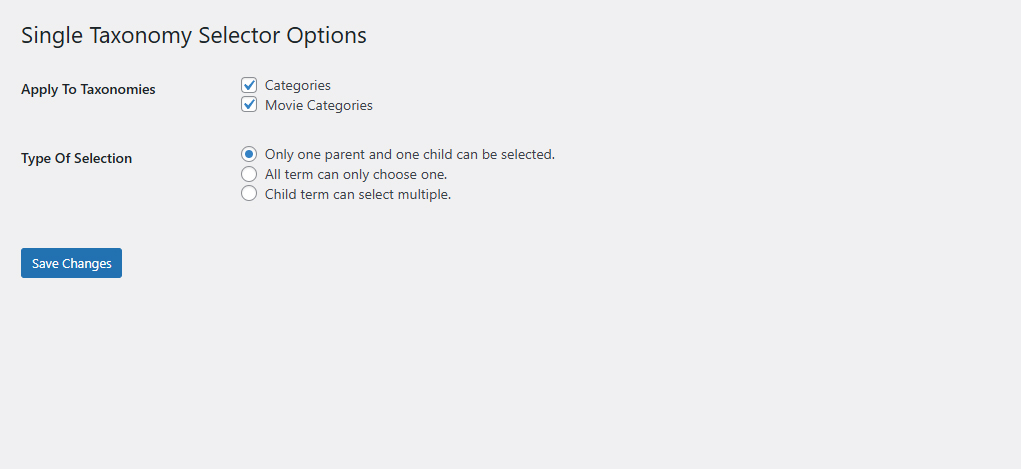
Options in admin

Select 1 parent 1 child in category

Select 1 parent multiple child in category
Changelog
1.1.1
- Improved term selection logic.
1.0.0
- Initial release.