

Maintenance 20/1005001d since update
Active installs
30
Downloads
4,557
Reviews
0
Age
13.7y
Plugin info
Total downloads: 4,557
Active installs: 30
Total reviews: 0
Average rating: 0
Support threads opened: 0
Support threads resolved: 0 (0%)
Available in: 1 language(s)
Contributors: 1
Last updated: 7/24/2012 (5001 days ago)
Added to WordPress: 7/11/2012 (13 years old)
Minimum WordPress version: 2.9
Tested up to WordPress version: 3.4.2
Minimum PHP version: f
Maintenance & Compatibility
Maintenance score
Possibly abandoned • Last updated 5001 days ago
20/100
Is Site Traffic Trend abandoned?
Possibly abandoned (last update 5001 days ago).
Compatibility
Requires WordPress: 2.9
Tested up to: 3.4.2
Requires PHP: f
Similar & Alternatives
Explore plugins with similar tags, and compare key metrics like downloads, ratings, updates, support, and WP/PHP compatibility.
No similar plugins found yet.
Description
Adds rankarchive.com trend to the admin Dashboard for current domain. The trend shows
Alexa traffic rank history for period makes it convenient to see how is your site grows.
Requirements:
- WordPress 2.9++
- PHP 5.1.xx
- MySql 5.1.xx
- PHP 4.xx and MySql 4.xx not supported
- Free one-click domain submission to http://rankarchive.com
Instruction
- Upload the full directory into your wp-content/plugins folder
- Activate the plugin at the plugin administration page
- Go to http://www.rankarchive.com site and enter the domain name of your blog
- If your domain is new, the statistic start showing after two days
- If your doamin already included you will see the graph in the Dashboard widget
Features
- Automatically adds the Traffic Rank widget to the admin Dashboard.
- Shows traffic changes collected by rankarchive for your domain.
- Statistic graph grows with the site traffic, not like Alexa shows it.
- Stores traffic data at the external source, not in your database.
Installation
- Upload the full directory into your wp-content/plugins folder
- Activate the plugin at the plugin administration page
- Go to http://www.rankarchive.com site and enter the domain name of your blog
Frequently Asked Questions
Will it slow down my site ?
No, the plugin works once when admin visits Dashboard, it is not using your the database also.
Review feed
No reviews available
Screenshots
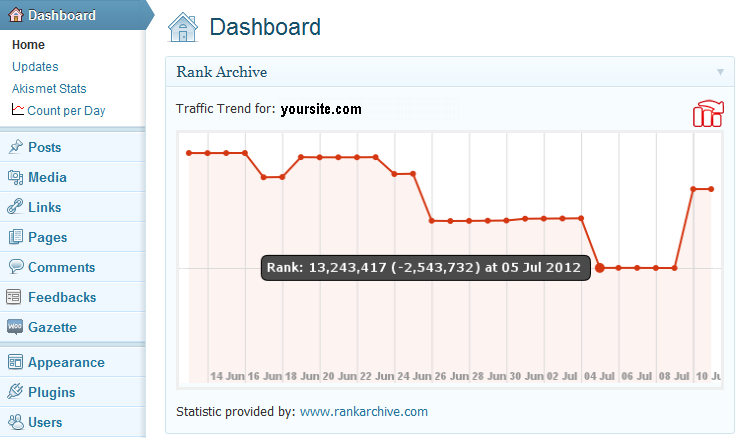
Main screen
Changelog
1.0
- Initial release
1.0.1
- Minor changes in the plugin description
1.0.2
- Added the form to show the site traffic if the connection can not be established