
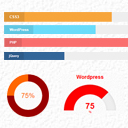
SKT Skill Bar
Showcase skillsets that you are good at anywhere on your website using this plugin.
Plugin info
Maintenance & Compatibility
Maintenance score
Maintained • Last updated 97 days ago • 14 reviews
Is SKT Skill Bar abandoned?
Likely maintained (last update 97 days ago).
Compatibility
Similar & Alternatives
Explore plugins with similar tags, and compare key metrics like downloads, ratings, updates, support, and WP/PHP compatibility.
Description
This plugin adds fancy jQuery skill bars. Skill bar like progress bar or circular bar or vertical bar or half circular bar showcasing your skill set in percentage is shown. Fancy animation due to jQuery.
Related Links:
* Demo Link for Skill Bars in Action
Also check our WordPress theme free at SKT Themes which are available for any commercial or personal use. These ready to use templates are available for free download.
License
This plugin is free and complimentary and is governed by GPL2 License. Kindly check our wordpress themes at: http://www.sktthemes.org/
Installation
This section describes how to install the plugin and get it working.
e.g.
- Upload
sktskillbar.zipto the/wp-content/plugins/directory - Activate the plugin through the ‘Plugins’ menu in WordPress
-
Place shortcode: ‘[skillwrapper type=”bar” bar_titlefontsize=”12″ bar_titlecolor=”#000″ bar_percentfontszie=”11″ bar_percentcolor=”#336699″]
[skill title_background=”#f7a53b” bar_foreground=”#ff9000″ bar_background=”#eeeeee” percent=”90″ title=”CSS3″]
[skill title_background=”#39bcdf” bar_foreground=”#6adcfa” bar_background=”#eeeeee” percent=”55″ title=”WordPress”]
[skill title_background=”#ff2727″ bar_foreground=”#fa6e6e” bar_background=”#eeeeee” percent=”85″ title=”PHP”]
[skill title_background=”#0d5aa6″ bar_foreground=”#336699″ bar_background=”#eeeeee” percent=”100″ title=”jQuery”]
[/skillwrapper]’ without the inverted commas in your page or post for bar type or progress bar. -
Or for half circle place shortcode: ‘[skillwrapper type=”gage” align=”left”]
[skill percent=”75″ title=”WordPress” bar_foreground=”#f00″ bar_background=”#eee”]
[skill percent=”25″ title=”SEO” bar_foreground=”#f60″ bar_background=”#eee”]
[skill percent=”50″ title=”PHP” bar_foreground=”#900″ bar_background=”#eee”]
[/skillwrapper]’ without the inverted commas in your page or post for half circular bars. -
Or for full circle place shortcode: ‘[skillwrapper type=”circle” track_color=”#333333″ chart_color=”#dddddd” chart_size=”550″ chart_fontsize=”13″ chart_headingfontsize=”16″ align=”left”]
[skill percent=”88″ title=”Web Research”]
[skill percent=”55″ title=”WordPress”]
[skill percent=”85″ title=”PHP”]
[skill percent=”100″ title=”jQuery”]
[/skillwrapper]’ without the inverted commas in your page or post for full circular bars. -
Or for vertical graph place shortcode: ‘[skillwrapper type=”skt_verticalgraph”]
[skill percent=”51″ title=”WordPress” verticalgraph_background=”#6adcfa” verticalgraph_titlecolor=”#000000″]
[skill percent=”70″ title=”JavaScript” verticalgraph_background=”#fa6e6e” verticalgraph_titlecolor=”#000000″]
[skill percent=”40″ title=”PHP” verticalgraph_background=”#336699″ verticalgraph_titlecolor=”#000000″]
[/skillwrapper]’ without the inverted commas in your page or post for vertical graph bars. -
Or for pie graph place shortcode: ‘[skillwrapper type=”skt_piegraph”]
[skill percent=”51″ title=”WordPress” piegraph_background=”#6adcfa”]
[skill percent=”70″ title=”JavaScript” piegraph_background=”#fa6e6e”]
[skill percent=”40″ title=”PHP” piegraph_background=”#336699″]
[/skillwrapper]’ without the inverted commas in your page or post for pie graph. -
Or for poly graph place shortcode: ‘[skillwrapper type=”skt_polygraph”]
[skill percent=”51″ title=”WordPress” polygraph_background=”#6adcfa”]
[skill percent=”70″ title=”JavaScript” polygraph_background=”#fa6e6e”]
[skill percent=”40″ title=”PHP” polygraph_background=”#336699″]
[/skillwrapper]’ without the inverted commas in your page or post for poly graph. -
Or for line graph place shortcode: ‘[skillwrapper type=”skt_linegraph”]
[skill percent=”51″ title=”WordPress” linegraph_background=”#6adcfa”]
[skill percent=”70″ title=”JavaScript” linegraph_background=”#fa6e6e”]
[skill percent=”40″ title=”PHP” linegraph_background=”#336699″]
[/skillwrapper]’ without the inverted commas in your page or post for line graph.
Frequently Asked Questions
Easy to use plugin. Just install it and check under settings for SKT Skill Bar. Given are the different shortcodes for usage. Just place the shortcode in any page or post and you should be done.
Review feed
First plugin of ours. Do let us know for any feedback/errors
Screenshots

This is how progress skill bar will appear.
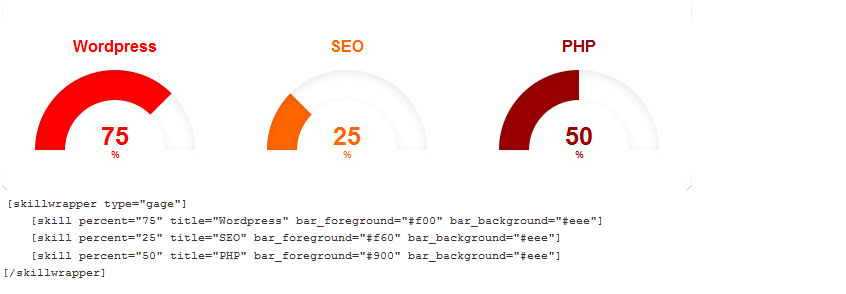
This is how half circular skill bar will appear.

This is how full circular skill bar will appear.

This is how vertical graph skill bar will appear.

This is how pie graph will appear.

This is how poly graph will appear.

This is how line graph will appear.
Changelog
=1.7=
Rectified several previous bugs, checked with recent WordPress version and added a new skill bar.
=1.6=
Found plugin working with version 5.3
=1.5=
Found plugin working with version 4.9.1
=1.4=
Updated plugin to work with latest version of WordPress and mobile devices
=1.3=
Compatibility tested for WordPress 4.2.2
=1.2=
Bugfixes for WordPress 3.8.1
=1.1=
Bugfixes for WordPress 3.8 for skill bar not working
=1.0=
Compatible upto WordPress 3.7.1