

SM CPT Sidebar Widget Displays
Enables a widget that can display multiple posts of any post type or CPT (custom post type) into any sidebar. It uses html tag classes for easy stylin …
Plugin info
Maintenance & Compatibility
Maintenance score
Possibly abandoned • Last updated 3902 days ago • 3 reviews
Is SM CPT Sidebar Widget Displays abandoned?
Possibly abandoned (last update 3902 days ago).
Compatibility
Similar & Alternatives
Explore plugins with similar tags, and compare key metrics like downloads, ratings, updates, support, and WP/PHP compatibility.
Description
Enables a widget that can display multiple posts of any post type or CPT (custom post type) into any sidebar. It uses html tag classes for easy styling, has some sorting options, & has some advanced “taxonomy matching filters”, perfect use case is for brief testimonials. This plugin is maintained and provided by http://sethmatics.com/.
We plan to expand the feature set of this plugin to work with more post types in the future. Some ideas are uses with featured images, link options, etc. Please use the support forum to bring your suggestions so that we can create some feature milestones for the dev team.
Video Tutorial / Showcase
Coming soon…
Installation
To install the plugin manually:
- Extract the contents of the archive (zip file)
- Upload the sm-cpt-sidebar-widget-displays folder to your ‘/wp-content/plugins’ folder
- Activate the plugin through the Plugins section in your WordPress admin
- Visit the “appearance->widgets” section from within /wp-admin/.
- Drag the “SM Display CPTs” widget to a sidebar and configure the options.
**repeat into as many sidebars or multiple times in 1 sidebar for multiple post types - View a page that uses the above sidebar to view the results. Most likely you will need to enhance the widget using styles in the themes style.css.
Frequently Asked Questions
A question that someone might have
None yet, fire away.
Review feed
Screenshots
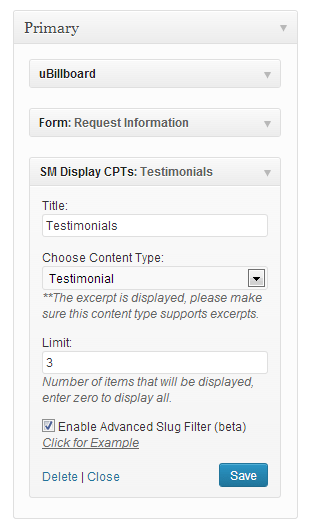
Example of the widget in a sidebar.

Example of a the widget on a website, after styling with custom CSS.
Changelog
Version 1.0.1
– Testing and update for WordPress 4.2
Version 1.0.1
– Attempting to remove empty folders from SVN: try 2
– First public version released, no changes yet.