

Smart Brands for WooCommerce
Create unlimited brands to assign to your products, highlight the brands of the products you sell, and boost sales instantly!
Plugin info
Maintenance & Compatibility
Maintenance score
Maintained • Last updated 129 days ago • 4 reviews
Is Smart Brands for WooCommerce abandoned?
Likely maintained (last update 129 days ago).
Compatibility
Languages
Similar & Alternatives
Explore plugins with similar tags, and compare key metrics like downloads, ratings, updates, support, and WP/PHP compatibility.
Description
Live Demo | Documentation | Support | Upgrade to Pro »
Overview
Smart Brands for WooCommerce helps you display Product Brands nicely in your WooCommerce Store. Also, you can showcase your Brands in a sliding manner too. You can show your product’s Brand Name, Description, and Brand Logo. The brands in this plugin are built as independent taxonomies, allowing you to use all of the benefits of WordPress in working with taxonomies. Additionally, The plugin has a simple and easy-to-use shortcode generator interface with many handy options which will help you to display brands list, and customize and manage them easily without coding.
Smart Brands for WooCommerce plugin allows you to add brands for products and gain credibility by displaying them in your WooCommerce shop. Smart Brands for WooCommerce is free, rapidly growing, and comes with great support.
Why Smart Brands for WooCommerce Plugin is important?
A product’s brand can have a significant impact on its value and demand. Additionally, it’s something to emphasize if you run a WooCommerce site and offer goods from particular well-known Brands. According to CrowdSpring, 77% of all buyers make purchases based on a brand name.
Smart Brands for WooCommerce plugin allows you to add a brand name, logos, and links to your brands, as well as create custom pages for each Brand. And then, you can assign the brands to your desired products. This gives your store or website a considerably more polished, professional appearance in the eyes of your customers.
Exciting Features List
- Minimalist design and fully responsive
- Create unlimited brands
- Set a name and description for each brand
- Upload a logo or an image for each brand
- Add custom links to brands
- Assign one or more brands to each product
- Show brands on the product detail page
- Brand archive page
- Shortcode to display brands list (as a carousel)
- Swiper, powerful, and fast loading
- Display product count to brands
- Device-wise specific responsive control for brand carousel
- Order your brands by (name, date, & random)
- Show/hide brand carousel section title
- Set space between brands in the carousel
- Set brand border, border style, color, hover color, & border-radius
- 10+ Carousel Controls:
-AutoPlay
-AutoPlay speed
-Sliding speed
-Pause on hover
-Infinite loop
-slide to scroll
-Slide to scroll in responsive devices
-Show/hide navigation
-Show/hide pagination dots
-Touch swipe - Display brands in the sidebar or widget
- Option to change brands taxonomy and label
- Custom CSS option to override styles
- Page builders compatible
- RTL supported
- Multisite supported
- Multilingual ready
- Compatible with popular WooCommerce themes and plugins
- Compatible with WooCommerce High-Performance Order Storage (HPOS) feature.
- Frequently updated and secured codebase
- Fast forum support
- All modern browsers supported
- SEO friendly and fully optimized
- And many more options
For Fast Support, Feature Request, and Bug Reporting
Ask us at either via our Support
We’re really proud to serve and enhance WooCommerce.
Author
Designed and Developed by ShapedPlugin
Installation
This section describes how to install the plugin and get it working
AUTOMATIC INSTALLATION (EASIEST WAY)
To do an automatic install of Smart Brands for WooCommerce, log in to your WordPress dashboard, navigate to the Plugins menu and click Add New.
In the search field type “Smart Brands for WooCommerce” by ShapedPlugin. Once you have found it you can install it by simply clicking “Install Now” and then “Activate”.
MANUAL INSTALLATION
Uploading in WordPress Dashboard
- Download smart-brands-for-woocommerce.zip
- Navigate to the ‘Add New’ in the plugins dashboard
- Navigate to the ‘Upload’ area
- Select smart-brands-for-woocommerce.zip from your computer
- Click ‘Install Now’
- Activate the plugin in the Plugin dashboard
Using FTP
- Download smart-brands-for-woocommerce.zip
- Extract the smart-brands-for-woocommerce directory to your computer
- Upload the smart-brands-for-woocommerce directory to the /wp-content/plugins/ directory
- Activate the plugin in the Plugin dashboard
Frequently Asked Questions
Review feed
Screenshots

Brand Showcase

Brands on Shop Page

Brands on Product Single Page

General Settings

Display Settings

Carousel Controls

Basic Preferences

Navigation
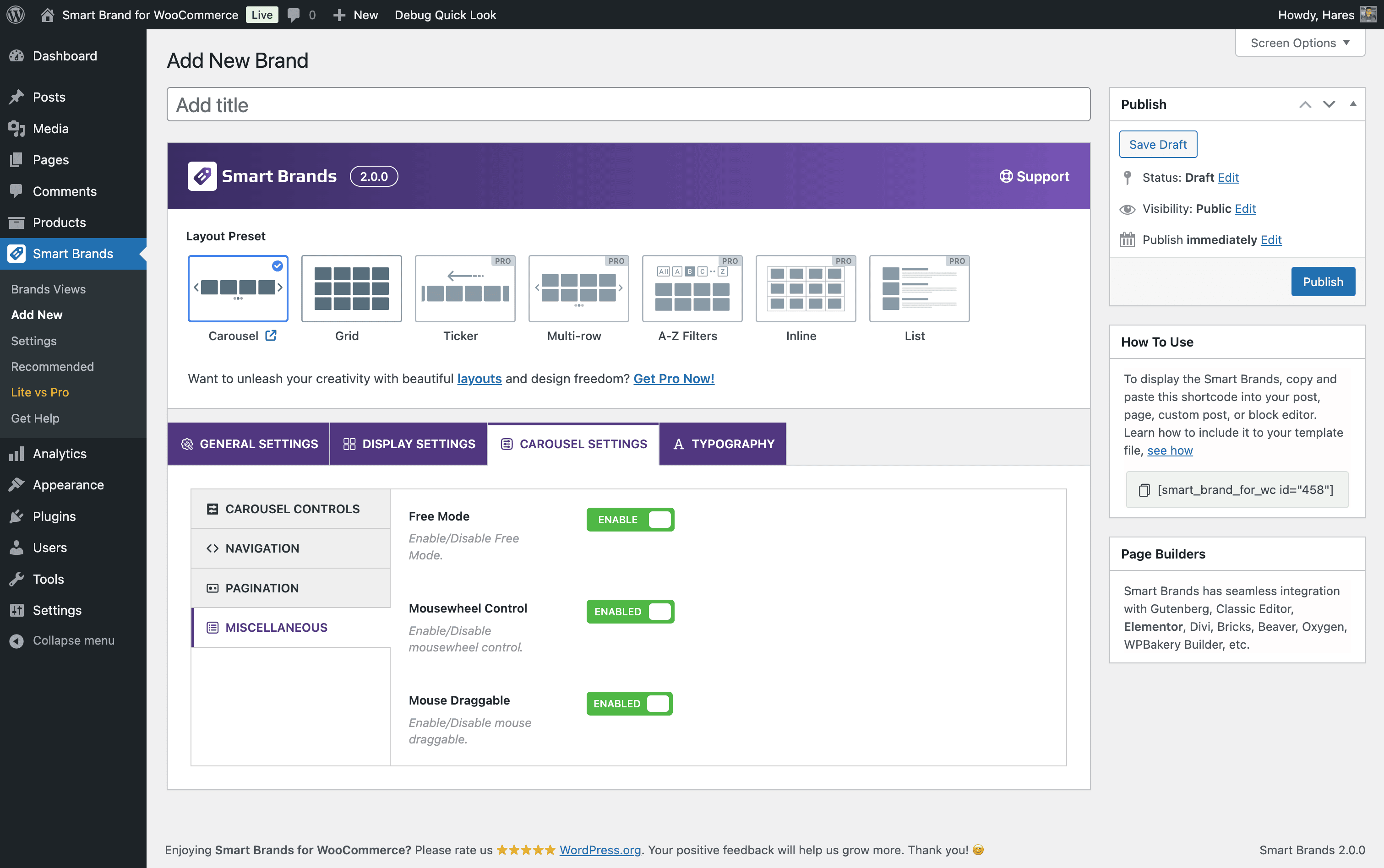
Miscellaneous
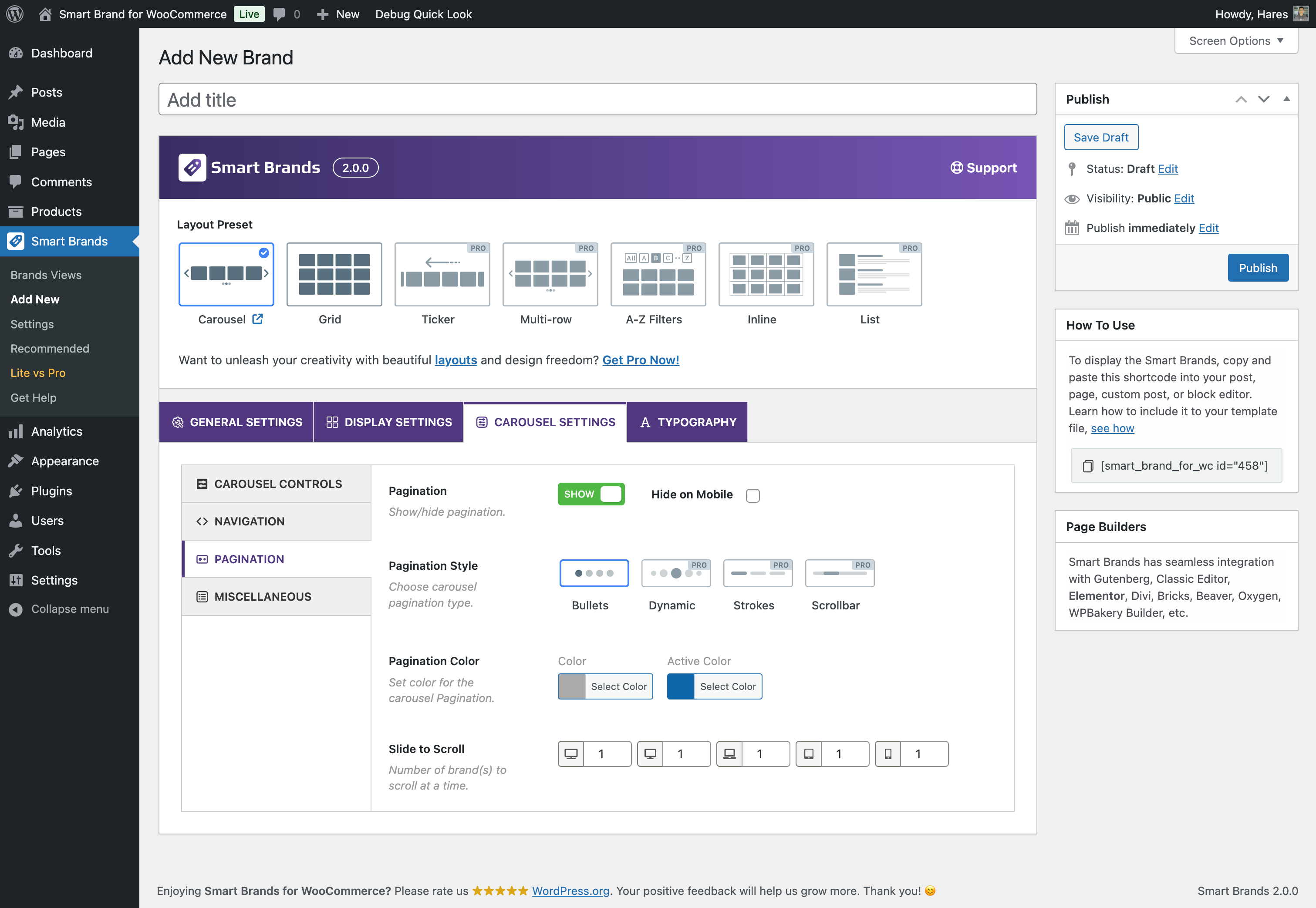
Pagination
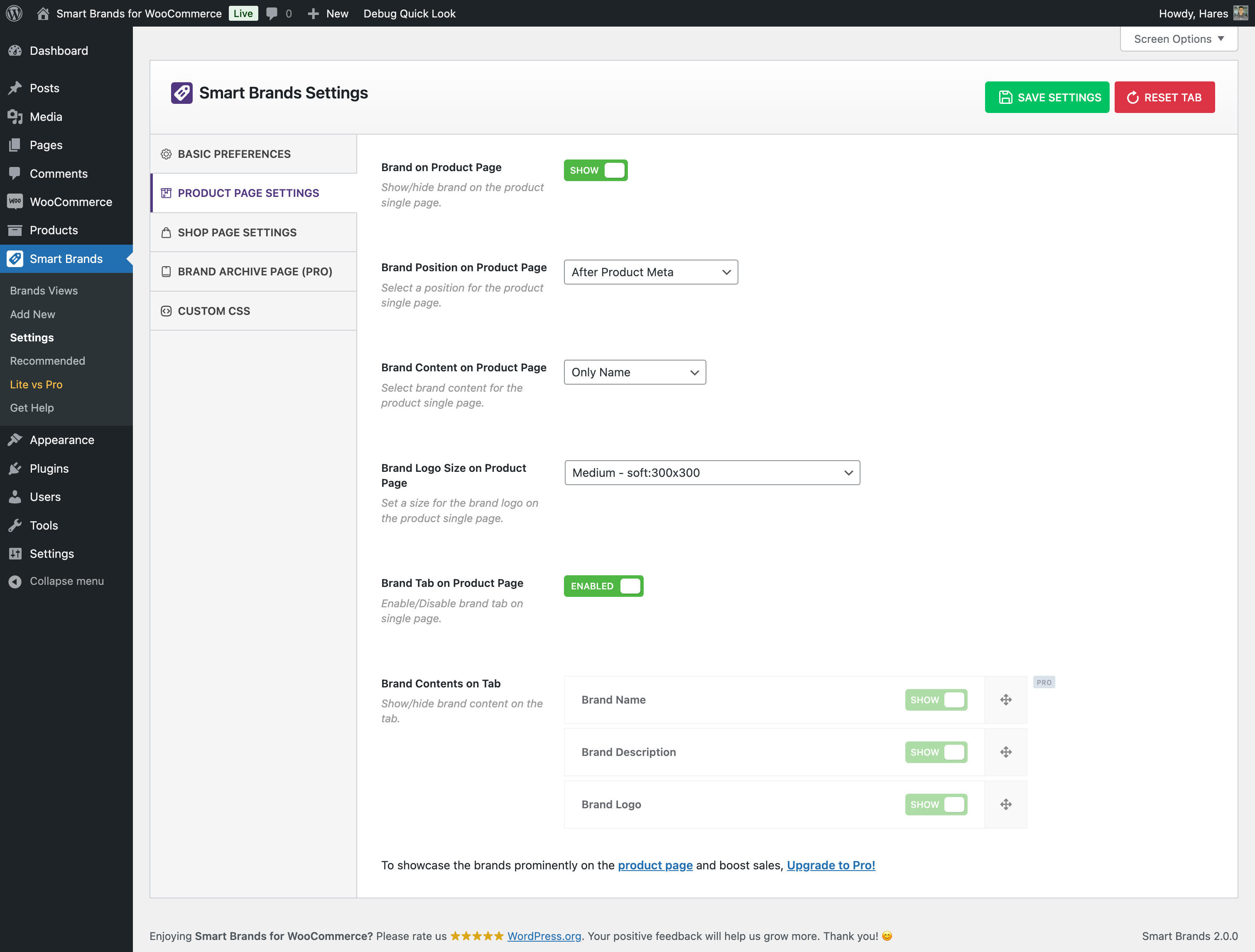
Product Page Settings

Custom CSS

All Brands

Shop Page Settings
Changelog
2.0.3 – Nov 25, 2025
- Improved: Enhanced plugin security and data validation.
- Improved: The Additional CSS option.
- Fix: The product count value was not working in the brand carousel.
- Tested: WordPress 6.9 compatibility.
- Tested: WooCommerce 10.3.5 compatibility.
2.0.2 – Jul 24, 2025
- Fix: The Archive description was not shown in the Brand Archive page
- Tested: WooCommerce 10.0.4 compatibility.
2.0.1 – Apr 16, 2025
- New: The plugin was made compatible with WooCommerce brand taxonomy.
- Improved: The plugin brands were migrated to WooCommerce brands.
- Fix: The text-domain warning issue was found with WP 6.8
- Fix: The duplicate brand taxonomy issue was found with WooCommerce v9.6.0 or greater.
- Tested: WordPress 6.8 compatibility.
- Tested: WooCommerce 9.8.1 compatibility.
2.0.0 – Jan 14, 2025
- New: The Responsive Grid Layout feature
- New: The Vertical Alignment (Top, Middle, Bottom) option.
- New: The Inner Padding option.
- New: The Carousel Navigation Padding option.
- New: The Mousewheel Control option.
- New: The Mouse Draggable option.
- Improved: The plugin backend options panel has been reorganized to make it more user-friendly.
- Improved: The Layout Preset option moved to the top of the shortcode setup page.
- Improved: The How to Use section moved to the right side of the page.
- Improved: The options of the Carousel Settings tab are organized by the nested tab.
- Improved: The Slide to Scroll option moved to the Carousel Pagination tab of the Carousel Settings tab
- Updated: The language (.pot) file.
- Tested: WooCommerce 9.5.2 compatibility.
1.1.6 – Nov 22, 2024
- Fix: The plugin style issue for RTL sites.
- Fix: The translation-related warning found with WP 6.7.1
1.1.5 – Nov 15, 2024
- Tested: WordPress 6.7 compatibility.
- Tested: WooCommerce 9.4.1 compatibility.
1.1.4 – Oct 01, 2024
- Fix: Some strings translation issue
- Updated: The language (.pot) file.
- Tested: WordPress 6.6.2 compatibility.
- Tested: WooCommerce 9.3.3 compatibility.
1.1.3 – Jul 18, 2024
- Tested: WordPress 6.6 compatibility.
- Tested: WooCommerce 9.1.2 compatibility.
1.1.2 – Jun 05, 2024
- Tested: WooCommerce 8.9.2 compatibility.
1.1.1 – Apr 02, 2024
- Tested: WordPress 6.5 compatibility.
- Tested: WooCommerce 8.7.0 compatibility.
1.1.0 – Feb 27, 2024
- New: Elementor Addon for showing brand carousel shortcode easily.
- New: The Navigation color option of the Carousel.
- New: The Pagination color option of the Carousel.
- Improved: The Help Page has been redesigned to make it more user-friendly.
- Improved: The plugin backend design.
- Improved: The plugin options are optimized.
- Improved: Added a redirect to the help page after plugin activation.
- Updated: The language (.pot) file.
- Fix: The warning found on the brand archive page with the Block theme
- Tested: WordPress v6.4.3 compatibility.
- Tested: WooCommerce v8.6.1 compatibility.
1.0.8 – Nov 13, 2023
- Fix: Few PHPCS warnings with PHP8.2.
- Fix: The Brand position issue in the single product page for the block theme.
- Tested: WooCommerce 8.2.1 compatibility.
- Tested: WordPress 6.4.1 compatibility.
1.0.7 – Aug 02, 2023
- Fix: The Product Slider for WooCommerce plugin compatibility.
- Tested: WooCommerce 7.9.0 compatibility.
- Tested: WordPress 6.3 compatibility.
1.0.6 – Jul 17, 2023
- Fix: The style issue of the plugin admin panel for the RTL site.
- Fix: The issue of not showing the brand carousel with the Elementor Pro (v3.14.1) plugin.
- Tested: WooCommerce High-Performance Order Storage (HPOS) feature compatibility.
- Tested: WooCommerce 7.8.2 compatibility.
1.0.5 – May 30, 2023
- New: The Gutenberg Block feature.
- Tested: WordPress 6.2.2 compatibility.
- Tested: WooCommerce 7.7.1 compatibility.
1.0.4 – Mar 17, 2023
- New: The Live Preview feature for brand show.
- New: The language file (.pot) file.
- Improved: Reset All button replaced with Reset Tab button in plugin setting.
- Fix: The warning found in brand table if brand does not have any image.
- Fix: The image tag does not have width height attribute.
- Fix: The undefined variable warning when shop page is set for homepage.
- Tested: WooCommerce 7.5.0 compatibility.
1.0.3 – Jan 16, 2023
- New: The brand logo shown at brand table in the admin panel.
- Improved: Plugin security improved.
- Improved: Load Stylesheets in the header based on shortcodes on the page.
- Fix: The image extra bottom space of brand carousel.
- Tested: WordPress 6.1.1 compatibility.
- Tested: WooCommerce 7.3.0 compatibility.
1.0.2 – Dec 07, 2022
- New: The Free mode feature of the carousel.
- Fix: Warning for missing map of swiper JS file.
- Fix: The carousel navigation effect on other shortcodes if that carousel hides its navigation.
- Fix: The brand does not keep selected duplicated products as the main product.
1.0.1 – Nov 15, 2022
- Tested: WordPress 6.1 compatibility.
- Tested: WooCommerce 7.1.0 compatibility.
1.0.0 – Oct 18, 2022
- First Release