

Smart Reviews Display
Display WordPress.org, Yelp, and Google reviews via shortcode or block with responsive layouts, avatars, ratings, and smart caching.
Plugin info
Maintenance & Compatibility
Maintenance score
Stale • Last updated 181 days ago
Is Smart Reviews Display abandoned?
Likely maintained (last update 181 days ago).
Compatibility
Developers
Languages
Similar & Alternatives
Explore plugins with similar tags, and compare key metrics like downloads, ratings, updates, support, and WP/PHP compatibility.
Description
Smart Reviews Display lets you showcase reviews from multiple sources including WordPress.org, Yelp, and Google Reviews. Choose from responsive grid (masonry), list, or carousel displays with full reviewer details and smart caching.
Key Features
- Multiple Review Sources: WordPress.org plugins/themes, Yelp business reviews, Google Places reviews, and custom reviews
- Custom Reviews System: Create up to 10 custom reviews with full control over content, ratings, and clickable links
- Review Grouping: Organize custom reviews into categories (testimonials, product-reviews, etc.)
- Responsive Layouts: Masonry grid, list, and carousel (3 reviews on desktop, 2 on tablet, 1 on mobile)
- Smart Management: Dashboard with add/edit/delete review displays, custom reviews management, internal vs display titles
- Rich Content: Avatars, star ratings, descriptions, aggregate ratings, contextual fields, and review links
- ID-Based Shortcodes: Simple
[smart_reviews id="123"]format that auto-updates - Gutenberg Blocks: Full block editor support with live preview
- Smart Caching: Configurable cache management and TTL controls
- Upgrade Integration: Clear upgrade path to Pro version for unlimited custom reviews
- Security First: WordPress coding standards compliance with proper sanitization
- Lightweight: No external dependencies, optimized CSS/JS
Usage
Dashboard Management
- Go to Smart Reviews Display Dashboard
- Click “Add New Review Display” to create a new configuration
- Fill in the form:
- Internal Title: For backend management (e.g., “WooCommerce Reviews”)
- Display Title: Shown on frontend (e.g., “What our customers say”)
- Description: Optional description text
- Review Source: WordPress.org, Yelp, Google Reviews, or Custom
- Slug/ID: Plugin slug, Yelp business ID, Google Place ID, or leave empty for Custom
- Review Group: Select specific group for Custom reviews (optional)
- Type: Plugin/Theme (WordPress.org only), Business (Yelp), Place (Google), or Custom
- Layout: Grid (masonry), List, or Carousel
- Display Options: Show title, show aggregate rating
- Save and use the generated shortcode or block
Custom Reviews Management
- Go to Smart Reviews Display Custom Reviews
- Click “Add Review” to create a new custom review
- Fill in the custom review form:
- Source: WordPress, Google, or Yelp (for styling consistency)
- Username: Reviewer’s name
- Profile Photo URL: Optional profile photo (default avatar used if empty)
- Review Date: When the review was written
- Review Text: The actual review content
- Review Link: Optional clickable link to original review
- Star Rating: 1-5 star rating
- Review Group: Group name for organization (e.g., “testimonials”, “product-reviews”)
- Business ID/Place ID: Required for Google and Yelp sources
- Save the review and use it in your review displays
- Note: Free version supports up to 10 custom reviews. Upgrade to Pro for unlimited reviews.
Gutenberg Block
Search for “Smart Reviews” in the block editor. You can either:
* Use ID: Select a saved review display by ID
* Configure Manually: Set all options directly in the block
Shortcode Usage
New ID-based format (recommended):
[smart_reviews id=”123″]
Custom reviews examples:
[smart_reviews source=”custom” layout=”grid” title=”Customer Testimonials”]
[smart_reviews source="custom" group="testimonials" layout="grid" title="Customer Testimonials"]
Yelp example:
[smart_reviews source=”yelp” business_id=”your-business-id” type=”business” layout=”grid”]
Google Reviews example:
[smart_reviews source=”google” place_id=”your-place-id” type=”place” layout=”carousel”]
Installation
From WordPress Admin Dashboard
- Log in to your WordPress admin dashboard
- Navigate to Plugins Add New
- Search for “Smart Reviews Display”
- Click Install Now and then Activate
- Go to Smart Reviews Display Dashboard to manage review displays
Manual Installation
- Download the plugin files
- Upload the
smart-reviews-displayfolder to/wp-content/plugins/directory - Activate the plugin through the Plugins screen in WordPress
- Go to Smart Reviews Display Dashboard to manage review displays
Frequently Asked Questions
WordPress.org (plugins/themes), Yelp business reviews, Google Places reviews, and custom reviews.
Use the new ID-based shortcode [smart_reviews id="123"] after creating a review display in the dashboard.
Custom reviews allow you to create up to 10 of your own reviews with full control over content, ratings, and links. Perfect for testimonials, case studies, or showcasing specific feedback.
Go to Smart Reviews Display Custom Reviews, click “Add Review”, fill in the details (username, text, rating, optional link), and save. Use groups to organize them.
Yes! Assign each custom review to a group (e.g., “testimonials”, “product-reviews”). When creating a review display, select “Custom” as source and choose a specific group.
Yes! Add a review link when creating custom reviews. Users can click on the review to visit the original source or any URL you specify.
Free version supports up to 10 custom reviews. Upgrade to Smart Reviews Pro for unlimited custom reviews.
Yes, for WordPress.org plugins and all external sources (Yelp, Google). Themes don’t have aggregate ratings on WordPress.org.
Reviews are cached with transients. Control TTL and clear cache in Smart Reviews Display Cache Management.
Yes. The plugin uses responsive masonry grid, list, and carousel layouts. Carousel shows 3 reviews at once on desktop, 2 on tablet, and 1 on mobile. Override with custom CSS.
Internal Title is for backend management only. Display Title appears on the frontend (optional).
Yes, you’ll need to configure Yelp Fusion API and Google Places API keys in the settings.
Review feed
Screenshots
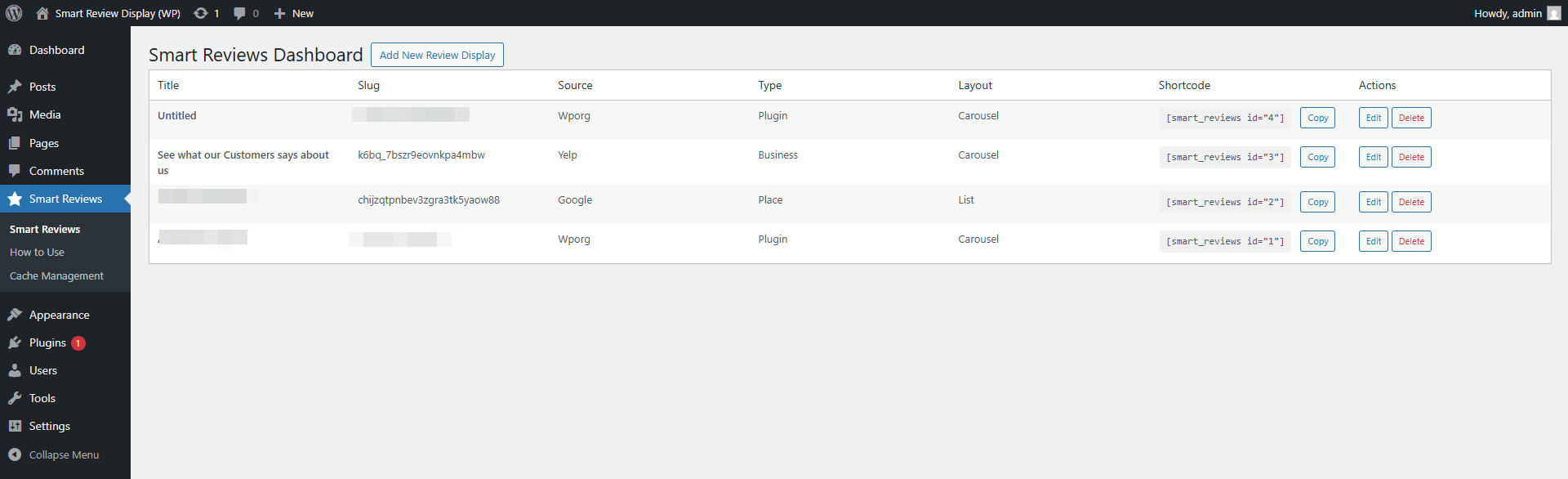
Dashboard with review management interface

Add/Edit review display modal

List layout with descriptions
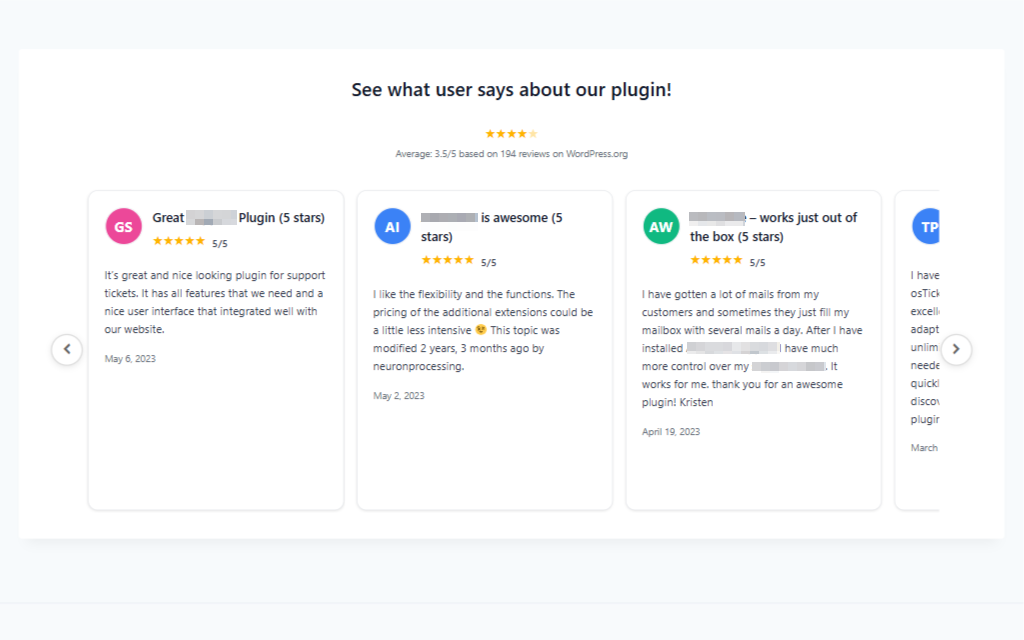
Carousel layout with edge-positioned navigation
Changelog
1.0.2
- Custom Reviews System: Added ability to create up to 10 custom reviews with full CRUD operations
- Custom Reviews Management: New admin page for managing custom reviews with add/edit/delete functionality
- Review Grouping: Added group/category system for organizing custom reviews
- Review Links: Custom reviews can now include clickable links to original review sources
- Upgrade Integration: Added upgrade button linking to Pro version when 10 review limit is reached
- Database Schema: Added review_link and review_group fields to custom reviews table
- Frontend Integration: Custom reviews now display properly with group filtering support
- Carousel Enhancement: Updated carousel to show 3 reviews at once with full-width layout
- UI Improvements: Minimized gap between username and stars for better visual hierarchy
- Center Alignment: Username and stars now center-aligned with avatar image
- Responsive Design: Maintained original review card widths while showing 3 reviews on desktop
- Migration Support: Automatic database migrations for existing installations
1.0.1
- New Features: Added Yelp and Google Reviews integration with API support
- Dashboard Revamp: Complete admin interface with add/edit/delete review displays
- ID-Based Shortcodes: Simple
[smart_reviews id="123"]format that auto-updates - Enhanced UI: Internal vs Display titles, descriptions, contextual type fields
- Carousel Fix: Navigation arrows positioned at container edges
1.0.0
- Initial submission
- Shortcode and block for WP.org reviews (plugins/themes)
- Grid, list, and carousel layouts
- Reviewer avatars, stars, numeric rating, date, and content
- Optional aggregate rating display (plugins)
- Settings page (defaults, cache)