

SmartPro Database Optimiser & Cleaner
Smart, lightweight tool to clean, optimize, and back up your WordPress database for better speed and performance.
Plugin info
Maintenance & Compatibility
Maintenance score
Maintained • Last updated 133 days ago
Is SmartPro Database Optimiser & Cleaner abandoned?
Likely maintained (last update 133 days ago).
Compatibility
Similar & Alternatives
Explore plugins with similar tags, and compare key metrics like downloads, ratings, updates, support, and WP/PHP compatibility.
Description
SmartPro Database Optimiser & Cleaner helps you maintain a faster, cleaner, and more efficient WordPress website by removing unnecessary database clutter and optimizing all database tables.
It features a beautiful modern interface, one-click actions, real-time item counts, and AJAX-powered cleaning for a seamless experience.
This tool also includes an integrated full database backup system, allowing you to download your entire WordPress database in .sql format before cleaning.
No technical skills required — simply open Tools SmartPro Database Optimiser & Cleaner, click “Clean”, and enjoy improved performance instantly.
🚀 Key Benefits
- Faster database performance
- Reduced storage usage
- Ability to safely back up your WordPress database
- Clean, modern, user-friendly UI
- No page reloads (AJAX-based)
- Safe queries using
$wpdb - No bloat, lightweight, and optimized
🧹 Cleanup Features
Clean up unnecessary and unused database entries with a single click:
- Remove post revisions
- Delete auto-saved drafts
- Remove trashed posts and trashed pages
- Clean spam and trashed comments
- Remove expired transients
- Delete all transients
- Remove orphaned post meta
- Remove orphaned comment meta
- Delete orphaned user meta
- Remove unused tags
- Delete empty taxonomy terms
- Optimize all WordPress tables
Each cleanup item displays:
– Real-time items count
– Action button
– Instant results message
Also includes:
– Clean All button
– Refresh Counts button
🛢️ Database Backup Features
Before cleaning, download your full database for safety.
- One-click SQL backup download
- Shows total database size
- Backups stored in:
/wp-content/uploads/smartpro-database-optimiser-cleaner/ - Backup is generated safely using WordPress standards
🗂️ Database Table Optimization
From the Optimize Tables tab, you can:
- View every database table
- See table size, index size, total size, row count
- Optimize each table individually
- Or use Optimize All Tables
All database optimization is handled using safe, built-in SQL operations.
🖥️ Smart, Modern UI
The plugin includes a clean and intuitive interface:
- AJAX-powered actions
- Smooth progress indicators
- Live counts
- Field-based table listing
- Fully responsive design
- Admin-friendly layout
🔒 Security & Permissions
- Nonce-protected AJAX requests
- Sanitized inputs
- Works only for administrators
- No risky SQL execution
- Follows strict WordPress coding standards
Installation
- Upload the plugin folder to the
/wp-content/plugins/directory - Activate the plugin through the “Plugins” menu in WordPress
- Go to Tools SmartPro Database Optimiser & Cleaner
- Click Refresh Counts
- Clean or optimize the database using the action buttons
Frequently Asked Questions
Yes — all operations use safe WordPress and SQL methods. However, it’s recommended to take a backup using the built-in download tool.
Backups are saved inside:
/wp-content/uploads/smartpro-database-optimiser-cleaner/
Yes. It can clean and optimize WooCommerce database tables safely.
No. The plugin only removes unnecessary and unused entries. It does not modify posts, pages, users, WooCommerce products, or active content.
Yes — all cleaning and optimization actions run without page reloads.
Review feed
Screenshots
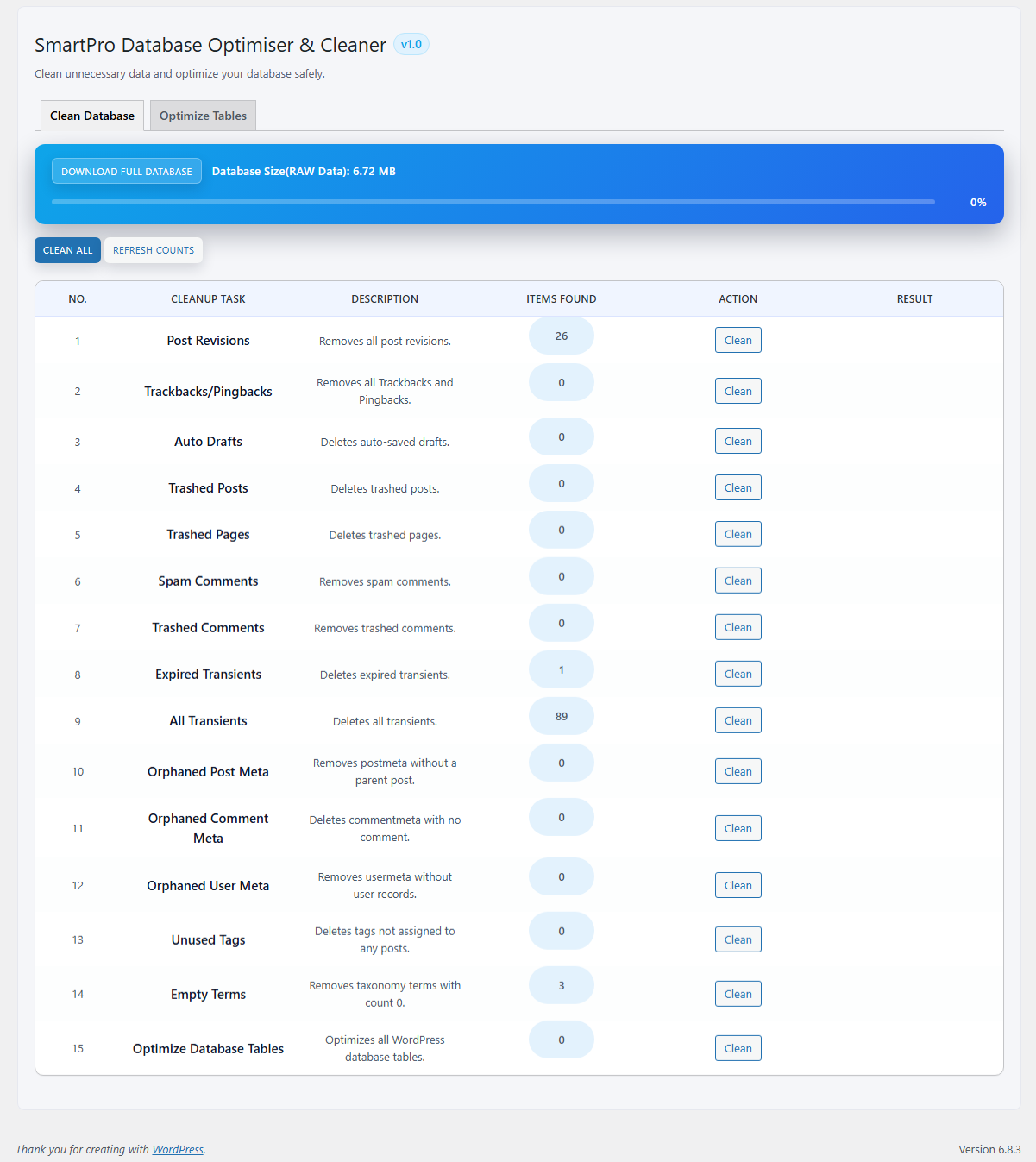
Dashboard — Cleanup Tools
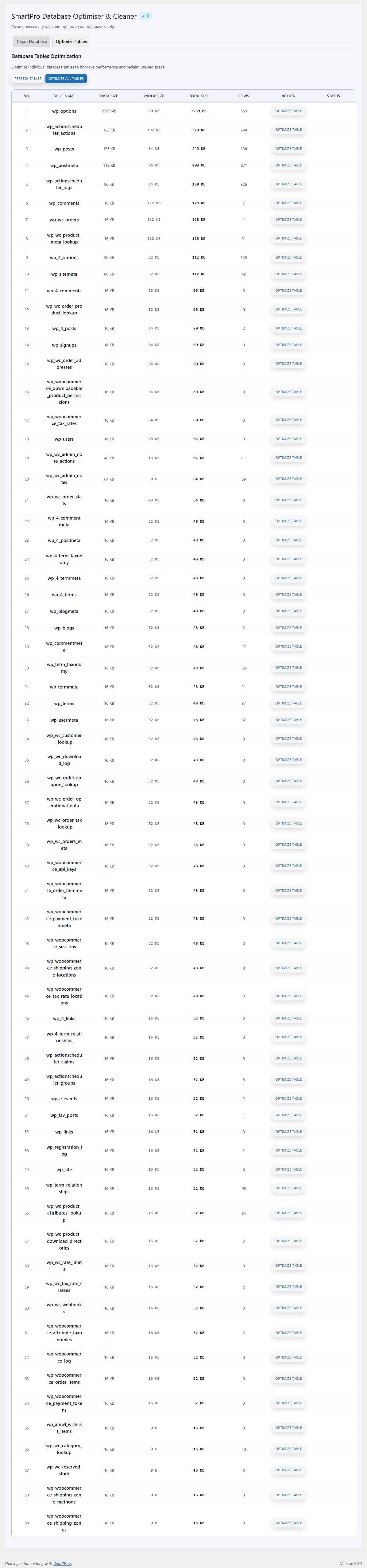
Database Table Optimization Interface
Changelog
1.0
- Initial release
- Added full database backup system
- Added real-time counts for all cleanup types
- Added cleanup tools (revisions, drafts, trash, comments, transients, orphaned meta)
- Added table optimization module
- Added Clean All and Refresh Counts buttons
- Added progress UI and AJAX engine
- Stable, optimized, and secure release