

Snazzy Maps
Apply styles to your Google Maps with the official Snazzy Maps WordPress plugin.
Plugin info
Maintenance & Compatibility
Maintenance score
Stale • Last updated 329 days ago • 15 reviews
Is Snazzy Maps abandoned?
Likely maintained (last update 329 days ago).
Compatibility
Similar & Alternatives
Explore plugins with similar tags, and compare key metrics like downloads, ratings, updates, support, and WP/PHP compatibility.
Description
Snazzy Maps adds styles to your existing Google Maps with the click of a button.
Features
- Browse through hundreds of free styles.
- Quickly apply styles to all of the Google Maps on your WordPress site.
- Works with most Google Maps plugins.
- Access your favorites from Snazzy Maps by signing up for an API key.
- Build and customize your own styles on Snazzy Maps and access them through the plugin.
- Free to use for personal and open source projects. Affordable licenses for businesses.
Please note this plugin does not add a Google Map to your page. It simply adds styles to any existing maps that you
already have on your site.
Installation
- Install Snazzy Maps by uploading the files to your server.
- Activate the plugin through the ‘Plugins’ menu in WordPress
- Access Appearance > Snazzy Maps in the WordPress menu.
- Choose a collection of styles in the ‘Explore’ tab.
- Apply your chosen style by clicking ‘Enable’ in the ‘Site Styles’ page.
- Enjoy your newly styled Snazzy Maps!
Please note this plugin does not add a Google Map to your page. It simply adds styles to any existing maps that you
already have on your site.
Frequently Asked Questions
The Snazzy Maps plugin is free to use for personal and open source projects. Business licenses are available for
single and multiple sites and can be purchased at https://snazzymaps.com/plugins
This plugin does not add a Google Map to your page. It simply adds styles to your existing maps. If you haven’t
added a map yet, search WordPress Plugins for a suitable Google Maps plugin.
We’ve tested our plugin with the following Google Maps plugins. If you find another plugin that works please send us an email at [email protected].
- WP Google Maps
- Geo Mashup
- Comprehensive Google Map Plugin
- Leaflet Maps Marker
- WP Google Map Plugin
- Map List Pro
- WP Flexible Map
- Basic Google Maps Placemarks
- Pronamic Google Maps
- Robo Maps
- Google Routeplanner
- WPMU DEV Google Maps
The Snazzy Maps plugin cannot apply styles to maps created using the Google Maps Embed API. This is because of
fundamental limitations on the way IFrames work on the web. We cannot access the map within Google’s IFrame and cannot
apply any styles to it. Sorry! Switching to a WordPress plugin that uses Google’s JavaScript API will work instead.
The following plugins will not work with the Snazzy Maps WordPress plugin:
If you happen to find any other map plugins that don’t work please send us an email at [email protected].
- Sign up for an account at SnazzyMaps.com.
- Click your email address in the top left corner.
- Click the developer menu item on the left side.
- Click the “Generate API Key” button.
- Copy the long generated API Key.
- Paste the key into the ‘Settings’ tab in the Snazzy Maps plugin.
- You should now be able to access your favorites and private styles in the ‘Explore’ tab by changing the first filter dropdown.
Review feed
UPDATE: This is a great plugin
Screenshots
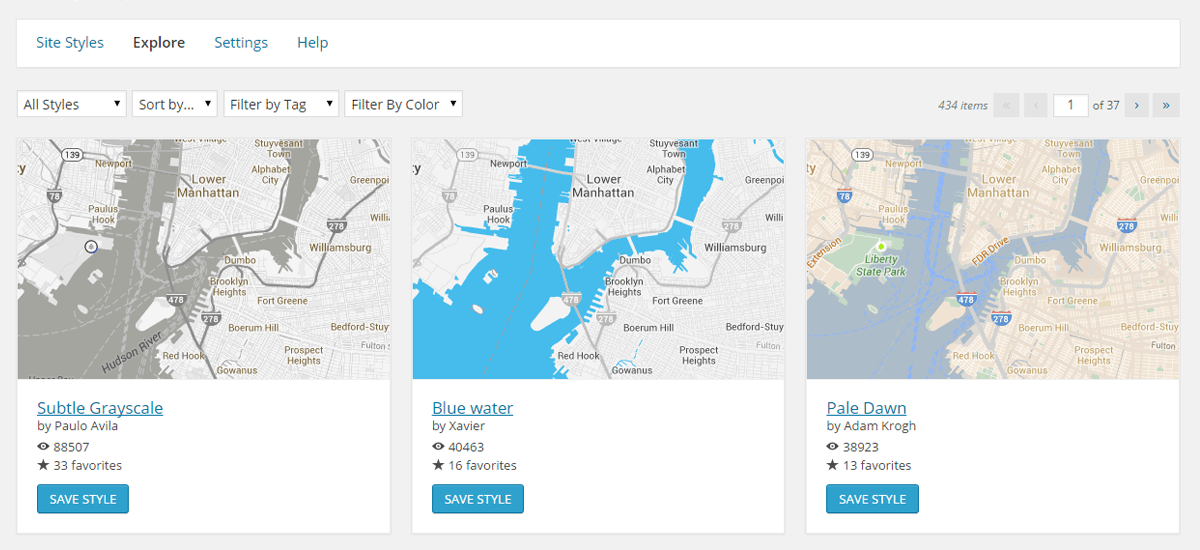
Explore hundreds of different styles.

Select a style to use for the Google Maps on your site.
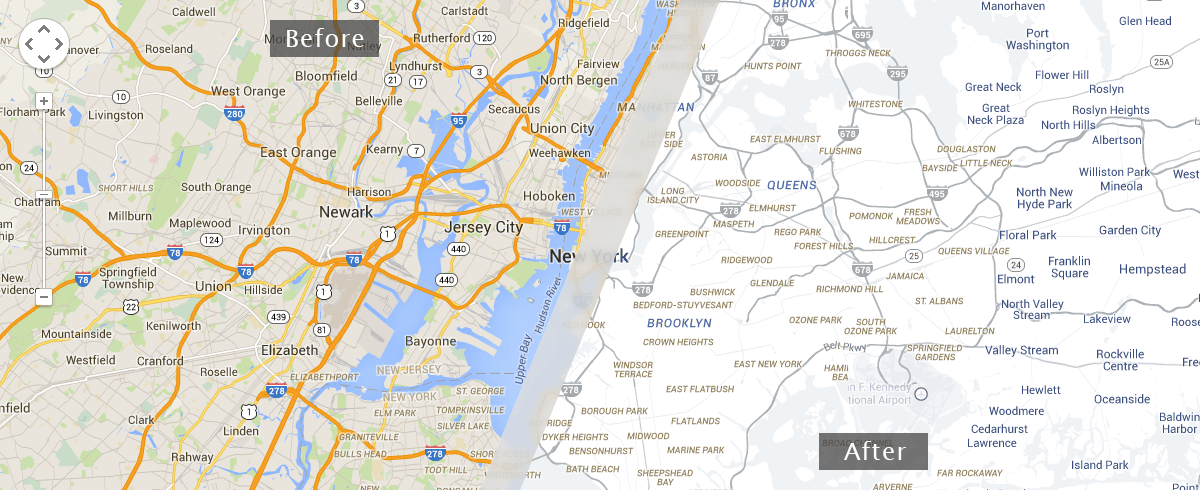
Your Google Map is now a Snazzy Map!
Changelog
1.5.0
Release Date: May 7th, 2025
- Update: Verified that the plugin works with newer versions of WordPress up to 6.8.1.
1.4.0
Release Date: March 27th, 2021
- Update: Minor changes to support PHP 8.
- Update: Verified that the plugin works with newer versions of WordPress up to 5.7.
1.3.0
Release Date: October 4th, 2020
- Update: Minor changes to ensure that the plugin works with newer versions of WordPress up to 5.5.1.
1.2.1
Release Date: November 27th, 2019
- Update: Additional security fixes.
1.2.0
Release Date: November 26th, 2019
- Update: Security fixes.
- Update: Verified that the plugin works with newer versions of WordPress up to 5.3.
1.1.5
Release Date: August 1st, 2018
- Update: Additional security fixes.
- Update: Minimum supported version of WordPress has been increased from 2.8 to 3.0.
1.1.4
Release Date: July 31st, 2018
- Update: Security fixes.
- Update: Verified that the plugin works with newer versions of WordPress up to 4.9.7.
1.1.3
Release Date: March 10th, 2017
- Update: Verified that the plugin works with newer versions of WordPress up to 4.7.3.
- Update: Geo Mashup is now a compatible plugin.
- Deprecated: Renamed enqueue_script to snazzy_enqueue_script.
1.1.2
Release Date: May 24th, 2016
- Update: Verified that the plugin works with newer versions of WordPress up to 4.5.2.
1.1.1
Release Date: July 21st, 2015
- Bug Fix: Renamed the Services_JSON class to fix a redeclare class error when working with other plugins.
1.1.0
Release Date: June 15th, 2015
- New Feature: Added search to the explore tab.
- Bug Fix: Updated save style to properly work with unicode characters.
- Bug Fix: Changed all include to include_once because of redeclared errors.
1.0.6
Release Date: May 11th, 2015
- Bug Fix: Added support for Google Maps asynchronous loading.
1.0.5
Release Date: April 24th, 2015
- Bug Fix: Updated snazzymaps.js to copy over the existing Google Maps prototype during our constructor override.
1.0.4
Release Date: April 16th, 2015
- Bug Fix: Moved snazzymaps.js from the footer to the head to support additional themes.
- Bug Fix: Changed the add_theme_page capability from edit_themes to manage_options.
1.0.3
Release Date: April 8th, 2015
- Bug Fix: Added some javascript to support more browsers and Google Maps plugins.
- Bug Fix: Fixed up some PHP warning messages on the plugin pages.
1.0.2
Release Date: March 25th, 2015
- Bug Fix: Updated the plugin to work with older PHP and WordPress versions. We now support PHP 5.0.5 and later and WordPress 2.8 and later.
1.0.1
Release Date: March 17th, 2015
- Bug Fix: Resolved the “headers already sent” issue that occurred when submitting POSTs with certain themes.
1.0.0
Release Date: March 1st, 2015
- Initial Release!