

Snorkel
Snorkel combines your sales data and chat transcripts to show you ROI on conversations as well as other crucial sales insights.
Plugin info
Maintenance & Compatibility
Maintenance score
Possibly abandoned • Last updated 2309 days ago
Is Snorkel abandoned?
Possibly abandoned (last update 2309 days ago).
Compatibility
Similar & Alternatives
Explore plugins with similar tags, and compare key metrics like downloads, ratings, updates, support, and WP/PHP compatibility.
Description
A simple, free , sales report.
Snorkel is simple free report that shows you Woocommerce analytics, and both paid and organic traffic right beside your Olark or Tidio chats so you can quickly see where and why your customers stop buying. Save time, get insights and make confident decisions to increase your sales.
Once you have installed the plugin, go to app.snorkelapp.com to set up your account and enter your WooCommerce and chat provider details.
Installation
You can search for “Snorkel” in the wordpress plugins section of your dashboard. Once you have installed, make sure the plugin is activated. Then make sure that you have gone to app.snorkelapp.com to set up your account and enter your WooCommerce and chat provider details.
Or
- Upload the contents of
snorkel.zipto the/wp-content/plugins/directory - Activate the plugin through the ‘Plugins’ menu in WordPress
- Go to app.snorkelapp.com to set up your account and enter your WooCommerce and chat provider details.
Frequently Asked Questions
Which chat providers do you support?
We currently support Olark and Tidio. We hope to support more soon!
Will this plugin slow my site down?
We hope not! We have worked hard to make sure the plugin is as lightweight as possible, and that it loads asynchronously, after your page content.
When will I see insights in Snorkel?
As soon as you have completed installation, Snorkel starts collecting data. As soon as your website gets traffic you should start to see information in the dashboard at app.snorkelapp.com
What data does Snorkel use?
Snorkel consumes data from your WooCommerce store in order to compute conversion funnels and analyze chat transcripts. When website visitors add items to their cart, create an order or create an account, data is sent to our servers. When you enable Snorkel and if you modify the products available in your store, product data is sent to Snorkel. This data is used to determine which products your customers mention in chat conversations.
In addtion to data from your WooCommerce store, Snorkel tracks page-view events from website visitors and messages sent over your live chat widget.
Review feed
Screenshots
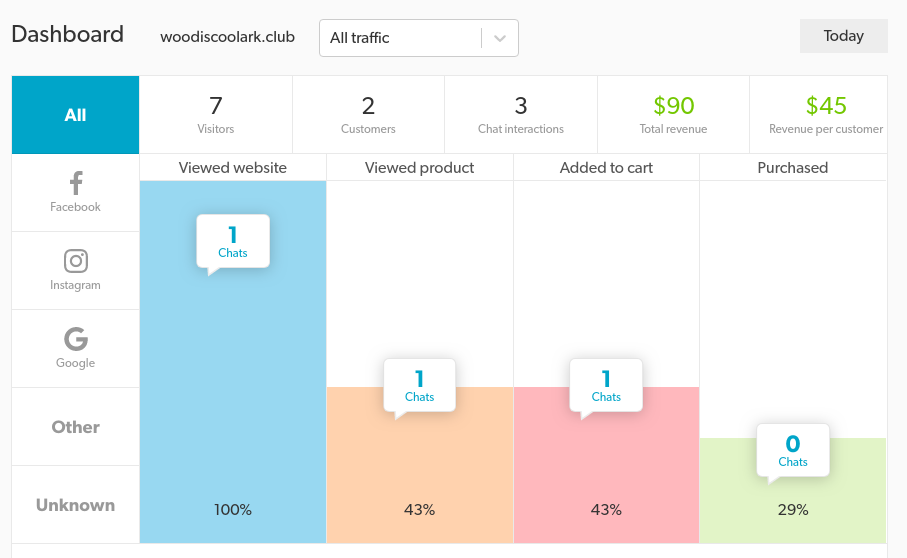
A conversion funnel visualized in Snorkel

An example interaction viewed in Snorkel
Changelog
0.1
Initial Snorkel Release